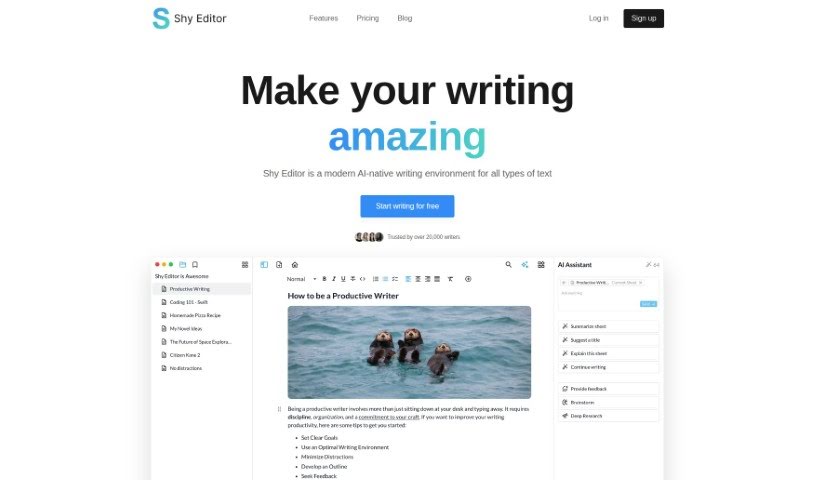
Screenshot of Shy Editor

Shy Editor

Discover Shy Editor, an AI-powered writing tool. Learn its features, how it helps writers of all kinds, and compare it with other writing tools in 2025.

Screenshot

What is Shy Editor?

Shy Editor is an AI-powered writing platform built to help and improve writing for all sorts of users. It packs a lot of useful features, like a markdown editor, an AI assistant for brainstorming and getting feedback, tools for making notes, organizing research, managing citations, keeping track of versions, smart search, and grammar checking. Plus, it offers various ways to export your work. All of this is designed to make your writing faster, better, and more confident. Whether you’re a novelist, a student, an academic, a blogger, or a journalist, Shy Editor has tools to support your unique writing style and boost your productivity. It really focuses on keeping your personal style intact with customizable options like lists, toggles, markdown, and blocks. You can easily mix in text, images, media, and tables to create a workflow that feels personal and works efficiently for you.

Here are some of its key features:

  • An AI assistant that helps you improve your writing, brainstorm ideas, and keep your work organized.
  • A markdown editor that gives you flexible formatting options and lets you adjust your content easily.
  • Version control so you can keep track of all your changes and revisions.
  • Intelligent search to quickly find the information you need.
  • A grammar check function that uses AI technology to really polish your writing style.
  • Multiple export options, letting you save your work as TXT, MD, DOCX, or PDF files.

The platform comes in both basic and professional versions, each offering different features and benefits to match what users need. The basic version gives you unlimited projects, smart writing help, project notes, a knowledge base, citation management, writing goals with stats, and the ability to export to TXT or markdown. If you opt for the professional version, you’ll get even more, including advanced color themes, export options for PDF and DOCX, better version control, automatic importing of sources into your bibliography, smarter search capabilities, early access to new features, and priority email support. Ultimately, Shy Editor wants to empower writers by making their writing process smoother without ever changing their individual style.

Who created Shy Editor?

Shy Editor was developed by a founder who prefers to remain anonymous. It first launched on November 11, 2023. The platform is built to help a wide range of writers, from novelists and non-fiction authors to students, academics, bloggers, and journalists. It offers a suite of tools, including an AI assistant, an intelligent grammar checker, a markdown editor, version control, and robust organizational features. The core idea behind Shy Editor is to give writers the power of AI-driven features without taking away from their own creativity.

What is Shy Editor used for?

Shy Editor is a versatile tool used for many writing-related tasks:

  • Version Control: Keep track of all your content changes.
  • Grammar Check: Improve your writing with AI-powered corrections.
  • Intelligent Search: Quickly find information across your projects and notes.
  • Citation Management: Easily create bibliographies and manage your sources.
  • Writing and Editing: A comprehensive space for all your writing needs.
  • Code Creation and Organization: Customize your approach to writing and organizing code.
  • Boosting Productivity: Leverage AI assistance for brainstorming, research, and more.
  • Research Organization: Use the knowledge base to keep your research tidy.
  • Progress Tracking: Set goals and monitor your progress with detailed stats.
  • Distraction-Free Note-Taking: Focus on your thoughts without interruptions.
  • Content Integration: Seamlessly combine text, images, media, and tables.
  • Export Options: Save your work in TXT, MD, DOCX, or PDF formats.

Essentially, it helps you write and edit, organize your research, track your progress, manage citations, and improve your overall writing quality and speed, all while letting you customize your workspace and maintain your unique style.

Who is Shy Editor for?

Shy Editor is designed for a broad spectrum of writers and content creators, including:

  • Novelists
  • Non-fiction writers
  • Students
  • Academics
  • Bloggers
  • Content creators
  • Journalists

Anyone who writes and wants to improve their process will find value here.

How to use Shy Editor?

Here’s a simple guide to getting the most out of Shy Editor:

  1. Sign Up and Log In: First, head over to the Shy Editor website, create your account, and then log in to start using the platform.
  2. Explore the Features: Take some time to get acquainted with everything it offers. Check out the AI assistant, the smart grammar checker, the markdown editor, and the version control system, among others.
  3. Start Writing: Jump right into your writing projects. Use the markdown editor to easily add text, photos, tables, and to-do lists, all formatted in Markdown for simple customization.
  4. Use the Management Tools: Make your workflow efficient by taking advantage of the note-taking features, the knowledge base for organizing research, progress tracking tools, and citation management for building bibliographies.
  5. Boost Your Productivity: Let the AI assistant help you brainstorm ideas, get feedback, and organize your research, which can really speed up your writing.
  6. Customize Your Workspace: Make the platform feel like your own. You can personalize your workspace with different themes, lists, toggles, markdown, and blocks to create a comfortable and productive environment.
  7. Export Your Work: When you’re ready, export your projects in the format you need, whether it’s TXT, MD, DOCX, or PDF.
  8. Track Your Progress: Use the progress tracking stats to set clear goals, monitor how you’re doing, and get detailed insights into your projects.
  9. Maintain Your Unique Style: Remember, Shy Editor is built to enhance your writing, not change it. It ensures your personal touch and unique style stay front and center.
  10. Consider Upgrading: If you find yourself needing more, like extra AI assistant credits, more storage, advanced color themes, better version control, or priority email support, think about upgrading to the professional version.

By following these steps, you’ll be able to use Shy Editor smoothly, boost your productivity, and create high-quality written content without any hassle.

Related AI Tools

Discover more tools in similar categories that might interest you

Stay Updated with AI Tools

Get weekly updates on the latest AI tools, trends, and insights delivered to your inbox

Join 25,000+ AI enthusiasts. No spam, unsubscribe anytime.