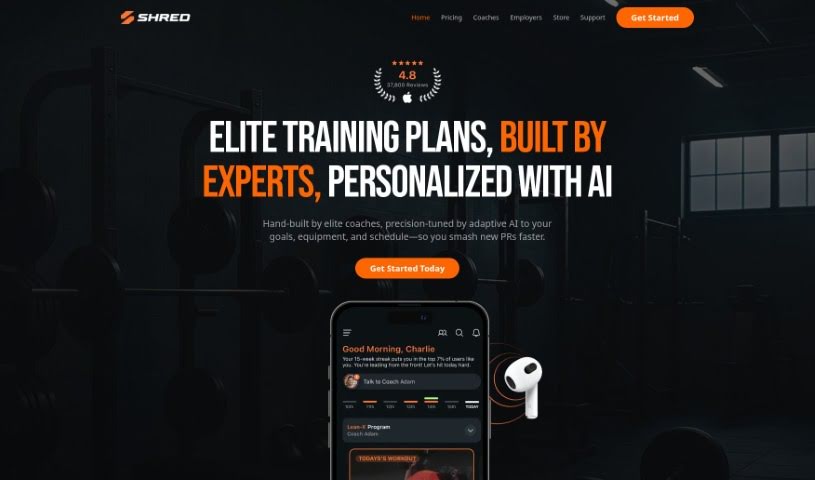
Screenshot of Shred App

Shred App

Discover what the Shred App is and how to use it to boost your fitness in 2025. We'll cover its features, compare it to other productivity tools, and show you how to get the most out of it.

Screenshot

What is Shred App?

SHRED is a digital training app designed to really improve your workouts, whether you’re exercising at home or hitting the gym. It offers personalized workouts that feel like you’ve got a personal trainer right there with you. Plus, it’s got flexible programs that work no matter where you are, and it makes training social and fun. You’ll also find advanced tracking features, and it works seamlessly with smartwatches. You can join fitness groups, sync your workouts with friends, and even join in on competitions to keep that motivation high. The app also tracks your health stats by connecting with Apple Healthkit.

Who created Shred App?

SHRED, a really popular fitness app, was actually created by a team led by its founder. The app’s main focus is on giving users personalized workout experiences, using AI-powered features, social interaction, and advanced tracking. The founder’s vision has clearly paid off, with over 6 million workouts already completed and a thriving community of users who are all about fitness. SHRED offers adaptable workout programs that are great for both home and gym settings, making it a really well-rounded fitness solution for anyone looking to boost their health and wellness.

What is Shred App used for?

  • AI-Powered Personal Training: Get workouts made just for you, like having a digital personal trainer.
  • Gym & Home Workouts: Flexible programs that work whether you’re at home or in the gym.
  • Social & Fun Training: Join fitness groups, sync up with friends, and jump into competitions.
  • Advanced Tracking: Connects with Apple Healthkit to keep tabs on your fitness and health stats.
  • Smartwatch Integration: You can get the full workout experience right on your smartwatch.
  • Creating Fitness Groups: You can easily create your own fitness groups or join existing ones.
  • Workout Synchronization: Sync your workouts with your friends so you can train together.
  • Friendly Competitions: Get involved in fun competitions with your friends and family.
  • Seamless Apple Healthkit Integration: Track your overall progress, including things like steps, weight, and hydration.
  • Interactive Guidance for Form and Reps: The app shows you the correct form, weight, and rep count for each exercise.
  • AI-Powered Personal Training: Tailored workouts that give you a digital personal trainer experience.
  • Gym & Home Workouts: Versatile workout programs perfect for both home and gym settings.
  • Social & Fun Training: You can join fitness groups, sync workouts with friends, and enter competitions.
  • Advanced Tracking: Integrates with Apple Healthkit to monitor your fitness and health metrics.
  • Smartwatch Integration: Get the complete workout experience right on your wrist, compatible with both iOS and Android.

Who is Shred App for?

  • Anyone looking to improve their fitness, whether at home or in the gym.
  • People who enjoy social fitness and want to train with friends.
  • Individuals who appreciate personalized workout guidance.
  • Users who want to track their health and fitness metrics easily.

How to use Shred App?

To get the most out of the SHRED app, just follow these simple steps:

  1. Download the App: First, grab the SHRED app from your device’s app store – it’s available for both iOS and Android.
  2. Sign Up: Next, create your account. You can sign up directly on the SHRED app’s website.
  3. Explore All the Features:
    • AI-Powered Guidance: Take advantage of workouts that are personalized just for your fitness goals.
    • Choose Your Workout Spot: You’ve got versatile programs ready for either home or gym workouts.
    • Get Social: Join fitness groups, sync your workouts with friends, and join in on some friendly competitions.
    • Keep an Eye on Progress: Use the Apple Healthkit integration to track important metrics like your steps, weight, and how much water you’re drinking.
    • Use Smartwatch Integration: You can get the full workout experience conveniently right on your wrist.
  4. Make the Most of Smartwatch Compatibility: You can manage exercise demos, control your music, and handle other workout aspects directly from your smartwatch.
  5. Connect with the SHRED Community: Jump in and interact with other users, take part in challenges, and really transform your fitness journey with a supportive community around you.
  6. Check Out the FAQs:
    • Compatibility: The SHRED app works on both iOS and Android smartphones.
    • Workout Variety: You can access a wide range of workout programs that are great for both home and gym environments.
    • Health Tracking: The app lets you track health statistics like steps, weight, and hydration.
    • Social Features: Build social connections by creating fitness groups, syncing workouts with friends, and participating in friendly competitions.

By following these steps, you’ll be able to use all the SHRED app’s features effectively and really boost your fitness journey.

Related AI Tools

Discover more tools in similar categories that might interest you

Stay Updated with AI Tools

Get weekly updates on the latest AI tools, trends, and insights delivered to your inbox

Join 25,000+ AI enthusiasts. No spam, unsubscribe anytime.