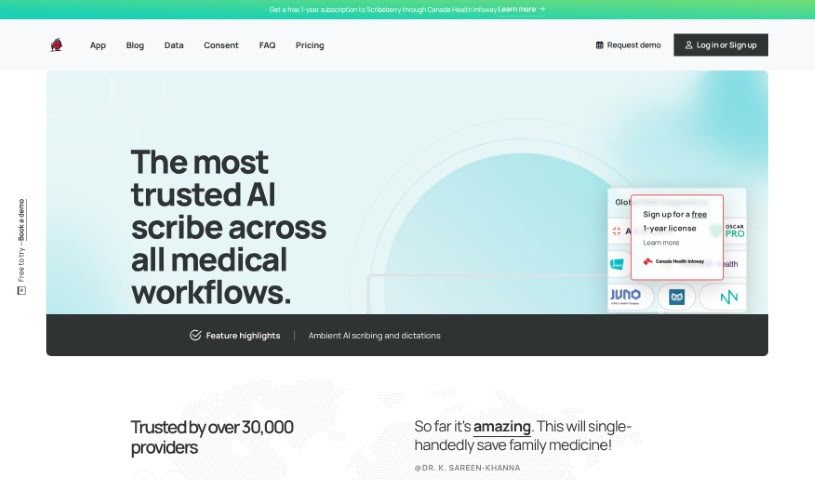
Screenshot of Scribeberry

Scribeberry

Discover what Scribeberry is and how to use it effectively in 2025. We'll explore its features and compare it to other transcription tools.

Screenshot

What is Scribeberry?

ScribeBerry is an AI-powered tool designed specifically for medical dictation and transcription. It is a digital assistant for healthcare professionals, helping them create medical notes, charting, consult letters, and all sorts of other healthcare records much more efficiently. It uses a smart combination of advanced medical language models, artificial intelligence, and even some web3 tech to turn your dictations into detailed medical notes. You can either speak directly into the app, type things out, or upload audio files. ScribeBerry then takes that and generates the output, often based on templates you select. Right now, it’s free to use as they’re in an early preview stage, and they’re really keen on getting user feedback to make it even better. The main goal here is to boost clinic efficiency by automating the often time-consuming documentation process, freeing up doctors and nurses to spend more time with their patients. ScribeBerry can help whip up all sorts of documents, like standard medical notes, chart notes, consult letters, SOAP notes, discharge summaries, and operative notes. Plus, you can customize templates and notes, use it on different devices, and rest easy knowing your data is stored securely and privately right on your own device.

Who created Scribeberry?

ScribeBerry was developed with a clear mission: to help healthcare professionals cut down the time they spend creating medical notes and records. It officially launched on May 3, 2023. At its core, ScribeBerry is an AI-driven medical dictation and transcription tool, brought to life by a team passionate about making clinics run more efficiently and reducing the documentation burden for medical staff. The tool leverages AI-powered language models and web3 technologies to transcribe dictations, generate medical notes, and generally smooth out the clinic’s workflow.

What is Scribeberry used for?

ScribeBerry is a versatile tool that can help with a wide range of tasks for healthcare professionals:

  • Transcribing audio files: Easily convert spoken words into text.
  • Creating medical notes: Generate comprehensive medical documentation.
  • Chart notes: Quickly draft and organize patient chart entries.
  • Consult letters: Prepare professional letters for patient consultations.
  • SOAP notes: Structure patient encounters using the SOAP format.
  • Discharge summaries: Compile essential information for patient discharge.
  • Operative notes: Document surgical procedures accurately.
  • Customizing notes: Tailor notes and templates to your specific needs.
  • Saving time: Significantly reduce the time spent on charting and documentation.
  • Dictation assistance: Help with dictating and transcribing medical records.
  • Automated corrections: Automatically refine dictations for accuracy.
  • Patient backgrounds: Create thorough patient histories.
  • Document variety: Produce various healthcare records like medical notes, chart notes, consult letters, SOAP notes, discharge summaries, operative notes, and other relevant documents.
  • Streamlining processes: Save valuable time in charting, dictating consults, and the overall document creation process.
  • Note transfer: Easily move your notes to any other device.
  • Summary generation: Create summaries from uploaded audio files.
  • Template options: Provide medical templates for easier note creation.
  • User customization: Allow users to personalize generated notes.
  • Audio file support: Transcribe most common audio file formats.
  • Security focus: Adhere to strict data security and privacy measures.
  • Target users: Serve professionals like family doctors, surgeons, nurse practitioners, and specialists.
  • Key features: Includes dictation transcription, dictation correction, patient background creation, template customization, and note transfer capabilities.
  • Local storage: Notes are stored locally on each device, ensuring privacy and accessibility across your devices.
  • Feedback loop: Offers a mechanism for users to provide feedback for ongoing improvements.

Who is Scribeberry for?

ScribeBerry is designed to be a valuable tool for a variety of healthcare professionals, including:

  • Family doctors
  • Surgeons
  • Nurse Practitioners
  • Specialists

Essentially, anyone in a healthcare role who needs to manage medical documentation efficiently can benefit from ScribeBerry.

How to use Scribeberry?

Using ScribeBerry is pretty straightforward. Here’s a simple breakdown of the steps:

  1. Get Started: First, you’ll want to access ScribeBerry. Just log in to their website using your preferred web browser. You can do this from any device – whether it’s your smartphone, a tablet, or a regular computer.
  2. Create Your Documents: Once you’re in, you can start creating your medical records. Use ScribeBerry to transcribe dictations or upload audio files. It will then turn these into detailed medical notes, covering everything from general medical notes and chart notes to consult letters, SOAP notes, discharge summaries, and operative notes.
  3. Make It Your Own: ScribeBerry allows you to customize your notes. You can pick from a selection of medical templates they provide, or if you have specific needs, you can create your own personalized templates.
  4. Works on Multiple Devices: You can access ScribeBerry on various devices. However, it’s important to remember that your notes are stored locally on each device. This means they don’t automatically sync up across all your different devices.
  5. Share Your Thoughts: Since ScribeBerry is still in its early preview stage, they really value your input. You can provide feedback via email. This is a great way to help them improve the user experience, report any issues you run into, or get help with troubleshooting.
  6. Security is Key: You can feel confident using ScribeBerry, as it follows strict data security and privacy protocols. All your data is stored locally on your device, ensuring confidentiality and integrity.
  7. Boost Your Efficiency: ScribeBerry is all about saving you time. It streamlines your workflow by significantly cutting down the time you spend on charting, dictating consults, and creating documents. This ultimately helps increase your overall clinic efficiency.
  8. Early Access Benefits: Because ScribeBerry is in an early preview stage, you get unlimited usage. This is a fantastic opportunity to explore all its features while they actively gather feedback for continuous improvement.

By following these steps, healthcare professionals can effectively use ScribeBerry to make their documentation processes smoother and boost their productivity and overall effectiveness.

Related AI Tools

Discover more tools in similar categories that might interest you

Stay Updated with AI Tools

Get weekly updates on the latest AI tools, trends, and insights delivered to your inbox

Join 25,000+ AI enthusiasts. No spam, unsubscribe anytime.