777ccc.com
Education Summarizers
Learn more
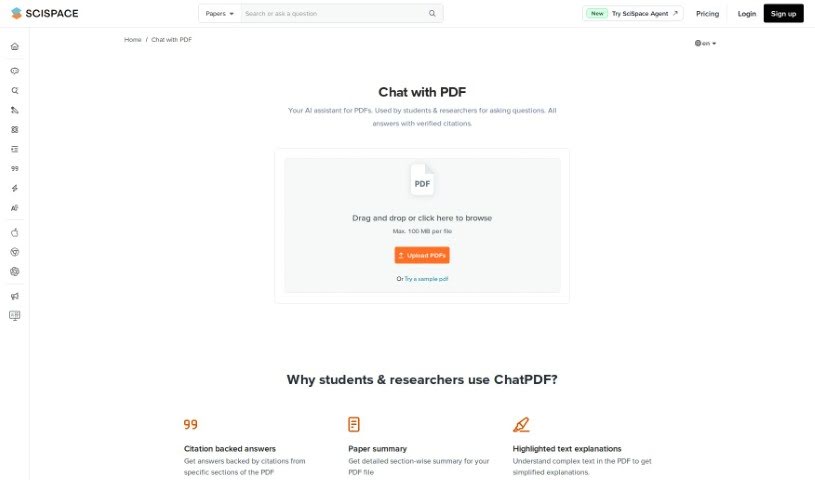
Discover what SciSpace AI Chat for scientific PDFs is and how it helps students and researchers understand complex papers with cited answers and summaries.
SciSpace AI Chat is an AI assistant built for students and researchers who work with PDF documents. It makes interacting with complex research papers easier by providing answers backed by citations, so you can see where information comes from. You can chat with several PDFs at once, select text for quick summaries of specific parts, and adjust the length, tone, and format of answers.
The tool offers access to multiple AI models, supports different languages, and can break down math, equations, tables, and figures. It also helps with note-taking and can generate summaries for different sections of your PDFs.
Files up to 100 MB can be uploaded, with support for larger files planned. All chats are encrypted and data is handled according to privacy laws. It works on smartphones and tablets as well as desktop, so you can use it wherever you are.
The specific founder isn’t mentioned in the available information. The tool’s goal is to make understanding research papers simpler, explain academic texts clearly, and offer easy-to-grasp explanations of scientific concepts.
The tool suits a wide range of users:
SciSpace AI Chat is designed to surface the important information in a paper quickly, so you don’t have to read the whole document to get the key points.
Related
Discover more tools in similar categories
Weekly picks of the best AI tools we've researched and added — no spam, unsubscribe anytime.
Join 25,000+ AI enthusiasts. No spam, unsubscribe anytime.