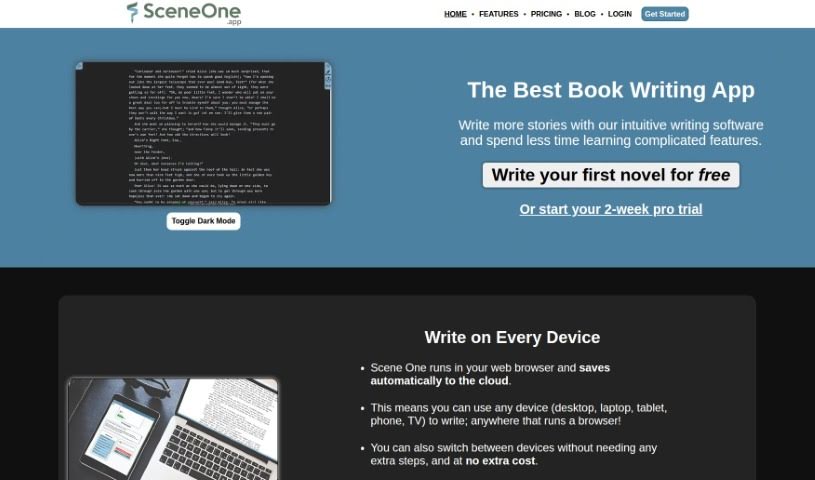
Screenshot of Scene One

Scene One

Discover what Scene One is and how to make the most of it in 2025. We'll walk through its features, compare it to other novel writing tools, and show you how to boost your writing process.

Screenshot

What is Scene One?

Scene One is a handy online book writing software built for writers like you. Since it runs right in your web browser, you can use it on any device – even your phone! It comes packed with useful features, including a text editor, a word counter to keep you on track, an AI Writing Assistant to help out, a custom wiki for all your world-building needs, and a ‘Save the Cat! Beat Sheet Manager’ to help structure your story. Everything you write is securely stored in the cloud, so you can easily access your work from wherever you are. They offer a few different plans: Free, Standard, Advanced AI, and Professional AI, each with its own set of features and word limits. Plus, you can export your finished manuscripts as PDF or DocX files.

Who created Scene One?

Scene One was developed by SceneOne.app, a company focused on making book writing simpler. They launched on June 14, 2024, with a clear mission: to streamline the entire book writing process. The software itself offers a robust text editor, an AI Writing Assistant to give your writing a boost, a custom wiki creator for organizing your ideas, and the ‘Save the Cat! Beat Sheet Manager’ for plotting. You can write on any device you own, and all your work is safely stored in the cloud, ready for you whenever inspiration strikes. SceneOne.app provides both free and paid plans, and even a free trial that includes extra AI words to get you started.

What is Scene One used for?

Scene One is incredibly versatile for writers. You can use it for:

  • Writing scenes and managing your entire project: Keep everything organized in one place.
  • Compiling and exporting your work: Easily get your manuscripts ready as PDF or DocX files.
  • Planning your stories: The ‘Save the Cat! Beat Sheet Manager’ is fantastic for structuring your plot.
  • Boosting your writing efficiency: The AI Writing Assistant can help you write more, faster.
  • Tracking your progress: Use the Word Counter feature to set and meet your writing goals.
  • Building your world: The Custom Wiki lets you create detailed profiles for characters, items, and locations.
  • Collaborating: Share your projects with other users.
  • Keeping notes: The Revision Board is perfect for reminders and notes on your manuscript or specific scenes.
  • Understanding your writing: Access integrated analytics designed for authors.
  • World-building: Develop rich, detailed worlds for your novels.
  • Project management: Keep all aspects of your writing project organized.
  • Writing from different devices: Seamlessly switch between your phone, tablet, or computer.
  • Story planning: Get a clear roadmap for your narrative.
  • Revision management: Keep track of changes and notes.
  • Cloud-saving: Store an unlimited number of words across plans.
  • Shareable wikis: Easily share your organized notes and world details.
  • Automatic tracking: It automatically tracks and tags story elements, so you don’t have to.
  • Story development: Speed up how you create plots and develop your story.
  • Generating prose: The AI Writing Assistant can create new text that matches your unique writing style and voice.
  • Rewriting assistance: Expand your ideas or rephrase sentences and paragraphs with AI help.

Who is Scene One for?

Scene One is a great tool for anyone involved in creating written content:

  • Writers of all kinds
  • Authors working on novels or other books
  • Content creators producing various forms of digital media
  • Bloggers managing their posts and ideas
  • Developers who might need to document projects or write technical content
  • Project managers who need to organize and track written documentation
  • Professional writers looking for efficient and organized tools

How to use Scene One?

Getting started with SceneOne.app is straightforward. Here’s a simple guide:

  1. Create Your Account: First, head over to SceneOne.app and sign up for a free account. It’s quick and easy!
  2. Choose Your Plan: Look at the different plans available – Free, Standard, Advanced AI, or Professional AI – and pick the one that best fits what you need and your budget.
  3. Write Anywhere: Access the SceneOne.app platform on any device you have, whether it’s your phone, tablet, or computer. You can write and manage your projects wherever you go.
  4. Boost Your Writing with AI: Make your writing process more efficient by using the AI Writing Assistant. It can help generate prose that matches your personal style and voice.
  5. Track Your Progress: Keep an eye on your writing goals using the built-in Word Counter feature in SceneOne.app.
  6. Build Your World: Use the Custom Wiki to create detailed profiles for all your story elements – think characters, important items, and specific locations.
  7. Plan Your Story: Get your plot structured with the ‘Save the Cat! Beat Sheet Manager’, which is excellent for story planning.
  8. Manage Notes: Keep track of reminders and notes for your entire manuscript or even just individual scenes using the Revision Board.
  9. Export Your Work: Once you’re happy with your writing, you can compile and export your manuscripts in either PDF or DocX format.
  10. Enjoy Unlimited Storage: If you choose the Standard, Advanced, or Professional plans, you’ll benefit from unlimited cloud storage capacity for all your writing.
  11. Collaborate Easily: Share your projects with other users directly on SceneOne.app. This makes teamwork and project management much smoother.

SceneOne.app really aims to give you a great writing experience with its user-friendly interface, advanced tools, and the flexibility to use it on any device.

Related AI Tools

Discover more tools in similar categories that might interest you

Stay Updated with AI Tools

Get weekly updates on the latest AI tools, trends, and insights delivered to your inbox

Join 25,000+ AI enthusiasts. No spam, unsubscribe anytime.