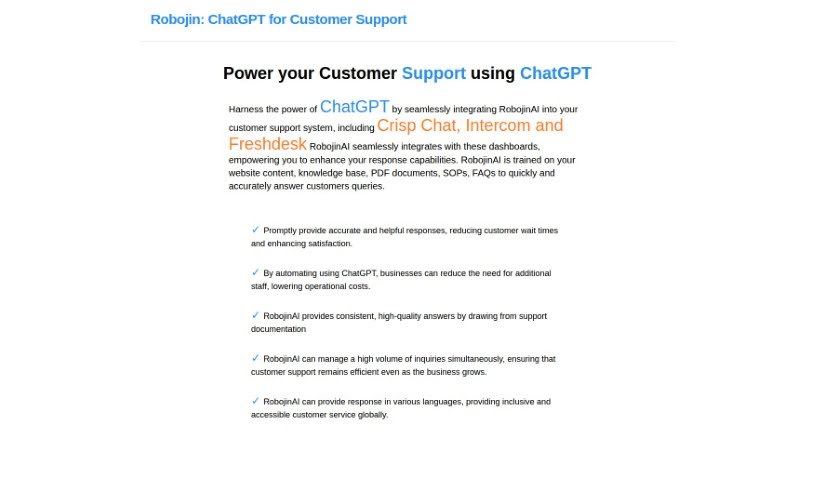
Screenshot of RobojinAI

RobojinAI

Discover what RobojinAI is and how to use it effectively in 2025. We'll explore its features and see how it stacks up against other customer service tools.

Screenshot

What is RobojinAI?

RobojinAI is a tool designed to really shake up customer support. It uses ChatGPT technology to give top-notch answers, drawing from all sorts of your content – think website text, PDF files, your company’s SOPs, and even those frequently asked questions. What’s neat is that it can handle a bunch of customer questions at the same time, supports over 50 languages, and already works with popular customer support platforms like Crisp Chat. Plus, they’ve got plans to connect with Intercom, Zendesk, and Freshdesk soon.

RobojinAI offers a few different pricing options: Ultimate, Pro, Growth, and Basic. Each plan comes with its own set of features, like how many chatbots you can have, how many pages or PDFs it can learn from, the languages it supports, and how many ChatGPT responses you get. If none of those quite fit, there’s also a custom plan you can tailor to your specific business needs, which even includes the option to self-host the tool.

When it comes to training RobojinAI, it uses the OpenAI GPT model. You’ll need to provide your own OpenAI API key for this. The great thing is, you can really customize it to fit your business. If you go with the custom plan, you can have an unlimited number of team members using it. RobojinAI takes your OpenAI API key’s security seriously, encrypting it and storing it safely in its database. The system can learn from all sorts of content to make sure your chatbot is super helpful when answering questions. Just a heads-up: if a webpage has more than 1200 words, it’ll be counted as a few pages to help keep your OpenAI API token costs down.

Who created RobojinAI?

Rajpal Singh is the creator behind RobojinAI, and the company itself is also called RobojinAI. It first launched on May 13, 2023. Their main goal is to make customer support much better by bringing ChatGPT technology into platforms like Crisp Chat, Intercom, Zendesk, and Freshdesk. The company really wants to help support teams work more efficiently, cut down on operational costs, and make sure customers are happy with AI-driven solutions.

What is RobojinAI used for?

RobojinAI is used for a variety of things to boost customer support:

  • Enhancing Customer Support: It provides high-quality answers by learning from your website content, PDF documents, Standard Operating Procedures (SOPs), and FAQs.
  • Handling Multiple Inquiries: The tool can manage many customer questions at once, keeping support efficient even during busy times.
  • Multilingual Support: It offers responses in over 50 languages, making customer service accessible globally.
  • System Integration: It integrates with popular customer support systems like Crisp Chat, Intercom, and Freshdesk, with Zendesk integration planned for the future.
  • Customization: You can tailor RobojinAI to your specific business needs, including options for unlimited chatbots, web/PDF pages, languages, ChatGPT responses, and team members on custom plans.
  • Security: Your OpenAI API key is encrypted and stored securely in the database.
  • Productivity Boost: It helps support staff be more productive by automating responses and providing consistent, accurate answers.
  • Training Automation: Chatbots can be trained using the OpenAI GPT model on various content types for robust performance.
  • Cost Management: Larger webpages are counted as multiple pages to help manage OpenAI API token costs.
  • Pricing Flexibility: Different pricing plans are available, each with varying features like chatbot numbers, page limits, language support, and response limits.

Who is RobojinAI for?

RobojinAI is a great tool for anyone involved in customer interaction and support:

  • Customer Support Representatives
  • Customer Service Managers
  • Technical Support Specialists
  • IT Help Desk Technicians
  • Call Center Agents
  • Chat Support Agents
  • Support Teams in general
  • Help Desk Operators
  • Customer Success Managers
  • Knowledge Base Managers
  • Business Owners
  • Content Managers
  • Customer Service Representatives
  • Technical Support teams
  • Customer Service departments
  • IT Support staff
  • Content Creators
  • Technical Writers
  • Knowledge Management Professionals
  • Language Translators

How to use RobojinAI?

Getting started with RobojinAI is pretty straightforward. Here’s a step-by-step guide:

  1. Sign Up and Log In: First, create your account on the RobojinAI platform. Once that’s done, log in to start using all the features.
  2. Connect Your Support Systems: You can easily link RobojinAI with platforms like Crisp Chat to make your response capabilities even better.
  3. Train Your Chatbot: This is where the magic happens! You’ll provide your website content, knowledge base articles, PDF documents, SOPs, and FAQs. This helps the bot learn and generate accurate answers.
  4. Fine-tune Responses: You can train the chatbot with different kinds of content to make sure it responds really well to customer questions.
  5. Use Multi-Language Support: RobojinAI can chat in over 50 languages, so you can connect with a global audience.
  6. Pick a Pricing Plan: Choose the plan that best suits you – options include Ultimate, Pro, Growth, or Basic, depending on what you need and your budget.
  7. Add Your OpenAI API Key: To train the chatbot and let it answer customer queries, you’ll need to add your OpenAI API key.
  8. Feel Secure: Don’t worry about your API key; RobojinAI encrypts it and stores it safely.
  9. Work Together: Depending on your plan, you can collaborate with your team members to make the most of the tool for customer support.
  10. Stay in the Loop: Keep an eye out for new integrations coming soon, like with Zendesk and Freshdesk.
  11. Consider Self-Hosting: If you need more advanced features, the custom plan offers self-hosting and unlimited chatbots.

By following these steps, you can really make the most of RobojinAI to improve your customer support using ChatGPT technology across different languages and support systems.

Related AI Tools

Discover more tools in similar categories that might interest you

Stay Updated with AI Tools

Get weekly updates on the latest AI tools, trends, and insights delivered to your inbox

Join 25,000+ AI enthusiasts. No spam, unsubscribe anytime.