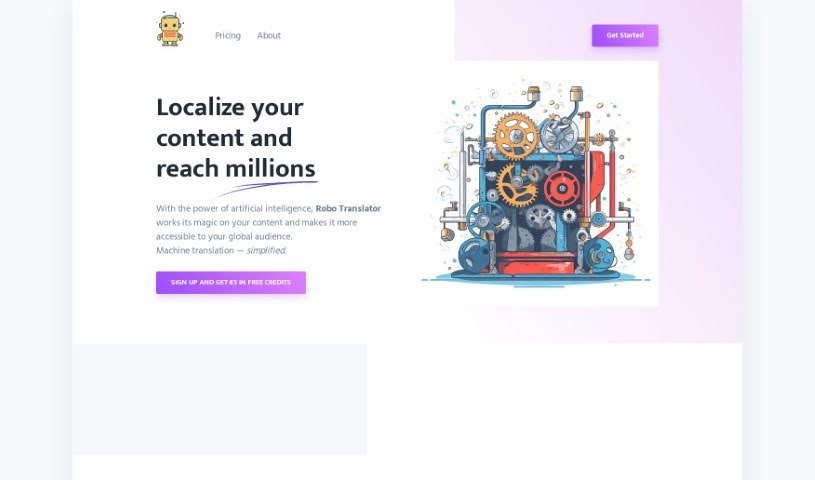
Screenshot of Robo Translator

Robo Translator

Discover Robo Translator in 2025! Learn what it is, how to use its features effectively, and how it stacks up against other translation tools.

Screenshot

What is Robo Translator?

Robo Translator is a machine translation service that uses OpenAI models and Azure Cognitive Services. Its main goal is to make machine translation simpler and content more accessible to people all over the world. It can translate audio, video, and text documents, and it also handles software localization for mobile and web apps. You’ll find features like automatic YouTube caption translation, audio transcription and translation, support for various localization file formats, and a flexible ‘pay as you go’ pricing model. For privacy, it uses encrypted file uploads, and files are only stored for a short time before being deleted. When you sign up, you get €5 in free credits to start.

Who created Robo Translator?

Robo Translator was developed by OpenAI and first launched on August 28, 2023. It’s a machine translation service that really shines by using the power of OpenAI models and Azure Cognitive Services technology. This combination makes machine translation easier and helps get content out to more people globally. The service is great for translating all sorts of content – think audio, video, and text documents – into many different languages, providing accurate localization.

What is Robo Translator used for?

  • Translate any audio, video, or text document into multiple languages.
  • Closed Caption Localization for YouTube videos: Easily add captions to your YouTube content.
  • Audio Transcription and Translation: Get your audio tracks transcribed and translated.
  • Software Localization: Adapt your mobile and web apps for different languages.
  • Support for various localization formats: Works with .xml, .json, .plist, .php, .properties, and more.
  • Pay As You Go Pricing: A flexible model that charges based on usage.
  • Fast and accurate translations: Powered by advanced OpenAI models.
  • Encrypted file uploads: Keeps your data secure.
  • State-of-the-art text-to-speech: Uses Azure’s advanced speech synthesis.
  • Multilanguage support: Essential for globalizing your content.
  • Translate any audio, video, or text document into one or more languages.
  • Audio Transcription and Translation: Convert spoken words into text and then translate them.
  • Software Localization: Tailor mobile or web apps for international markets.
  • Support for diverse localization formats: Handles common formats like .xml, .json, .plist, .php, .properties, etc.
  • Pay As You Go Pricing: Token-based charges make it cost-effective.
  • Content globalization: Reach wider audiences with localized content.
  • Multiple languages support: A broad range of languages are available.
  • Auto-translate captions (subtitles): Quickly translate captions from any YouTube video and create synthesized audio tracks in multiple languages for YouTube Studio.
  • Localized audio tracks: Turn original audio into localized versions by transcribing, generating captions, and synthesizing new audio tracks.
  • Translate language files: Work with .xml, .json, .plist, .php, .properties files for mobile or web apps.
  • ‘Pay as you go’ pricing: Based on tokens used, text-to-speech characters, and speech-to-text seconds.
  • Quality translations: Ensured by the use of OpenAI models.
  • Short-lived storage: Files are handled with temporary storage for privacy.
  • Transcribe and generate captions: Create captions in multiple languages quickly.
  • Generate captions for YouTube videos: Get captions ready in seconds.
  • Synthesize audio tracks: Create audio in multiple languages and import them as multi-language audio into YouTube Studio.
  • Software localization capability: Adapt your software for global users.
  • Supports diverse localization formats: Handles a wide array of file types.
  • Fast, accurate translations: Get reliable results quickly.
  • Encrypted file uploads: Your files are protected.
  • Short-lived storage: Files are deleted after a brief period.
  • Azure Cognitive Services integration: Leverages powerful AI services.
  • Content globalization: Make your content accessible worldwide.
  • Imports synthesized languages tracks: Easily add new audio to your content.
  • Transcribes and generates captions: A key feature for video content.

Who is Robo Translator for?

  • Translators: Streamline your workflow and handle more projects.
  • Content creators: Reach a global audience with translated content and captions.
  • Software developers: Localize your applications efficiently.
  • Mobile app developers: Make your apps accessible worldwide.
  • Web Developers: Adapt your websites for international users.
  • App developers: Expand your app’s reach with localization.
  • Language professionals: Utilize advanced tools for your work.
  • Video Producers: Easily add multilingual audio and captions to your videos.

How to use Robo Translator?

Using Robo Translator is straightforward. Here’s a simple guide:

  1. Sign up: Head over to the Robo Translator website and register. You’ll get €5 in free credits to start experimenting.
  2. Choose your content: Select whether you need to translate audio, video, or text documents.
  3. YouTube caption translation: If you’re working with YouTube, just upload your video. Robo Translator will automatically translate the captions in just seconds.
  4. Audio transcription and translation: Need to translate audio? First, transcribe it, then generate captions, and finally, synthesize new audio tracks in the languages you choose.
  5. Software localization: For your mobile or web apps, translate language files into different languages to make them accessible to a wider audience.
  6. Pay as you go: Use the ‘pay as you go’ pricing model. You’ll be charged based on the tokens used, text-to-speech characters, and speech-to-text seconds.
  7. Privacy first: Your files are uploaded securely using encryption, offering better privacy protection.
  8. Quality translations: You can trust the accuracy and speed, thanks to the OpenAI models used.
  9. Short-lived storage: Don’t worry about files being stored for too long; storage is temporary.
  10. YouTube Studio integration: Easily import synthesized audio tracks directly into YouTube Studio to add multi-language audio support to your videos.

Related AI Tools

Discover more tools in similar categories that might interest you

Stay Updated with AI Tools

Get weekly updates on the latest AI tools, trends, and insights delivered to your inbox

Join 25,000+ AI enthusiasts. No spam, unsubscribe anytime.