What is Revrite?
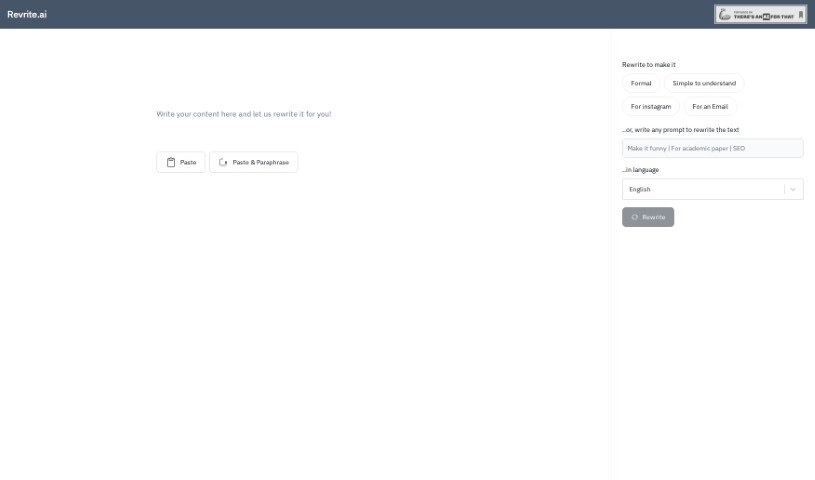
Revrite.ai is an online tool that uses AI to help you rephrase text. It is a smart paraphrasing assistant designed to make your writing more efficient, flow better, and be easier to understand. It’s pretty versatile, supporting over 100 languages, and it can handle entire paragraphs, not just single sentences. Plus, it offers rich text editing and works on your mobile device, so you can polish your writing wherever you are. Whether it’s for work, school, or research, Revrite aims to help. It’s built on ChatGPT technology, and they’re planning to add more features like saving your documents, keeping a history of your work, and export options down the line. Right now, though, it’s in beta, which means it’s still being developed. You’ll need JavaScript to use it, and some features like exporting, seeing your work history, or using it offline aren’t available just yet.
Who created Revrite?
Revrite.ai is the name behind this AI-powered paraphrasing tool, which officially launched on July 18, 2024. It’s a free service designed to boost the quality and readability of all sorts of content – from emails and WhatsApp messages to Instagram posts and even research papers. They’re using OpenAI’s ChatGPT technology to ensure you get great results. You’ll find features like rich text editing, a mobile-friendly design, options to customize settings to your liking, and they’re committed to regular updates to make the user experience even better.
What is Revrite used for?
Revrite is a handy tool for a bunch of writing tasks:
- Making text easier to read: It rewrites your words to be more efficient, fluent, and digestible.
- Multilingual support: You can paraphrase in over 100 languages.
- Paragraph rewriting: It understands and rewrites entire paragraphs, not just individual sentences.
- Editing flexibility: You get rich text editing support.
- On-the-go use: It’s compatible with mobile devices.
- Personalized results: You can customize how it paraphrases based on your preferences.
- Versatile content handling: It works well for emails, WhatsApp messages, Instagram posts, and research articles.
- Boosting academic work: It helps improve the quality of academic and research projects by making them more readable.
- Adjusting tone: It can potentially adjust the formality of your text.
- Document-level paraphrasing: You can rephrase entire documents at once.
- Broad language support: It handles languages like English, German, Spanish, Chinese, Russian, and French, among many others.
- Improving fluency: It enhances the readability and fluency of whatever text you input.
- Coherence boost: It improves the quality and coherence of paraphrased content by rephrasing whole paragraphs.
- Wide content range: It’s great for emails, WhatsApp messages, Instagram posts, and research articles.
- Customizable output: You can tailor the paraphrasing to your specific needs.
- Mobile convenience: It’s mobile-friendly for paraphrasing anytime, anywhere.
- Future enhancements: They’re planning features like saving documents, tracking work history, sentence-level paraphrasing, and export options.
- Powered by AI: It uses OpenAI’s ChatGPT technology for top-notch results.
- Academic and research aid: It’s useful for enhancing the readability and quality of your projects.
- Auto-language detection: A handy feature that automatically detects the language for a smoother process.
- Readability focus: It’s all about enhancing the readability of your text inputs.
- Extensive language support: It backs over 100 languages for your paraphrasing needs.
- Paragraph quality: It rewrites entire paragraphs to ensure higher quality output.
- Editing ease: Rich text editing support makes rephrasing straightforward.
- Mobile accessibility: You can paraphrase on the go thanks to its mobile compatibility.
- User-driven customization: You can prompt it for personalized paraphrasing.
- Content variety: It handles emails, WhatsApp messages, and research articles with ease.
- Formality adjustment: You can also improve the formality of your text.
- ChatGPT integration: It uses ChatGPT technology for optimal results.
- Upcoming features: Look forward to saved documents, history tracking, sentence paraphrasing, and export options.
- Text enhancement: It rewrites text inputs to improve readability.
- Content versatility: It handles various content types like emails, WhatsApp messages, and research articles.
- Document editing: Rich text editing support lets you rephrase entire documents at once.
- Preference customization: You can tailor the paraphrasing to your specific preferences.
- Clarity and simplicity: It improves readability, fluency, and simplicity.
- Multi-purpose tool: It’s great for work, academic, and research projects.
- Full document paraphrasing: You can paraphrase whole documents at once.
- Quality results: It uses ChatGPT technology for top-notch results.
- Mobile paraphrasing: It’s compatible with mobile devices for on-the-go use.
- Personalized paraphrasing: You can customize the output based on your preferences.
- Broad content support: It paraphrases emails, WhatsApp messages, Instagram posts, and research articles.
- Whole document paraphrasing: You can rephrase entire documents in one go.
- Academic improvement: It helps improve the quality and readability of academic and research projects.
- Formality control: You can adjust the formality of your text.
- Better messaging: It helps you craft better messages for work, academic, and research projects.
- Writing quality boost: It improves your writing by rephrasing messages to be more readable, clear, and simple.
- Content quality enhancement: It enhances the quality of emails, WhatsApp messages, Instagram posts, and research articles.
- Wide language support: It supports paraphrasing in over 100 languages, including English, German, Spanish, Chinese, Russian, and French.
- Personalized content: You can customize the output to your preferences for tailored content creation and optimization.
- Paragraph-level quality: Rephrasing entire paragraphs leads to higher quality output than just single sentences.
- Document editing: It’s a content editor with rich text editing support for rephrasing entire documents at once.
- Mobile convenience: You can easily rephrase text on the go with this mobile-friendly tool.
- Continuous improvement: The platform is constantly being updated with new features.
- Future features: Keep an eye out for saved documents, sentence paraphrasing, a history tracker, and export options.
Who is Revrite for?
Revrite is a great tool for:
- Writers
- Academic Professionals
- Researchers
- Copywriters
- Academics
- Anyone working in academia or research
- Content creators
- Language enthusiasts
- Professionals across work, academic, and research sectors
How to use Revrite?
Using Revrite.ai is pretty straightforward. Just follow these steps:
- First, head over to the Revrite.ai platform – it’s an online tool powered by AI.
- Next, paste the text you want to rephrase into the designated area.
- You can then choose your preferred language from over 100 options that are supported.
- If you like, you can customize the paraphrasing to better suit your needs.
- Make sure to use the tool’s rich text editing features, which let you rephrase whole paragraphs at once.
- After that, check the output to see how the readability, fluency, and simplicity have improved.
- Don’t forget you can use Revrite.ai on your mobile device, making it convenient for when you’re on the go.
- Keep in mind that the team is always working on updates, so expect new features like saved documents, sentence-level paraphrasing, work history tracking, and export options to be added.
- Remember, Revrite.ai is currently in its beta stage. This means you might run into occasional bugs, and it currently handles up to 500 words at a time for paraphrasing.
By following these steps, you’ll be able to effectively use Revrite.ai to really boost the quality and readability of your text, no matter what kind of content you’re working with or which language you’re using.