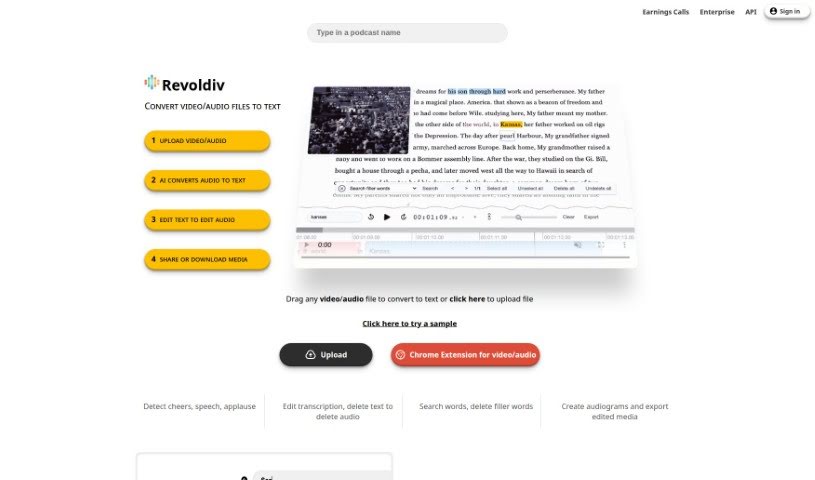
Screenshot of Revoldiv

Revoldiv

Discover what Revoldiv is and how to use it effectively in 2025. We'll explore its features and see how it stacks up against other transcription tools.

Screenshot

What is Revoldiv?

Revoldiv is a platform designed to make working with audio and video content much simpler. Here’s what it offers:

  • You can upload your video or audio files and get instant transcriptions, all done super fast and with great accuracy.
  • It lets you easily edit the text that’s transcribed. You can even get rid of those pesky filler words (like “um” and “uh”) and create neat audiograms from your content.
  • Need to share your work? You can export videos and subtitles in all sorts of formats, making it super convenient.
  • Revoldiv also makes it easy to share your projects or just specific parts of them. You can set up chapters to help people navigate your content, and there’s a space for comments and discussions too.
  • The whole interface is really user-friendly. You’ll find features like speaker detection, editing text in real-time, and the ability to create those shareable snippets and projects we mentioned.

Who created Revoldiv?

Revoldiv was developed by a dedicated team, led by its founder. While the founder’s specific details aren’t shared here, the platform itself launched on June 17, 2024. It came out with some really advanced features. Think accurate transcriptions that can tell different speakers apart, ways to remove filler words, options to create audiograms you can export, and support for a wide range of video and audio file types. It’s built with a user-friendly interface, allowing you to edit text and audio together in real-time. Plus, you can create content chapters and shareable snippets, which makes it a really versatile and easy-to-use tool for many different needs.

What is Revoldiv used for?

Revoldiv is incredibly handy for a variety of tasks:

  • Turning your video or audio files into text.
  • Cleaning up videos by removing filler words.
  • Editing text specifically for video projects.
  • Making audiograms from your favorite clips.
  • Exporting videos and subtitles in any format you need.
  • Sharing your entire projects or just specific snippets.
  • Creating chapters to make content easier to navigate.
  • Leaving comments or jumping into discussions about your work.
  • It even works with media files through its Chrome Extension.
  • You get real-time text editing capabilities.
  • You can edit the audio by editing the text itself.
  • It’s easy to create audiograms from your favorite moments.
  • Exporting videos and subtitles in any format is supported.
  • You can share full projects or just the snippets you like best.
  • Feel free to leave comments or reply to ongoing discussions.
  • It can even detect things like cheers, speech, and applause.
  • You can search for and delete filler words with ease.
  • For live events and larger businesses, it supports enterprise plans and offers an API.
  • You can edit video and audio transcriptions directly.
  • Exporting videos and subtitles in various formats is a key feature.
  • Creating chapters for content navigation is straightforward.
  • Adding comments and engaging in discussions is encouraged.
  • The Chrome Extension is great for handling media files.
  • It supports enterprise use with an API.
  • You can create shareable snippets and projects.

Who is Revoldiv for?

Revoldiv is a great tool for a wide range of professionals and individuals:

  • Content creators
  • Video editors
  • Podcasters
  • Digital marketers
  • Transcribers
  • Community Managers
  • Event Planners
  • Editors
  • Social media managers
  • Journalists
  • Marketers
  • Students
  • Researchers
  • Transcriptionists
  • Media professionals
  • Lecturers
  • Entrepreneurs

How to use Revoldiv?

Using Revoldiv is pretty straightforward. Just follow these simple steps:

  1. Upload Your File: You can either drag and drop your video or audio file right into the platform, or simply click the upload button. Choose the file you want to get transcribed.
  2. Let the AI Work: The AI will automatically convert your audio into text. Just give it a moment to complete the transcription process.
  3. Edit the Text: Once you have the transcription, you can edit it to make any necessary changes. It’s really easy to select parts of the text and tweak them.
  4. Export or Share: After you’re happy with your edits, you can export your media in different formats or share it using the options provided.
  5. Remove Filler Words: Need to clean up your audio? Just click a button to instantly remove common filler words like “um,” “like,” and “uhh” from your video.
  6. Create Audiograms: You can also easily make audiograms from your favorite snippets right within the tool.
  7. Organize with Chapters: To help people navigate your content, you can create chapters to mark different sections.
  8. Engage with Comments: Feel free to leave comments or join in on discussions related to your project.
  9. Explore Support Features: Revoldiv works with Chrome and Firefox, can detect different speech elements, and offers a user-friendly interface to make your experience smooth.
  10. Discover Additional Options: You’ll also find features like synchronized text-audio editing, speaker detection, and multiple export formats available for your convenience.

By following these steps, you’ll be able to use Revoldiv effectively to transcribe, edit, and enhance all your video or audio content with great ease.

Related AI Tools

Discover more tools in similar categories that might interest you

Stay Updated with AI Tools

Get weekly updates on the latest AI tools, trends, and insights delivered to your inbox

Join 25,000+ AI enthusiasts. No spam, unsubscribe anytime.