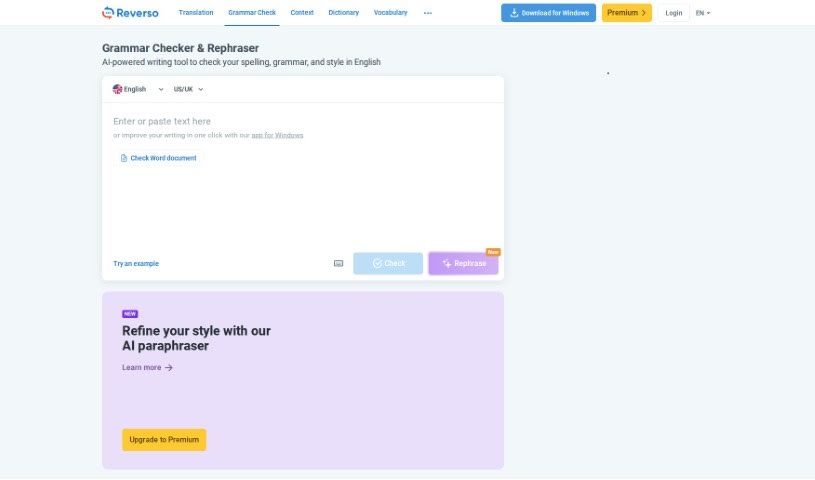
Screenshot of Reverso English Spelling Checker

Reverso English Spelling Checker

Discover what the Reverso English Spelling Checker is and how to use it effectively in 2025. We'll explore its features and see how it stacks up against other paraphrasing tools.

Screenshot

What is Reverso English Spelling Checker?

An English Spelling Checker is your personal proofreader for written English. Its main job is to spot and fix spelling mistakes in whatever you’ve written. How does it do this? It compares the words you’ve used against a huge list of correctly spelled words. If it finds a word that doesn’t match, it flags it for you. You’ll find these handy tools in all sorts of places – as standalone software, online tools, or even built right into your word processor. They’re super helpful for making sure your writing looks polished and professional, catching those pesky typos that can sometimes slip through. Whether you’re a student, a professional, or just someone who wants their writing to be error-free, an English Spelling Checker is a real lifesaver.

Who created Reverso English Spelling Checker?

Reverso Technologies Inc. is the company behind the Reverso English Spelling Checker. They developed this tool to automatically catch and fix both grammar and spelling errors, giving you options for how to make those corrections. To make it even better, Reverso Technologies Inc. integrated some of the best technology from Ginger Software. This really boosts the spell-checking tool, offering users efficient and accurate help with their English writing.

How to use Reverso English Spelling Checker?

Using the Reverso English Spelling Checker is pretty straightforward. Here’s a simple guide to get you started:

  1. First, head over to the official English Spelling Checker website.
  2. Once you’re there, look for the Grammar Check section.
  3. Now, just paste or type the text you want to check into the provided box.
  4. Hit the ‘Check’ button to let the tool do its work.
  5. You’ll see any mistakes it finds highlighted, along with suggestions for how to fix them. Sometimes, you might need to pick the correction that best fits your sentence.
  6. It’s worth noting that sometimes the tool might skip over certain errors to keep the warning count down, or a correction might not be a perfect fit for your specific context. So, always give the suggestions a careful look.
  7. After you’ve applied the suggested changes, it’s a good idea to give your text a quick manual read-through yourself. This helps ensure everything is just right.
  8. If you’re looking to really sharpen your English spelling skills, make sure to check out the online grammar module and the conjugator also available on the website.
  9. Your feedback is super valuable! Let them know how the spelling and grammar check worked for you; it helps them improve the service for everyone.
  10. And if you’re thinking about a custom spell-checking tool that’s perfectly tailored to your unique needs and language preferences, don’t hesitate to reach out to their support team.

By following these steps, you can really make the most of the English Spelling Checker tool to ensure your written English is accurate and correct.

Related AI Tools

Discover more tools in similar categories that might interest you

Academic Help Free Essay Generator

Education Academic Writing
Learn More

Stay Updated with AI Tools

Get weekly updates on the latest AI tools, trends, and insights delivered to your inbox

Join 25,000+ AI enthusiasts. No spam, unsubscribe anytime.