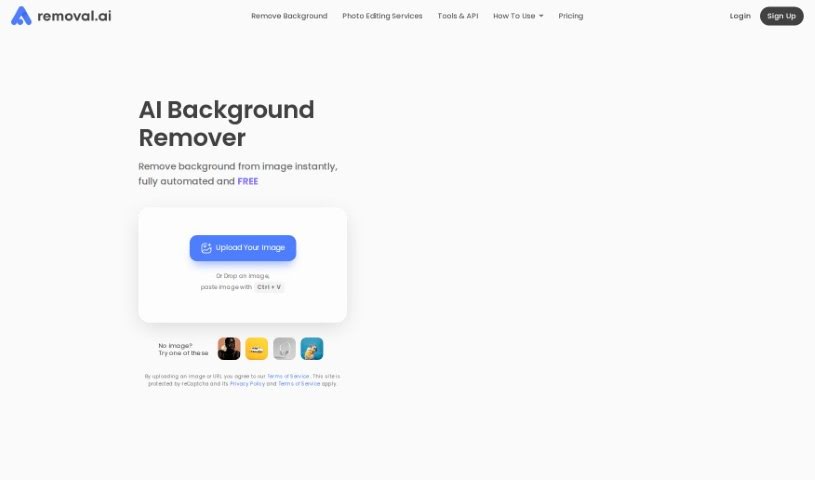
Screenshot of Removal.ai

Removal.ai

Discover Removal.ai in 2025! Learn what this free background remover tool does, explore its features, and see how it stacks up against other background removal services.

Screenshot

What is Removal.ai?

Removal.AI is a handy, free tool that makes taking backgrounds out of pictures super easy. It’s really designed to help you get more creative by simplifying the whole process of editing images, especially when it comes to background removal. Removal.AI uses smart computer vision technology – think of it like really advanced AI – to figure out exactly which parts are the main subject and which parts are the background. It can then separate them cleanly.

What’s great is that it can give you a transparent background, a white one, or even a custom background in just seconds. Plus, it’s really good at handling tricky details like wisps of hair or the edges of fur, giving you neat, smooth cutouts. You can even upload over 1,000 images at once, which is a huge time-saver!

Beyond just removing backgrounds, Removal.AI also has a free online photo editor. This lets you play around with your images even more – you can add text, apply different effects, or even fine-tune the foreground yourself using a background eraser tool. They even offer presets that are perfect for different online marketplaces. And if you’re a developer or run a business, Removal.AI makes it easy to integrate their technology directly into your own workflows with their API. It’s built to be reliable, efficient, and scalable, fitting all sorts of needs.

Basically, Removal.AI is all about boosting your creativity by making image editing simple. It helps both individuals and businesses create eye-catching visuals without a fuss.

Who created Removal.ai?

Removal.ai was developed by a team made up of data scientists, designers, and experienced photo editors. Their main goal is to speed up creativity by offering automated background removal that’s accessible to anyone, anywhere, at a fair price. Removal.AI’s mission is to bring advanced technology to everyone, making tasks like background removal much simpler using AI. The tool is designed to help people and companies by bringing their ideas together and sparking creativity, even if they don’t have advanced design skills.

What is Removal.ai used for?

Removal.AI is incredibly versatile! Here’s a look at what you can do with it:

  • Instant Transparent Backgrounds: Get a transparent background for any image right away.
  • Creative Boost: It helps designers create truly outstanding artwork.
  • Focus on Creativity: Assists professional creative agents by handling the tedious parts of editing.
  • Future-Ready Apps: Empowers developers to build innovative apps for the future.
  • Better Visuals: Enables educators to create more engaging lesson materials.
  • Graphics for Everyone: Lets people without design experience create amazing graphics easily.
  • Sparking Imagination: Boosts customers’ creativity through simple image editing.
  • Image Processing Support: Helps individuals and organizations manage their image editing needs.
  • Idea Realization: Makes it easier to bring customers’ ideas to life efficiently.
  • Faster Creativity: Accelerates creative processes for both companies and individuals.
  • Expert Assistance: Extends specialized knowledge to organizations and individuals who need it.
  • Focus on Artistry: Helps professional creative agents concentrate on their creative work.
  • App Development: Empowers developers to build new applications.
  • Artistic Transformation: Turn your photos into art, banners, visual presentations, and more.
  • Versatile Removal: Remove backgrounds from photos of products, people, cars, animals, and graphics.
  • Design Customization: Tailor your image designs to your specific needs.
  • Manual Editing: Fine-tune the foreground using the background eraser tool.
  • Adding Flair: Easily add text and effects to your images.
  • Bulk Processing: Handle over 1,000 images in a single upload.
  • Workflow Integration: Integrate with an API for a faster workflow.
  • Purpose-Driven: Optimized for a wide range of purposes and use cases.
  • Creative API: Enhance creativity with easy API integration.
  • Transparent Backgrounds: Specifically create transparent backgrounds for your images.
  • Visual Content Creation: Convert images into art, banners, presentations, product catalogs, and other graphics.
  • Editing and Customization: Edit foregrounds, add text and effects, and customize designs.
  • Precise Cutouts: Automatically detects subjects in photos, providing neat, clear, and smooth cutout edges.
  • Detail Handling: Effectively manages tricky edges like hair or fur.
  • Large-Scale Uploads: Process many images at once.
  • Efficient Workflow: Integrate with an API for speedy workflows with reliable and scalable features.
  • Support: Offers 24/7 technical support and consultations.
  • Flexible Plans: Supports flexible pricing with options like risk-free trials and auto-renewals.
  • Subscription Management: Allows easy upgrades, downgrades, or cancellations.
  • Instant Background Removal: Remove backgrounds from images instantly.
  • Background Options: Create transparent, white, or customized backgrounds.
  • Subject Detection: Automatically detects subjects in photos.
  • Design Customization: Customize designs for banners, art, and visual presentations.
  • Marketplace Presets: Use presets tailored for different marketplaces.
  • No Design Skills Needed: Edit graphics without needing prior design experience.

Who is Removal.ai for?

Removal.AI is a fantastic tool for a wide range of users:

  • Designers: To streamline their workflow and focus on creative aspects.
  • Creative Agents: To enhance their productivity and artistic output.
  • Educators: To create more engaging and visually appealing educational materials.
  • Developers: To integrate powerful background removal into their applications.
  • Non-designers: To easily create professional-looking graphics without needing design expertise.
  • Professional Creative Agents: To efficiently handle image editing tasks.
  • Passionate Educators: To improve the visual quality of their teaching resources.

How to use Removal.ai?

Using Removal.AI to remove backgrounds and edit your images is straightforward. Just follow these simple steps:

  1. Visit the Website: Start by heading over to the Removal.AI website.
  2. Upload Your Image: Upload your image file. It works best with .jpg or .png formats and images that have a clear main subject.
  3. Choose Your Background: Decide if you want a transparent, white, or a custom background for your image.
  4. Let the AI Work: The AI technology will automatically detect the subjects in your photo and create neat, clear, and smooth cutout edges for you.
  5. Customize Your Design: You can further personalize your image by adding text, applying effects, or manually editing the foreground if needed.
  6. Use the Editor: Make additional enhancements using the free online photo editor.
  7. Select a Plan: Choose a pricing plan that fits your needs, whether it’s monthly, a lifetime option, or unlimited usage.
  8. Flexible Subscriptions: You have the flexibility to upgrade, downgrade, or cancel your subscription whenever you need to.
  9. Satisfaction Guarantee: If you’re not happy with the results, take advantage of the 14-day money-back guarantee.
  10. Get Support: Don’t hesitate to contact customer support if you have any custom requirements or need assistance.

Removal.AI offers a user-friendly interface, advanced AI technology, and various pricing plans to match different usage volumes and preferences. By following these steps, you can efficiently remove backgrounds from your images and really let your creativity shine with stunning visuals.

Related AI Tools

Discover more tools in similar categories that might interest you

123RF AI Image Generator

Creative Image Generation
Learn More

Stay Updated with AI Tools

Get weekly updates on the latest AI tools, trends, and insights delivered to your inbox

Join 25,000+ AI enthusiasts. No spam, unsubscribe anytime.