What Exactly is RecurseChat?
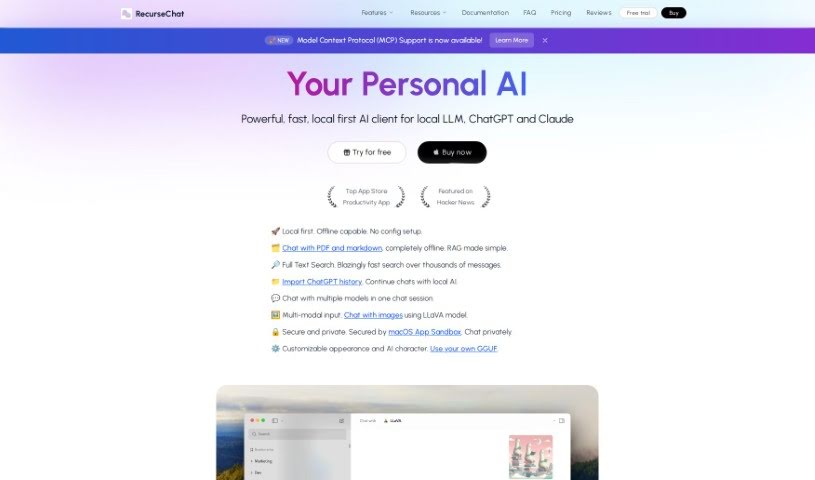
RecurseChat is a personal AI application built for chatting with AI models that run right on your computer. It’s designed with a really user-friendly interface and puts a strong emphasis on privacy, even using the macOS App Sandbox to keep things extra secure. You can even interact with images using the LLaVA model, which is pretty neat. Plus, you have the freedom to customize how the AI looks and what its personality is like. It also includes a handy full-text search, and you can even import your old ChatGPT conversations.
What’s great is that RecurseChat works perfectly offline and locally, meaning you don’t need any complicated setup to get started. The full-text search is designed to be super fast, letting you sift through thousands of messages in a flash, though the exact technical details behind that speed aren’t shared.
If you’ve got a history of chats with ChatGPT, you can easily bring them over to RecurseChat. This lets you pick up right where you left off with your local AI. You can even have conversations with several different AI models all at once in the same chat session. Your data stays safe and private, thanks to features like the macOS App Sandbox and options for private chats.
Who’s Behind RecurseChat?
RecurseChat was developed by a single person, Jack Wisdom. He first launched the app on February 28, 2024. As mentioned, it’s a personal AI application that really focuses on being easy to use and keeping your data private, utilizing features like the macOS App Sandbox for that extra layer of protection.
What Can You Do with RecurseChat?
Here’s a rundown of what RecurseChat is great for:
- Chatting Locally & Offline: Have conversations with AI models on your own device without needing an internet connection or dealing with complicated setups.
- File Conversations: You can chat with your PDF, markdown, and text files directly, all locally and offline.
- Quick Search: Find what you’re looking for fast with full-text search capabilities that let you browse through thousands of messages in seconds.
- ChatGPT History Import: Seamlessly bring your past ChatGPT conversations into RecurseChat to continue your discussions.
- Multiple AI Models: Talk to several different AI models within a single chat session.
- Image Chat (LLaVA): Engage in multi-modal conversations, including chatting with images using the LLaVA model.
- Personalize Your AI: Customize the AI’s personality and appearance to make the experience uniquely yours.
- Private Chats: Keep your conversations confidential with dedicated private chat options.
- Speedy Search: Enjoy blazingly fast search functionality for all your messages.
- Enhanced Privacy: Benefit from robust data protection, including the macOS App Sandbox.
Who Would Find RecurseChat Useful?
RecurseChat is particularly helpful for:
- Healthcare professionals
- Therapists
- Content creators
- Researchers
- Writers
How Do I Get the Most Out of RecurseChat?
To really make the most of RecurseChat, here’s a simple guide:
- Download and Install It: First things first, grab RecurseChat from the Mac App Store and get it installed on your Mac.
- Enjoy Local & Offline Use: You’ll love the freedom of chatting with local AI models offline. No tricky configurations needed, just easy access.
- Use the Full-Text Search: Make sure to take advantage of the full-text search. It’s a real game-changer for quickly finding messages, making your chat experience much smoother.
- Import Your ChatGPT History: If you have old ChatGPT chats, importing them is straightforward. It lets you continue conversations without missing a beat.
- Try Multi-Model Chats: Don’t hesitate to engage with different AI models in one session. It offers a great way to explore various AI perspectives.
- Experiment with Image Interaction: Use the LLaVA model to chat with images. It adds a whole new dimension to your conversations.
- Customize Your AI: Play around with the options to change the AI’s appearance and character attributes. Tailoring it makes the experience much more personal.
- Prioritize Data Security: Rest assured knowing that features like the macOS App Sandbox and private chat options are there to keep your data secure and private.
- No Subscriptions, Just Value: Forget about subscriptions! You pay once and can use it forever. Plus, you get free updates through the App Store.
By following these steps, you’ll be able to use RecurseChat like a pro, enjoying dynamic conversations while keeping your security and privacy front and center.