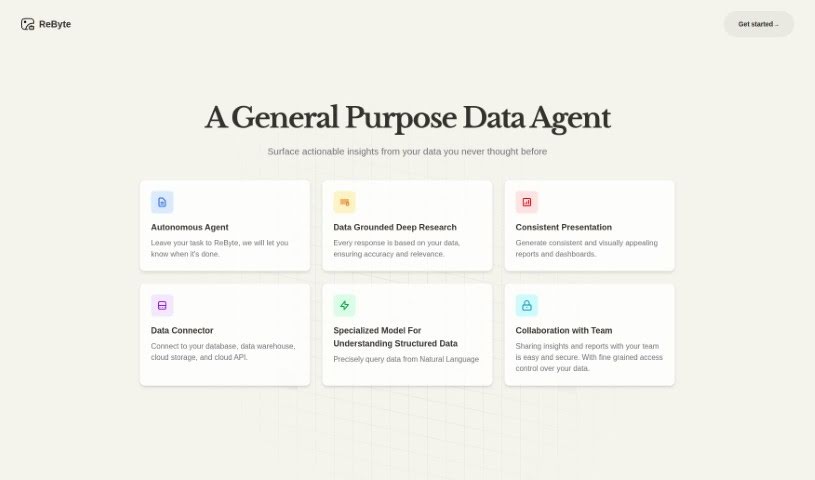
What is ReByte?
ReByte is a really interesting AI tool from RealChar AI. Think of it like editing a document, but for tools! It lets you tweak and adjust them easily. One of its standout features is an Internet Connected Assistant. This means you can ask it questions, and it’ll fetch factual, up-to-date information for you. You can ask in any language, and it usually gets back to you in English in about 5 seconds. Beyond that, ReByte offers a bunch of other cool stuff: you can visualize data, chat with a Virtual Girlfriend, use voice commands, talk with Mistral 7B, analyze bank statements, and even try out a simulated Airline Ticket Seller. It’s also customizable and voice-enabled, making it super versatile for all sorts of AI projects.
Who created ReByte?
ReByte first came out on September 22, 2023, and it’s the creation of RealChar AI. As I mentioned, it’s an AI tool that lets you edit tools much like you’d edit a document. It comes packed with features like that Internet Connected Assistant for up-to-date answers, Data Visualization tools, a Virtual Girlfriend feature for some fun, chat capabilities with Mistral 7B, bank statement analysis, and a simulated Airline Ticket Seller. If you’re curious, you can sign up for a free trial, and they’ve got documentation available to help you get started.
What is ReByte used for?
ReByte is pretty versatile! Here’s a look at what you can do with it:
- Data visualization: Make sense of your numbers visually.
- Plan and Execute complex tasks into small steps: Break down big projects into manageable chunks.
- Achieve surprisingly high accuracy with structured data RAG: Get really accurate results when working with structured data.
- Sync data from internal sources like Notion, GitHub, Slack, etc.: Connect your existing tools and bring your data together.
- Use ChatGPT For Teams without binding to OpenAI: Leverage team-friendly AI without being tied to OpenAI’s platform.
- Access Control with fine-grained access to data and audit logs: Keep your data secure with detailed control and tracking.
- Maintain Data Ownership with full control over conversations and data: You own all your data and conversations.
- Utilize APIs for building custom tools: Build your own specialized tools using ReByte’s APIs.
- Enhance personal productivity with Revia: Boost your own efficiency.
- Collaborate with teams to build and use multiple Assistants: Work with your team to create and share AI Assistants.
- Create applications on top of ReByte and ship to customers with the Developer Plan: Build and sell your own apps powered by ReByte.
- Data ownership: You’re in charge of your data.
- Plan and Execute: Tackle tasks step-by-step.
- Surprisingly High Accuracy RAG: Get precise results with structured data.
- Enterprise Data Sync: Connect your business data sources.
- Model Agnostic: Works with different AI models.
- Access Control Built-in: Secure your data easily.
- API Everywhere: Access powerful APIs for customization.
- Virtual Girlfriend feature: For engaging conversations.
- Bank Statement Analysis: Understand your finances better.
Who is ReByte for?
ReByte is a great fit for several groups:
- Knowledge workers: Anyone who deals with a lot of information and needs to organize or analyze it.
- Individual Developers: If you’re looking to build AI-powered tools or applications.
- Companies wanting to build applications on top of ReByte: Businesses that see potential in creating their own solutions using ReByte’s platform.
- Companies that want to build applications on top of ReByte: This is the same point as above, emphasizing its use for business application development.
How to use ReByte?
To really get the most out of ReByte, here’s a simple step-by-step guide:
- Sign Up: First things first, head over to their website and sign up. You can start with free usage or pick a paid plan if you need more advanced features.
- Choose a Plan: Take a look at the different plans available – Personal, Pro, Team, or Developer. Pick the one that best matches what you need and your budget.
- Access Features: Once you’re set up, dive into ReByte’s capabilities. You can create Assistants for all sorts of tasks, interact with them as much as you want, and even connect to your enterprise data sources like Google Drive or OneDrive.
- Utilize Tools: Make sure to try out the different tools! The Internet Connected Assistant is fantastic for real-time data, Data Visualization helps you understand numbers visually, and the Virtual Girlfriend offers a more lighthearted interaction.
- Engage With Assistants: Chat with Mistral 7B for conversations, use the bank statement analysis tool to get a handle on your finances, or play around with the simulated Airline Ticket Seller for some intelligent practice.
- Data Management: Pay attention to data security. ReByte offers fine-grained access control for your data and agents. You can also sync data from your internal sources, and importantly, you own all your conversations and the data you generate.
- API Integration: If you’re a developer, definitely explore the APIs. They let you build custom tools right on top of ReByte, giving you the flexibility to tailor it exactly to your needs.
- Support and Resources: If you ever get stuck or have questions, don’t hesitate to reach out to ReByte’s support team via email during business hours. Their documentation is also a great resource for learning how to use the tool effectively.
By following these steps, you’ll be able to effectively use ReByte’s features to boost your productivity and make your daily tasks run much more smoothly.