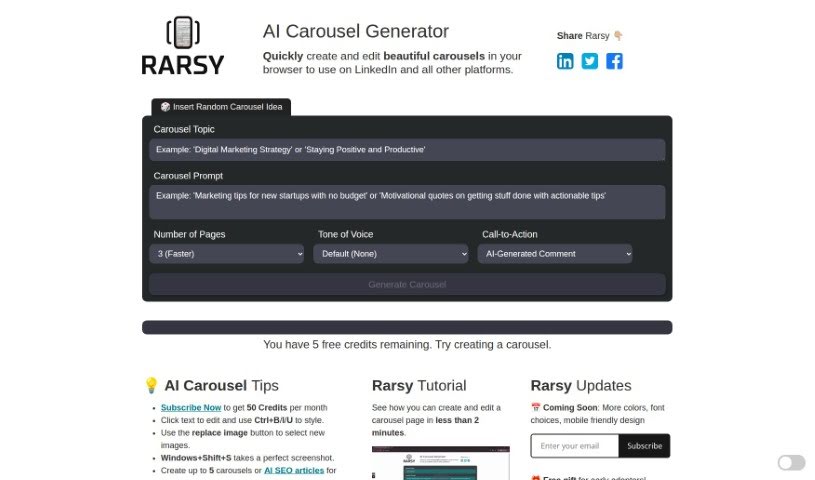
Screenshot of Rarsy Carousel Generator

Rarsy Carousel Generator

Discover what the Rarsy Carousel Generator is and learn how to use it to create engaging LinkedIn carousels in 2025. We'll cover its features, customization options, and how it stacks up against other LinkedIn tools.

Screenshot

The Rarsy Carousel Generator is a neat tool that uses artificial intelligence to automatically create LinkedIn carousels for you. It is your personal AI assistant for crafting eye-catching LinkedIn content. You can customize pretty much everything, from the main topics and specific prompts you want to cover, to your call-to-action, how many pages your carousel should have, and even the overall tone of voice. The big idea here is to seriously cut down the time you spend making carousels. It also offers handy features like letting you edit the text directly, swap out images if you want something different, and even convert your finished carousel into a PDF. Just a heads-up, though: right now, it’s still in beta, so you can only get in if you’ve been invited.

An undisclosed company developed the Rarsy Carousel Generator. It’s a pretty innovative tool that first launched on June 21, 2023. Its main purpose is to automate the creation of LinkedIn carousels, all thanks to artificial intelligence. This platform gives you a lot of control over your carousels. You can edit the text, apply different styles, replace images, capture screenshots, and convert everything into a PDF. Plus, you can fine-tune specific settings like the topic, prompt, call-to-action, page count, and tone of voice. As mentioned, it’s currently in its beta phase, meaning access is limited to a select group of invited users.

Here’s a quick rundown of what this tool is used for:

  • Creating LinkedIn Carousels: Its primary function is to generate these popular post formats.
  • Lots of Customization: You get plenty of options to tailor your carousels.
  • Editable Text: Easily tweak the text content.
  • Customizable Pages: Control how many pages your carousel has.
  • Text Styling: Apply different looks to your text.
  • Replaceable Images: Swap out default images for your own.
  • Screenshot Feature: Capture visuals directly.
  • Custom Calls-to-Action: Add your own prompts for engagement.
  • PDF Conversion: Turn your carousel into a PDF file.
  • LinkedIn Focus: It’s specifically designed for LinkedIn posts.

This tool is particularly useful for:

  • Marketers: To create engaging promotional content.
  • Content Creators: To streamline their content production process.
  • LinkedIn Users: Anyone looking to boost their presence on the platform with visual content.

Getting started with the Carousel Generator is pretty straightforward, though remember it’s invite-only for now:

  1. Access the Tool: First, you’ll need to get access to the AI Carousel Generator, which is currently in beta and only available to invited users.
  2. Set Your Preferences: Once you’re in, start by customizing your carousel. This involves picking your preferred topic, the specific prompt you want to use, the tone of voice for the content, the call-to-action you want to include, and how many pages your carousel should have.
  3. Refine Your Content: Now, you can dive into editing. This means tweaking the text, applying different styles to make it look good, replacing any default images with your own visuals, and generally fine-tuning those carousel parameters like topic, prompt, and tone.
  4. Use the Screenshot Feature: For high-quality visuals, you can use the built-in screenshot feature. A helpful tip is to go full screen (press F11) and then use the Windows shortcut Windows+Shift+S to capture exactly what you need.
  5. Convert to PDF: To get a PDF version of your carousel, you’ll need to take screenshots of each individual page. Then, you can use a PDF converter to combine these screenshots into a single PDF file.
  6. Share Your Thoughts: The platform has a feedback form, so be sure to use it to share your thoughts and help improve the tool.
  7. Explore Prompts: Take some time to look at the different prompt options available. These can really help guide the content direction of your carousel and ensure it aligns with your goals.
  8. Be Aware of Limitations: It’s good to know what the tool can’t do yet. Keep in mind that access is invite-only, customization options are still somewhat limited, and converting to PDF can be a bit tricky.
  9. Consider its Marketing Potential: Think about how you can use this tool as a marketing asset. Its customization features and ability to save time make it a valuable option for boosting your business’s presence.

By following these steps, you should be able to effectively use the AI Carousel Generator to create engaging LinkedIn carousels that are both easy to make and highly customizable.

Related AI Tools

Discover more tools in similar categories that might interest you

Stay Updated with AI Tools

Get weekly updates on the latest AI tools, trends, and insights delivered to your inbox

Join 25,000+ AI enthusiasts. No spam, unsubscribe anytime.