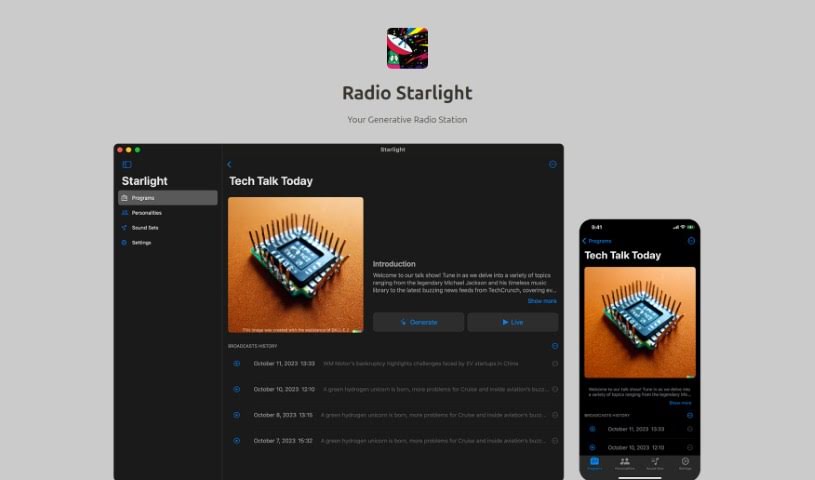
What is Radio Starlight?
Radio Starlight is a really neat generative radio tool that completely changes how we think about traditional radio. It lets you create personalized voice talks about your favorite songs and the latest news, all woven right into your music listening. It is having your own personal DJ and newsreader rolled into one handy app, which is fantastic for boosting productivity and multitasking. It’s powered by OpenAI technology, so Radio Starlight can whip up dynamic radio content that’s specifically made for you. What’s cool is that you can even generate programs in English using news from other languages, and you can pick your preferred language for broadcasts. Plus, you can create custom cover images and avatars for your shows, get a visual radio experience by seeing the script text and news images as you listen, pull in content from JSON APIs and web pages, and even listen while you’re out and about. While it’s free to use, they’re upfront about the costs associated with using the OpenAI API.
Who created Radio Starlight?
OpenAI, a company known for its groundbreaking AI work, created Radio Starlight. They launched this generative radio tool on September 28, 2023. It’s designed to redefine the traditional radio experience by offering personalized voice talks about songs and news, seamlessly blending them into your music listening. Radio Starlight really shines by combining the roles of a personal DJ and a newsreader in a single app, which seriously helps with productivity and multitasking. Because it’s powered by OpenAI technology, it delivers dynamic radio content that’s tailored precisely to your preferences. You also get lots of customization options, like creating your own avatars and program cover images. The tool pulls in real-time information from various sources, lets you listen on the go, and is clear about the costs for OpenAI API usage. To use it, you’ll need macOS 14.0 or later and an active OpenAI API key. There’s also a mobile version available for iOS 17.0 or later.
What is Radio Starlight used for?
Here’s a look at what you can do with Radio Starlight:
- Create eye-catching program cover images and unique avatars for your radio personalities.
- Follow along with script text and news images as you listen, making the experience more engaging.
- Design and customize your very own radio host personality to match your style.
- Listen to your programs on the go, even while they’re still being created.
- Set the perfect mood by adding your own background music (BGMs).
- Integrate content from JSON APIs and web pages directly into your radio programs for a richer listening experience.
- Access your crafted radio programs from macOS anytime with the handy Starlight GO feature.
- Generate English programs even if the original news sources are in other languages.
- Stay globally aware by setting language preferences for broadcasts in various languages.
- Experience dynamic radio content that’s truly tailored to your individual preferences.
- Design a personalized radio host that truly reflects your personal style and preferences.
- Listen to programs on the go without any interruptions.
- Pull content from JSON API and web pages into your radio programs.
- Access your crafted radio programs from macOS anytime, anywhere.
- Generate English programs from non-English news sources to broaden your global awareness.
- Craft broadcasts in a variety of languages, from Spanish to Mandarin.
- Maximize your time and multitasking abilities with a personal DJ and newsreader all in one app.
Who is Radio Starlight for?
Radio Starlight is a great tool for:
- Radio hosts
- Newsreaders
- Content creators
- Program Directors
- Music curators
- Language Specialists
- Radio personalities
- Language Enthusiasts
- Journalists
- Language professionals
- Language instructors
How to use Radio Starlight?
To get the most out of Radio Starlight, just follow these simple steps:
- Pick Your Language: Start by choosing the language for your program. You can select anything from Spanish to Mandarin, really tailoring the broadcast content to exactly what you prefer.
- Get Creative with DALL-E 2: Use DALL-E 2 to design unique cover images for your programs and create special avatars for your radio personalities. This really makes your broadcasts stand out visually.
- Enjoy Visual Radio: Make your listening experience more engaging by using the visual radio feature. You can see the script text and relevant news images right as you listen.
- Make Your Host Your Own: Craft a radio host personality that really speaks to your style and preferences. This makes your whole radio experience feel much more personal and engaging.
- Listen Whenever, Wherever: You can play your program on the go, and it’s even available while it’s being generated. This ensures your listening experience is always smooth and uninterrupted.
- Set the Mood with BGM: Customize the vibe of your programs by adding your own background music. Whether you’re going for a jazzy feel or upbeat pop, you can create your own unique ambiance.
- Bring in More Content: Easily integrate content from JSON APIs and web pages directly into your programs. This is a fantastic way to enrich your broadcasts with up-to-the-minute information and updates.
- Keep an Eye on Costs: Just remember, while Radio Starlight itself is free to use, there are costs associated with using the OpenAI API based on how much you use it. It’s good to be aware of these potential costs.
- Listen Seamlessly with Starlight GO: You can access your radio programs from macOS anytime, anywhere using Starlight GO. This feature makes it super easy to find your programs, save them to iCloud, and even share them with others in the community.
By following these steps, you’ll be able to use Radio Starlight’s features to create personalized and engaging radio programs that perfectly match your preferences and unique style.