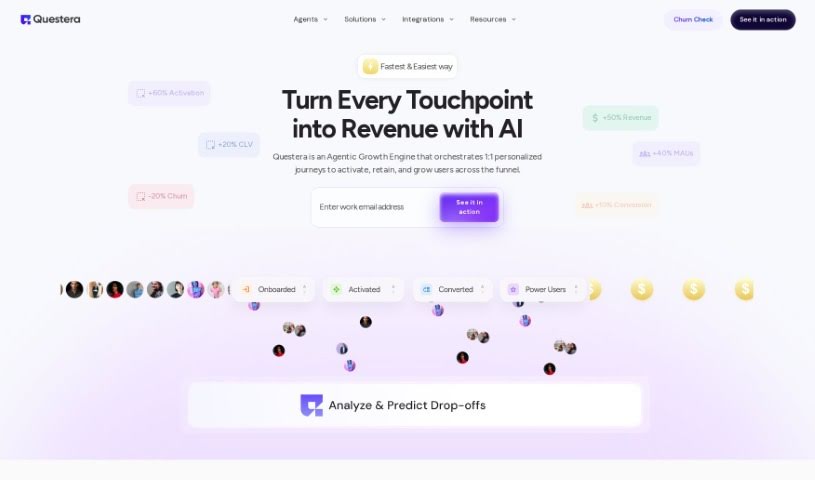
Screenshot of Quest Labs AI

Quest Labs AI

Discover what Quest Labs AI is and how to use it effectively in 2025. We'll explore its features and see how it stacks up against other automation tools.

Screenshot

What is Quest Labs AI?

Quest Labs is a smart tool that uses AI to help companies boost their in-app adoption, keep users engaged, and increase revenue. It does this by making user experiences and workflows much simpler. It is a way for companies to build great user experiences without needing to write any code, making it super easy to deploy Software Development Kits (SDKs). The platform provides customizable UI SDKs, which are great for personalizing how users first get started and stay engaged. It also offers AI-driven insights to help activate users, lets you run A/B tests, and connects with all sorts of other systems and platforms. Ultimately, Quest Labs wants to help you grow your user base by guiding them with AI, reach the right people with your data integrations, and offers solid customer support along with strong security measures. You can choose from different pricing plans, including a free option and enterprise solutions that come with custom insights and 24/7 support.

Who created Quest Labs AI?

Evan Smith is the person behind Questlabs. He launched the company on October 2, 2023. His main goal was to create an AI-powered tool that helps companies improve how users adopt their apps, stay engaged, and generate more revenue, all by simplifying user experiences and workflows. Questlabs provides a platform where companies can build these user experiences without needing to code. Key features include customizable UI SDKs, AI-driven insights, guidance for user activation, A/B testing, and the ability to connect with various data sources to effectively target specific users.

What is Quest Labs AI used for?

Quest Labs is used for a variety of things, all aimed at improving your app’s performance and user interaction:

  • Boosting Revenue: It helps drive more income.
  • Improving User Engagement: Keeps users actively interacting with your app.
  • Personalizing User Experiences: Tailors the app to individual user preferences.
  • Automated A/B Testing: Runs tests automatically to find what works best.
  • Enhancing In-App Adoption: Makes it easier for new users to start using your app.
  • Facilitating User Experiences: Simplifies how users interact with your app.
  • Streamlining User Onboarding: Makes the initial setup process smooth and quick.
  • Incentivizing Users: Encourages users to take desired actions.
  • Expanding User Base: Helps attract and bring in more users.
  • Automating A/B Testing: Handles A/B testing processes automatically.
  • Providing Insights on Experimentation Outcomes: Offers data on what your tests reveal.
  • Targeting Users Effectively: Reaches the right audience with your features.
  • Retention through Feedback & Surveys: Uses user input to keep them coming back.
  • Running A/B Tests: Conducts comparative tests to optimize features.
  • Providing Insights on Outcomes: Shares what the results of your tests mean.
  • Streamlining User Experiences: Makes interactions simpler and more efficient.
  • Personalizing User Onboarding: Customizes the initial user journey.
  • Automatic User Base Expansion: Helps grow your user numbers automatically.
  • Seamless Integrations with Various Systems: Connects easily with other tools you use.
  • Enhancing User Retention through Feedback and Surveys: Uses user opinions to keep them loyal.
  • Facilitating User Experiences and Workflows Without Coding: Lets you build great experiences without writing code.
  • Enhancing User Onboarding through Customizable UI SDK: Improves the first-time user experience with flexible SDKs.
  • Boosting Engagement through Gamification and Personalized Content: Uses fun elements and tailored content to keep users interested.
  • Retaining Customers with Feedback and Surveys: Collects user input to improve loyalty.
  • Expanding User Base through Incentivization and A/B Testing: Grows your user numbers by encouraging actions and testing what works.
  • Targeting Users Effectively by Integrating with Various Data Sources: Reaches the right people by connecting to your data.
  • Providing AI-Driven Insights for User Activation and Engagement: Uses AI to understand how to get users active and involved.
  • Hyper-Personalizing User Experiences Using AI Technology: Creates highly customized experiences with AI.
  • Eliminating Complicated Integrations Through Lightweight APIs: Simplifies connections with easy-to-use APIs.
  • Offering Special Promotions like 50% Off on SDK Components: Provides discounts on key parts of the platform.

Who is Quest Labs AI for?

Quest Labs is designed for a variety of professionals who work with apps and user engagement:

  • Marketers: To improve campaign effectiveness and user acquisition.
  • Product Managers: To enhance product features and user satisfaction.
  • Customer Success Managers: To ensure users get the most value from the app.
  • Developers: To build and deploy user experiences more easily.
  • Data Analysts: To gain insights from user behavior and testing.
  • App Developers: Specifically for those building mobile applications.
  • Software Developers: A broader category for those in software creation.
  • Marketing Managers: To oversee and strategize marketing efforts.
  • Marketing Professionals: Anyone involved in marketing activities.
  • Sales Professionals: To understand user needs and drive conversions.
  • User Experience Designers: To create intuitive and engaging interfaces.
  • Designers: For crafting visually appealing and functional elements.
  • Customer Support Managers: To improve user satisfaction and problem resolution.

How to use Quest Labs AI?

Here’s a straightforward guide to using Quest Labs effectively:

  1. Get Familiar: Start by learning about what Quest Labs offers, like its AI-powered features for boosting in-app adoption, engagement, and revenue.
  2. Build Without Code: Use the no-code platform to easily create and launch user experiences and workflows.
  3. Streamline Onboarding: Make use of the customizable UI SDK to simplify the process for new users and keep them engaged.
  4. Activate Users with AI: Leverage the AI-driven insights Quest Labs provides to guide user activation and run A/B tests.
  5. Target Effectively with Data: Explore data integrations, including with platforms like Snowflake, Segment, and Amplitude, to precisely target your users.
  6. Integrate Seamlessly: Take advantage of the lightweight APIs for easy connections with various systems and platforms.
  7. Personalize Experiences: Analyze user behavior and preferences using AI technology to create tailored experiences.
  8. Boost Retention: Use feedback and surveys within Quest Labs to improve how you keep customers.
  9. Choose Your Plan: Look at the different pricing tiers Quest Labs offers, from ‘Free’ to ‘Enterprise,’ to find one that fits your company’s needs.
  10. Get Support: Make sure to use the comprehensive customer support, including access to customer success managers and helpful resources.

By following these steps, you can really make the most of Quest Labs to improve user experiences, drive engagement, and effectively boost your revenue.

Related AI Tools

Discover more tools in similar categories that might interest you

Stay Updated with AI Tools

Get weekly updates on the latest AI tools, trends, and insights delivered to your inbox

Join 25,000+ AI enthusiasts. No spam, unsubscribe anytime.