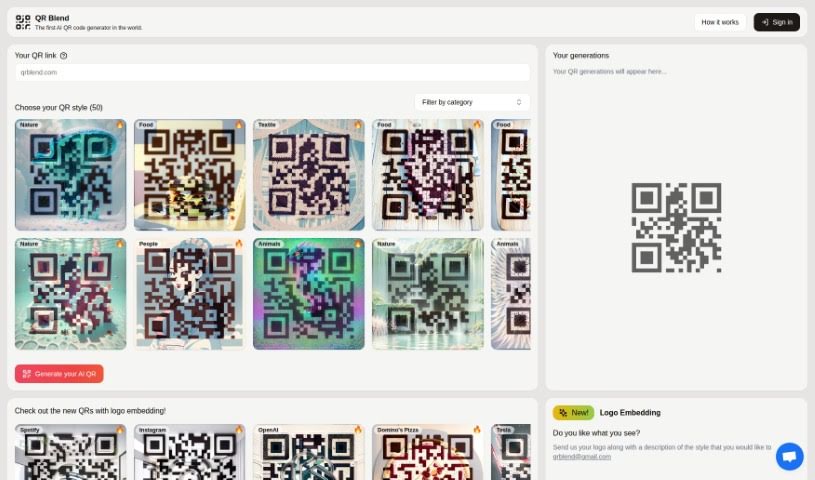
Screenshot of QR Blend

QR Blend

Discover QR Blend, the world's first AI QR code generator. Learn how to use its features for customization, logo embedding, and creating unique designs across themes like nature, food, and gaming, comparing it with other infographic tools.

Screenshot

What is QR Blend?

QR Blend: A Human-Friendly Look at What It Does

QR Blend is a really neat QR code generator. It was created by two siblings, Albert and Gabriel, who live in Barcelona and are super into both technology and art. What makes QR Blend special is that it’s the very first AI QR code generator out there. It’s designed to make creating unique QR codes super easy and quick for everyone. You’ve got over fifty different styles to pick from, covering themes like nature, food, technology, gaming, and lots more. Plus, you can generate codes fast, keep track of the ones you’ve made, and even add your own logo or get them in higher resolution. If you want, you can even filter codes by category, and if you have any specific questions, you can just shoot them an email at [email protected].

Who created QR Blend?

QR Blend is the brainchild of Albert and Gabriel, a brother-and-sister duo from Barcelona. They officially launched it on July 18, 2023, marking a significant moment as the world’s first AI QR code generator. Both Albert and Gabriel share a deep passion for technology and art, and they brought these interests together to create QR Blend.

What is QR Blend used for?

QR Blend is fantastic for a bunch of things:

  • Customizing QR Codes: Make them look exactly how you want.
  • Easy Creation: The process is straightforward and hassle-free.
  • Filtering by Category: Quickly find codes that fit your theme.
  • Managing Your Codes: Keep all your generated QR codes organized.
  • Personalized Generation: Create QR codes tailored specifically for you.
  • Lots of Style Options: Choose from a wide variety of unique looks.
  • Fast Generation: Get your QR codes in a flash.
  • Review Past Creations: Easily see what you’ve made before.
  • Industry Versatility: Useful across many different fields.
  • Innovative Designs: Explore fresh and creative design possibilities.
  • Helpful Support: Reach out if you need assistance.
  • QR Codes for Games: Perfect for adding interactive elements to games.
  • Adding Logos: Embed your brand’s logo right into the QR code.
  • Creating Custom Styles: Design your very own unique QR code looks.
  • High-Resolution Output: Get clear, sharp QR codes.
  • Efficient Process: The whole generation experience is smooth and quick.
  • Organizing Generated Codes: Keep your QR code library tidy.
  • Specific Email Inquiries: Get help with particular needs via email.
  • Navigating Generations: Easily browse through your past QR codes.
  • Themed QR Codes: Find codes organized by specific themes.
  • Nature-Themed Codes: Designs inspired by the natural world.
  • Food-Related Codes: Styles perfect for culinary businesses.
  • Fashion-Themed Codes: Trendy designs for the fashion industry.
  • Technology-Themed Codes: Sleek looks for tech-related content.
  • Games-Related Codes: Eye-catching designs for the gaming world.
  • Quick and Efficient Generation: Get your QR codes made fast.
  • Managing and Navigating: Easily handle and view your creations.
  • Customizing Designs: Tailor your QR codes to your exact needs.
  • Filtering by Category: Streamline your search.
  • Specific Customization Help: Email them for logo embedding or custom styles.
  • Unique AI QR Codes: Generate one-of-a-kind codes with AI.
  • Fifty Unique Styles: Pick from a vast selection of designs.
  • Category Choices: Select from nature, food, animals, technology, fashion, and gaming.
  • Easy Category Filtering: Navigate and select codes with ease.
  • ‘Your QR generations’ Section: Manage and view all your created codes.
  • Special Request Emails: Contact them for logo embedding, custom styles, and more.
  • User-Friendly Platform: Enjoy a simple and efficient creation process.
  • Attractive Designs: Get visually appealing QR codes.
  • Tech-Themed Examples: Find styles like ‘Electronic Circuit’ for technology.
  • Gaming Styles: Explore options like ‘Ominous Creature’ and ‘Hero Adventure’ in the ‘Gaming’ category.
  • Food-Themed Options: Designs for culinary content.
  • Gaming-Themed Options: Styles for the gaming industry.
  • Email for Customization: Reach out for specific needs.
  • Managing and Viewing: Keep track of your generated codes.
  • User-Friendly Creation: A platform designed for ease of use.
  • Unique and Striking Designs: Get QR codes that stand out.

Who is QR Blend for?

QR Blend is a great tool for a variety of people and professions:

  • Marketing Professionals: To create engaging and branded QR codes for campaigns.
  • Graphic Designers: For adding unique QR elements to client projects.
  • Game Developers: To integrate interactive QR codes into their games.
  • Fashion Designers: To create stylish QR codes for branding and promotions.
  • Artists: To share portfolios or connect with audiences through visually appealing codes.
  • Educators: For creating interactive learning materials.
  • Gaming Enthusiasts: To enhance their gaming experiences or share game-related content.
  • Nature-Related Businesses: To create themed QR codes for promotions or information.
  • Graphic Designers: (Repeated for emphasis on its broad appeal)
  • Marketers: (Repeated for emphasis on its broad appeal)
  • Website Designers: To incorporate unique QR codes into web designs.
  • Photographers: To link to portfolios or social media.

How to use QR Blend?

Using QR Blend is pretty straightforward. Just follow these simple steps:

  1. Sign In: First, head over to Qrblend in your preferred web browser and sign in.
  2. Pick a Style: Browse through the fifty different styles available. You can find themes inspired by nature, food, technology, gaming, and many other categories.
  3. Choose a Category: Select the category that best suits your QR code’s purpose. Options include nature, food, animals, people, textiles, interiors, and more.
  4. Filter for Ease: If you want to narrow down your choices, you can filter the QR codes by category to make finding the perfect style even simpler.
  5. Manage Your Creations: All the QR codes you generate can be found and managed in the ‘Your QR generations’ section on the platform.
  6. Need Customization? If you have specific requests, like adding a logo or a completely custom style, just send an email to Qrblend at [email protected].
  7. View Later: You can always revisit and view your generated QR codes in that same ‘Your QR generations’ section.
  8. Enjoy Quick, Stylish Codes: You’ll find that generating QR codes with unique aesthetic appeal is efficient and takes only seconds.

QRblend really stands out because it’s the first AI QR code generator, offering a wide array of beautiful QR styles across different themes like nature, food, fashion, and technology. The platform is designed to be user-friendly, giving you options for customization and making QR code creation quick and easy. If you have any specific questions or need personalized help, don’t hesitate to reach out via email. You’ll love how convenient it is to generate visually striking QR codes that are perfectly tailored to what you need with QR Blend.

Related AI Tools

Discover more tools in similar categories that might interest you

123RF AI Image Generator

Creative Image Generation
Learn More

Stay Updated with AI Tools

Get weekly updates on the latest AI tools, trends, and insights delivered to your inbox

Join 25,000+ AI enthusiasts. No spam, unsubscribe anytime.