What is the Promptsalsa Midjourney Prompt Generator?
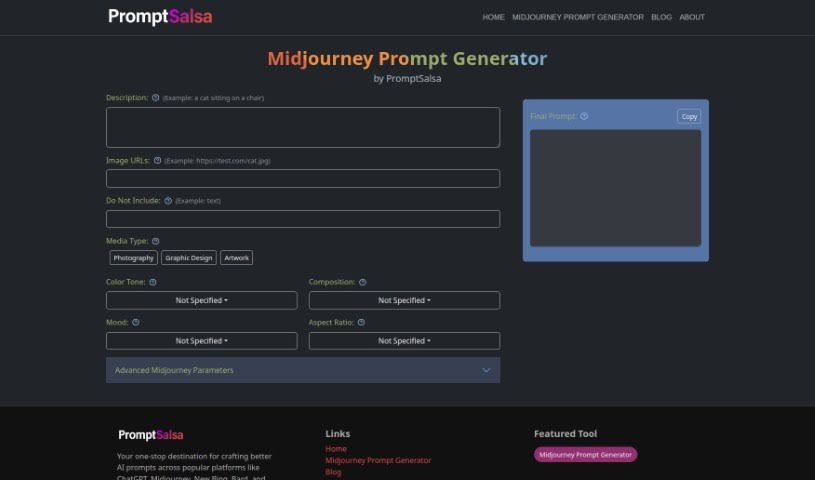
The Midjourney Prompt Generator from Promptsalsa is a tool designed to really boost your creative process, especially if you’re into photography, graphic design, or creating all sorts of art. It gives you special settings and features to help you craft really eye-catching content. You can tweak advanced photo settings like camera details, lighting, filters, focus, exposure, aperture, lens type, shutter speed, and ISO. Plus, you can fine-tune your prompts by adjusting things like style, color, composition, mood, and aspect ratio. This tool works with popular platforms like ChatGPT, New Bing, and Bard, and you can access it online. It makes creating prompts easier with its user-friendly interface and a bunch of advanced options, including version control, a chaos parameter, and more, all to help you get the exact output you’re looking for. Essentially, Promptsalsa’s Midjourney Prompt Generator is perfect for artists, photographers, graphic designers, and anyone who wants to generate fresh, personalized prompts without a hassle.
Who Created the Promptsalsa Midjourney Prompt Generator?
Promptsalsa developed this handy tool. It first came out on June 20, 2024. The main goal behind it is to help out creatives like photographers, graphic designers, and artists who are looking for unique, custom prompts. It’s packed with features that let you customize prompts, set up detailed photo settings, and even use it with different AI platforms such as ChatGPT and Bard.
What Can You Use the Promptsalsa Midjourney Prompt Generator For?
- It really helps enhance your creative work, whether you’re into photography, graphic design, or creating art.
- It’s great for sparking new ideas by offering unique settings and features you might not have thought of.
- You can generate captivating content by simply setting your specific preferences and customizing your prompts.
- It lets you dive deep into advanced photo settings, letting you control things like the camera, lighting, filters, focus, film type, exposure, aperture, lens, shutter speed, and ISO.
- You can really refine your output using advanced Midjourney parameters like version, quality, style, chaos, seed, repeat, stop, and stylize.
- It supports various media subtypes and lets you choose different aspect ratios.
- It’s a fantastic aid for creating dynamic prompts and giving your creative projects a real boost.
- You can also adjust viewing parameters to create content that truly stands out.
- It offers a lot of control over what you create, all through an easy-to-use interface with plenty of dropdown options.
- It helps photographers, designers, and artists come up with unique concepts, making it effortless to produce captivating content.
- You can adjust the Quality and Style settings.
- It includes parameters for Seed, Repeat, Stop, and Stylize.
- You can also make composite mood adjustments.
- It provides version control for Midjourney parameters.
- It offers a Chaos Parameter to add variety.
- It’s designed to boost your creative ventures.
- It supports different aspect ratios.
- It helps refine standard prompts.
- It’s great for creating distinctive content.
- It supports viewing parameters.
Who Should Use the Promptsalsa Midjourney Prompt Generator?
- Photographers
- Graphic designers
- Artists
How Do You Use the Promptsalsa Midjourney Prompt Generator?
Here’s a simple guide to using Promptsalsa’s Midjourney Prompt Generator:
- First, access the tool. You can find it on platforms like ChatGPT, New Bing, Bard, or other websites.
- Next, start customizing your prompts. You can adjust settings for color tone, composition, mood, and aspect ratio to get just the look you want.
- Then, dive into the advanced photo settings. Here you can specify details like the camera, lighting, filters, focus, film type, exposure, aperture, lens, shutter speed, and ISO.
- After that, use the Midjourney parameters like style, chaos, seed, repeat, stop, and stylize to really fine-tune your results.
- You can also input image URLs along with descriptive text to generate truly unique creative prompts.
- Take advantage of the tool’s user-friendly interface, which features helpful dropdown menus to make things easier.
- Generate captivating content by using the tool’s features, which are great for photographers, graphic designers, and artists.
- You’ll also appreciate the tool’s diverse applications, as it supports different media types and subtypes.
- And the best part? You can use this tool for free, so it won’t cost you anything to boost your creativity!
By following these steps, you’ll be able to make the most of Promptsalsa’s Midjourney Prompt Generator for all your creative projects.