What is Prompts Royale?
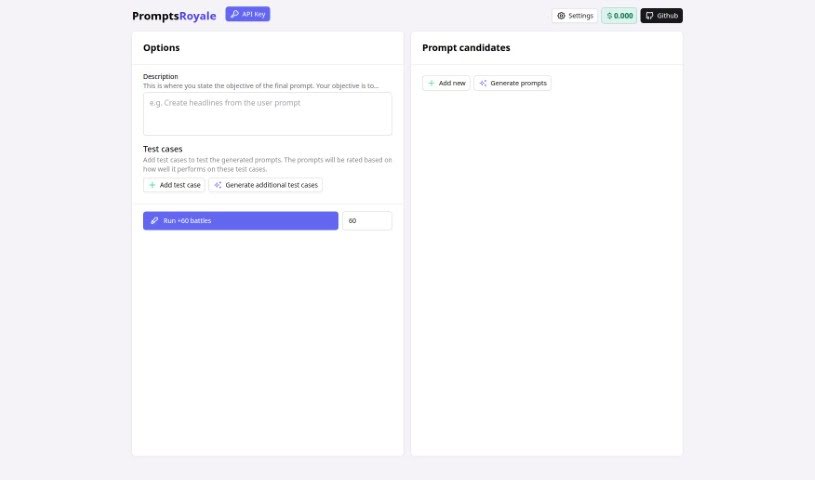
Prompts Royale is a smart AI tool built specifically for creating and ranking prompts for GPT (Generative Pre-trained Transformer) tasks. It is a helpful assistant that lets you set clear goals for the prompts you want to create. You can also add specific test cases to see how well those prompts perform against your criteria. The tool then ranks them, making it much easier to automate the process of generating great prompts for all sorts of text-based tasks. Prompts Royale offers some neat features, like letting you define objectives, add test cases, generate more prompts, and even a ‘battles’ feature, though the website doesn’t go into much detail about that last one. If you’re a developer, you can easily plug Prompts Royale into your projects using an API key. Plus, it’s open-source and available on Github, which is pretty cool.
Who created Prompts Royale?
Prompts Royale, the AI tool designed to help generate and rank GPT prompts, was created by an individual whose identity isn’t publicly shared. It first launched on July 13, 2023. As an open-source resource, it’s all about making prompt generation for text tasks using GPT technology more automated and accessible.
What is Prompts Royale used for?
Prompts Royale is incredibly useful for a variety of tasks related to GPT and text generation. Here’s a breakdown of what you can do with it:
- Open-Source Tool Usage: You can freely use and contribute to this open-source project.
- Automated Prompt Generation for GPT: It’s designed to automatically create prompts for GPT models.
- Enhancing Project Integrability: It’s built to be easily integrated into your existing projects.
- Facilitating Prompt Optimization: The tool helps you make your prompts better and more effective.
- Promoting GPT Usage: It encourages and supports the use of GPT technology.
- Aiding in Text Generation: It assists you in creating various types of text.
- Generating and Ranking Prompts: You can create new prompts and then rank them based on quality.
- Assessing Prompt Quality: It helps you evaluate how good your prompts are.
- Aligning with User-Set Objectives: Prompts are generated to meet the specific goals you define.
- Evaluating Prompt Performance: It measures how well prompts perform against your custom test cases.
- Generating New Prompt Candidates: You can create multiple new prompt options.
- Objective-Setting for Prompt Generation: You get to decide what the final prompt should achieve.
- Test Case Provision for Prompt Evaluation: You can supply specific scenarios to test prompts.
- Ranking Prompts Based on Performance: The tool sorts prompts by how well they perform.
- Generating Additional Test Cases: You can create more tests if needed.
- Creating New Prompt Candidates: It helps you brainstorm more prompt ideas.
- Automating Prompt Generation for GPT: This is a core function, making prompt creation easier.
- Assisting in Text Generation Tasks: It’s a helpful tool for anyone generating text.
- Objective-Setting: A key feature is defining your prompt’s purpose.
- Test Cases Provision: You can provide specific examples for testing.
- Ranking the Prompts Based on Performance: It helps you sort the best prompts.
- Generation of Additional Test Cases: Create more tests to refine your prompts.
- Integration of API Key: Easily connect it to your own applications.
- Automated Prompt Generation: Streamlines the process of creating prompts.
- Effective Prompt Creation: Helps you craft better, more useful prompts.
- Automatic Prompt Generation for GPT Text Tasks: Specifically designed for GPT text tasks.
- Ranking Prompts Based on User-Defined Test Cases: Performance is measured against your specific tests.
- Objective-Setting for Final Prompt Generation: You set the goals for the prompts.
- Integration into Projects Through API Key: Connect it seamlessly with your work.
- Assessing Prompt Quality Through Test Cases: Use tests to judge prompt effectiveness.
- Ability to Create Additional Test Cases: Generate more tests for thorough evaluation.
- Facilitating Text Generation Tasks: Makes text creation smoother.
- Facilitates Prompt Optimization: Helps you improve your prompts.
- Text Generation Tasks: Supports all your text creation needs.
- Enhances Project Integrability: Makes it easy to add to your projects.
- Assesses Prompt Quality: Helps you understand prompt effectiveness.
- Implementing Test Cases: You can set up specific tests.
- Aids in Text Generation: Provides support for creating text.
- Define Objectives for Prompts: Set clear goals for your prompts.
- Adding Additional Test Cases: You can add more tests as needed.
Who is Prompts Royale for?
Prompts Royale is a valuable tool for anyone working with or interested in AI and text generation. This includes:
- Text generation professionals: Those who rely on creating high-quality text.
- AI developers: People building and working with artificial intelligence.
- Content creators: Individuals who produce written content for various platforms.
- Writers: Authors, copywriters, and anyone who writes professionally.
- AI enthusiasts: People passionate about artificial intelligence and its applications.
- Developers: Programmers looking to integrate AI capabilities.
- Data scientists: Professionals who work with data and AI models.
- Academics: Researchers and students in fields related to AI and language.
- Developers of GPT prompt generation systems: Those specifically building tools for prompt engineering.
How to use Prompts Royale?
Using Prompts Royale is pretty straightforward. Just follow these steps:
- Set Your Objective: First, decide what you want the final prompt to achieve. You’ll input this goal into the tool.
- Add Test Cases: Next, create specific test cases. These are like mini-tests that the tool will use to evaluate how well the prompts it generates actually perform against your objective.
- Integrate with API Key: To use Prompts Royale in your own projects, you’ll need an API key. The website doesn’t detail exactly how to get this key, but it’s essential for integration.
- Explore Features: Take some time to check out the tool’s features. You can set objectives, add test cases, generate more test cases, and use the ‘battles’ feature for evaluating prompts.
- Visit the Github Repository: For more in-depth information, code, or to contribute, you can access Prompts Royale’s Github repository.
By following these steps, you can effectively use Prompts Royale to automate prompt generation, rank them based on performance, and generally improve your text generation tasks by setting clear objectives and using custom test cases.