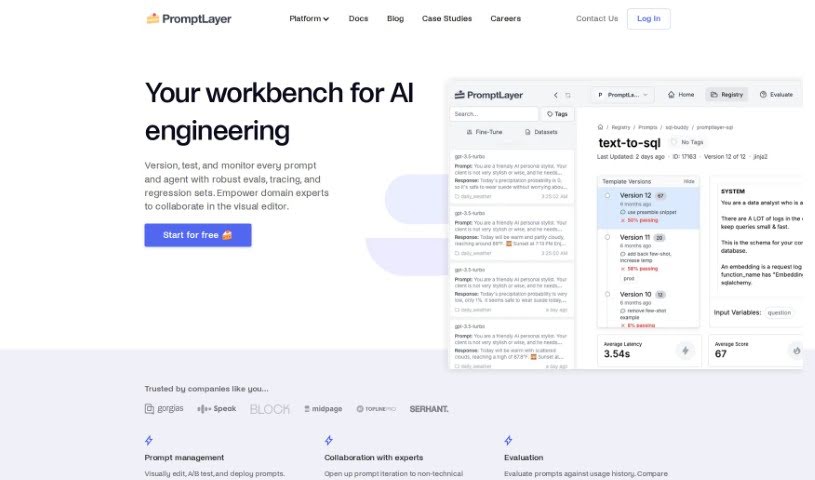
What is PromptLayer?
PromptLayer is a smart AI tool built to help you with all sorts of tasks, whether you’re creating content, writing copy, designing, or managing projects. It uses advanced algorithms and natural language processing to offer personalized, efficient solutions that really help streamline your work and boost your productivity. What’s great about PromptLayer is its easy-to-use interface, making it a fantastic option for a wide range of professionals. Data scientists, entrepreneurs, and folks in many other fields can all benefit from using it to make their tasks much smoother.
Who created PromptLayer?
PromptLayer was developed by a team passionate about using advanced algorithms and natural language processing. Their goal? To create efficient solutions for all sorts of tasks. The company really values teamwork between its product and engineering departments and takes privacy and security seriously – they’re even SOC 2 Type 2 compliant! Promptlayer offers personalized suggestions and a user-friendly interface, all designed to help people in different fields get more done.
What is PromptLayer used for?
PromptLayer helps you do a lot of things:
- Keep your prompts organized visually.
- Evaluate how well different AI models are performing.
- Log all your requests to large language models (LLMs).
- Keep an eye on your API usage, costs, and how long things take.
- Manage different versions of your prompts in a visual way.
- Test your prompts using both human feedback and AI graders.
- Run sequences of prompts (pipelines) with test inputs.
- Track analytics for your LLM applications.
- Make it easier for product, marketing, and engineering teams to work together on prompts.
- Provide tailored solutions for a variety of tasks.
- Compare different versions of your prompts side-by-side.
- Test your prompts against your past usage data.
- Save every LLM request you make for easy logging.
- Organize, refine, and deploy your prompt versions visually.
- Understand exactly how your LLM application is being used.
- Visually manage prompts and assess model performance.
- Log LLM requests and easily search through your usage history.
- Collaborate with your team on prompt engineering.
- Visually create, edit, and deploy prompts.
- Test prompts against your usage history and compare different models.
- Save all LLM requests and search them using session details.
- Clean up your project by keeping all prompts in one central place.
- Allow product, marketing, and content teams to directly edit prompts.
Who is PromptLayer for?
- Data Scientists
- Entrepreneurs
- Professionals in any field
How to use PromptLayer?
Here’s a straightforward guide to using Promptlayer effectively:
- Prompt Versioning:
- You can easily create, edit, and deploy prompts visually.
- Compare how different prompts perform in terms of usage and latency to help you optimize them.
- Evaluation:
- Test your prompts against your past usage data and set up tests to check for regressions.
- Use one-off batch runs for efficient evaluations.
- Logging:
- Save all your LLM requests so you can refer back to them later.
- Search through these requests using session metadata or organize them with tags.
- Monitor Usage:
- Log LLM requests to get a clear picture of how users are interacting with your application.
- Keep track of your API usage, costs, and latency to find ways to improve.
- Version Prompts:
- Organize, iterate on, and deploy different prompt versions visually.
- You can update prompts without needing to involve the engineering team.
- Evaluate Results:
- Create new prompts in a structured way and test them using both human graders and AI graders.
- Run prompt pipelines for bulk jobs and effectively compare different AI models.
- Track Analytics:
- Efficiently understand your LLM application’s usage, latency, and other statistics.
- Identify any users who might be negatively impacting your services.
Promptlayer is a really flexible tool that makes prompt creation, evaluation, and monitoring processes much smoother, leading to better performance and efficiency. By following these steps, you can use its features to boost your productivity and make better decisions.