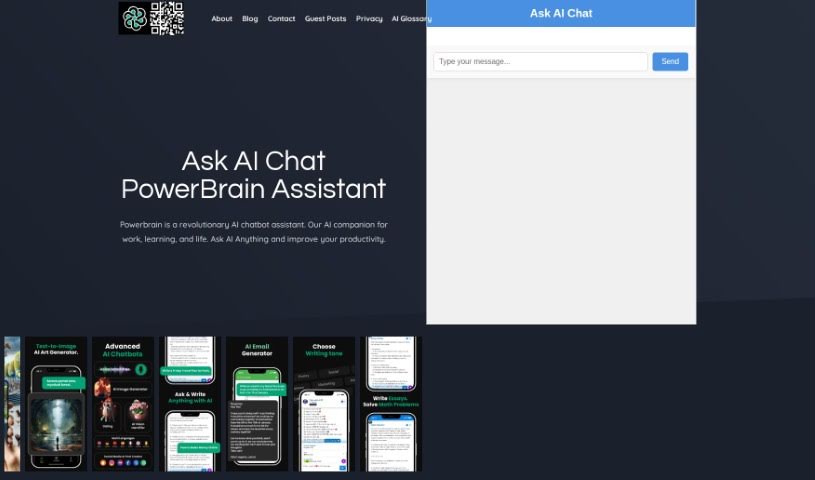
What is Powerbrain AI?
PowerBrain AI is a really neat chat app, available for both iOS and Android. It’s built using advanced natural language processing, which basically means it’s designed to understand and respond to you like a person would. It uses the ChatGPT and GPT-4 API, acting like a virtual assistant. You can chat with it naturally, get quick answers, and it can even help automate tasks. Think of it for things like getting ideas for writing, brainstorming business concepts, or even managing your social media. Plus, PowerBrain AI Chat has this cool AI Vision feature that can recognize images, making it super versatile. It’s all about making your daily life and creative projects easier and more productive.
Dr. Alex Rutherford started PowerBrain AI with a big goal: to change how people and AI interact. He wants to give everyone, individuals and businesses alike, the chance to tap into the incredible potential of AI. Their mission is pretty straightforward: to remove obstacles, push what’s possible, and boost productivity, creativity, and accessibility in everything we do, all thanks to smart AI solutions.
Who created Powerbrain AI?
Dr. Alex Rutherford, a well-respected AI expert, founded PowerBrain AI. He’s really focused on making human-AI interaction better. The company is a leader in the latest Artificial Intelligence and Machine Learning, creating innovative tools that let people and businesses harness the vast possibilities of AI technology.
What is Powerbrain AI used for?
PowerBrain AI can help with a surprising number of things:
- Task Automation: It can handle repetitive tasks for you, making your workflow smoother and more efficient. It’s also great at managing several tasks at once.
- Content Creation: Need help with copywriting? PowerBrain AI can assist with writing blog posts, stories, and even creative prompts.
- Business Support: It’s a fantastic tool for generating new business ideas and can even help with managing your social media presence.
- Communication: It can automate responses to emails, messages, and other digital communications, saving you time.
- User Experience: Features like chat history and syncing across devices make it easier to pick up where you left off, enhancing how you interact with the AI.
- Education: It can act as a virtual tutor, offering personalized learning experiences.
- Culinary Help: Think of it as your kitchen assistant – it can chat with you, help you find recipes, and give you food recommendations.
- Customization: You can tailor the AI chat experience to feel personal, almost like talking to a friend.
- Business Growth: It can help businesses understand the market better through tailored AI conversations.
- Web Search: It’s revolutionizing how we search online by offering a conversational approach.
- General Assistance: It helps answer questions, schedule appointments, and assist with research.
- Cost Savings: By automating routine tasks, it can help reduce operational costs.
- AI Chatbot Development: You can even craft your own AI chatbot using PowerBrain.
- Multilingual Support: It can help you create, write, and generate content in various languages.
- Business Brilliance: It helps build strong business capabilities through smart AI conversations.
Who is Powerbrain AI for?
PowerBrain AI is a great tool for:
- Marketers
- Entrepreneurs
- Researchers
- Copywriters
- Business professionals
- Social media managers
- Content creators
- Language Learners
How to use Powerbrain AI?
Getting the most out of PowerBrain AI is pretty straightforward. Just follow these steps:
- Start with the Free Plan: You can begin using PowerBrain’s free plan right away. It gives you access to basic conversational AI features, like writing prompts and AI writer communication, without needing a subscription.
- Check Out the Features: PowerBrain AI Chat has a really user-friendly interface. It’s easy to navigate and use all the generative AI capabilities. You can even switch between different AI models and ask questions without any hassle.
- Boost Your Productivity: For the best experience, try features like Genius Mode. This unlocks the chatbot’s full potential, allowing it to have personalized conversations that actually evolve as you chat more, which really helps boost productivity and engagement.
- Make It Your Own: You can customize your AI chat conversations to fit exactly what you like. It’s designed to feel like you’re chatting with an old friend, making every interaction comfortable and familiar.
- Use AI’s Strengths: PowerBrain AI is great at understanding context and remembering past conversations. This means your interactions become more meaningful and consistent over time.
- Get Creative with AI Vision: Explore the AI Vision feature for image recognition. You can upload photos to identify items instantly, and it integrates smoothly into your workflow, offering smart suggestions and creative inspiration.
- Download the App: Make sure to download the PowerBrain AI Chat app on either iOS or Android. This way, you’ll have a sophisticated virtual assistant ready to go, capable of natural language processing, automating tasks, and handling multiple things at once.
- Need Help? Contact Support: If you have any questions or want to share feedback, you can reach out to them via email at [email protected].
By following these simple steps, you’ll be able to effectively use PowerBrain AI’s features to boost your productivity, spark your creativity, and just have a better overall experience.