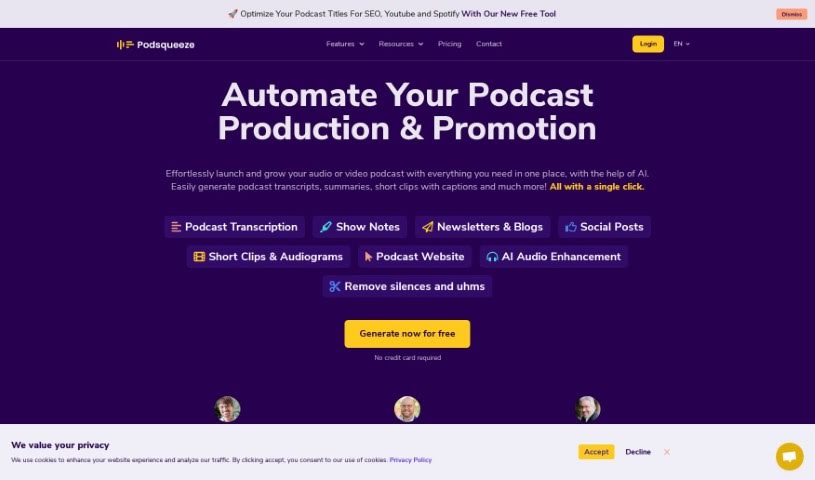
Screenshot of Podsqueeze

Podsqueeze

Discover what Podsqueeze is and how to use it effectively in 2025. We'll explore its features and see how it stacks up against other podcasting tools.

Screenshot

What is Podsqueeze?

Podsqueeze is a smart tool that uses AI to make creating content for your podcast much simpler. You can either pick an episode from your podcast’s RSS feed or upload an audio file directly. Then, with just a single click, the AI gets to work, generating all sorts of useful content. Think show notes, timestamps, newsletters, tweets, social media posts, and even catchy titles. The goal here is to make your podcast easier for people to find and navigate, while also keeping your listeners in the loop and excited about new episodes. On top of that, Podsqueeze offers some really neat extras to boost your podcasting game. You can get personalized AI voices, create video clips or audiograms, generate unlimited quote images, upload files, and even set up your own custom podcast landing pages. It’s all about making your podcast experience better.

Who created Podsqueeze?

Podsqueeze was actually created by Justin Jackson, who’s also the co-founder of Transistor.fm. Justin’s well-known for his innovative contributions to the podcasting world. This tool, Podsqueeze, offers AI-driven solutions specifically for managing and improving podcasts. It helps with things like making short clips, boosting audio quality, and efficiently generating content. Many podcasting pros, from solo creators to agencies and podcast managers, use Podsqueeze to speed up how they create their podcast content.

What is Podsqueeze used for?

Podsqueeze is incredibly versatile for podcast content creation. Here’s a breakdown of what you can do with it:

  • Social Media: Craft engaging tweets and create social media posts.
  • Newsletters: Generate newsletters to keep your audience informed.
  • Show Notes & Timestamps: Produce detailed show notes and helpful timestamps.
  • Titles: Create catchy titles that grab attention.
  • Discoverability: Make your content more searchable and easy to navigate.
  • Listener Engagement: Keep listeners updated on new episodes through newsletters.
  • Transcription: Automatically transcribe your podcast episodes.
  • Content Management: Effortlessly manage content creation for podcasters, content creators, video creators, podcast managers, producers, and studios.
  • Organization: Create podcast folders to keep your episodes neatly organized.
  • Sharing: Share content pages with clients and team members.
  • Voice Customization: Tune the AI voice for each show you manage.
  • Content Planning: Plan future episodes using an advanced podcast topics finder.
  • AI Prompts: Use AI prompts to ensure consistent voices across all your shows.
  • All-in-One Generation: Generate blog posts, newsletters, social media posts, and clips for your podcasts all using AI.

Essentially, it streamlines the entire process of getting your podcast content out there in various formats.

Who is Podsqueeze for?

Podsqueeze is a fantastic tool for anyone involved in podcasting or content creation. This includes:

  • Podcasters
  • Content creators
  • Video creators
  • Podcast Managers
  • Producers
  • Producers & Studios

If you’re looking to save time and improve your podcast’s reach, Podsqueeze is definitely worth checking out.

How to use Podsqueeze?

Using Podsqueeze is pretty straightforward. Here’s a simple step-by-step guide:

  1. Get Your Episode In: Start by selecting an episode from your RSS feed or uploading an audio file directly to the Podsqueeze platform.
  2. One-Click Content Creation: Once your episode is loaded, the AI will generate a variety of content elements with just one click. This includes show notes, timestamps, newsletters, tweets, blog/social posts, and catchy titles.
  3. Boost Searchability: Use the generated show notes and timestamps to make your podcast content more searchable and easier for your audience to navigate.
  4. Keep Listeners Informed: Leverage the newsletter feature to keep your audience updated on new episodes and other relevant information.
  5. Enhance Audio Quality: Take advantage of the AI-powered editing tools. You can remove silences, cut out filler words like ‘ums,’ and generally improve the overall sound quality of your recordings.
  6. Choose Your Plan: Explore the different subscription plans Podsqueeze offers. They have options like Starter, Pro, Agency Lite, Agency Plus, and Agency Scale, so you can pick what best fits your podcasting needs.
  7. Consider the Affiliate Program: If you’re looking to earn some extra income, you might want to join their affiliate program. You can earn a 25% commission for 15 months on sales and subscription renewals that come through your referral.

By following these steps, you can really streamline and improve how you manage and create content for your podcast using Podsqueeze’s AI tools.

Related AI Tools

Discover more tools in similar categories that might interest you

Stay Updated with AI Tools

Get weekly updates on the latest AI tools, trends, and insights delivered to your inbox

Join 25,000+ AI enthusiasts. No spam, unsubscribe anytime.