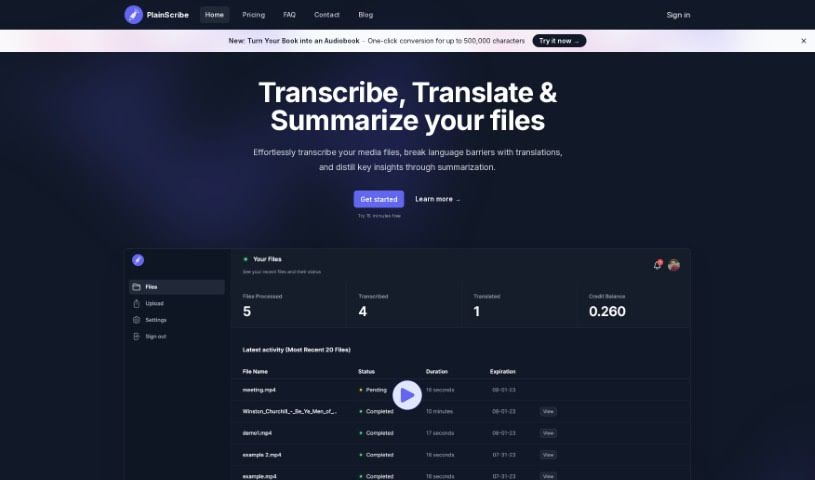
Screenshot of PlainScribe

PlainScribe

Discover what PlainScribe is and how to use it effectively in 2025. We'll walk through its features, compare it to other transcription tools, and show you exactly how to get started.

Screenshot

What is PlainScribe?

PlainScribe is a really versatile platform that can handle a few key tasks for your audio and video files: transcription, translation, and summarization. It’s designed to be user-friendly, letting you upload files up to 100MB. If you need translations, it primarily converts them into English from over 50 different languages. Once you upload your media, the system takes care of all the processing. For your peace of mind and data security, files are automatically deleted after 7 days. Need to get the gist of a long recording quickly? The summarization feature breaks down your content into 15-minute segments, giving you the key insights without having to listen to everything. Plus, it operates on a Pay-As-You-Go model, which is a great way to keep costs down. You can also download your transcripts in handy formats like CSV or SRT/VTT, perfect for creating subtitles.

Who created PlainScribe?

While the specific individuals or team behind Plainscribe aren’t detailed in the information I have, what’s clear is their focus on providing a user-friendly experience for transcription, translation, and summarization of audio and video content. They’ve set up the platform to handle files up to 100MB and prioritize your data privacy by automatically deleting everything after 7 days. The Pay-As-You-Go pricing model is a smart choice, meaning you only pay for what you actually use, making it quite cost-effective. Plainscribe also offers translations into English from more than 50 languages, and they provide summarized versions of your content, which is super helpful for getting the main points quickly.

What is PlainScribe used for?

Here’s a quick rundown of what you can do with PlainScribe:

  • Transcribe your audio and video files, even if they’re up to 100MB.
  • Translate your transcripts into English from over 50 languages.
  • Summarize content to quickly get the main ideas, with summaries provided for every 15-minute segment.
  • Enjoy flexible payment with their Pay-As-You-Go model.
  • Feel secure knowing your data is confidential, as files are deleted after 7 days.

How to use PlainScribe?

Using Plainscribe is pretty straightforward. Just follow these simple steps:

  1. Upload Your Files: Start by uploading your audio or video files to the Plainscribe platform. They can be up to 100MB in size.
  2. Pick Your Services: Decide what you need – transcription, translation, or summarization – and select the relevant services.
  3. Let it Process: The system will handle the heavy lifting. You’ll get an email notification once everything is processed.
  4. Translate if Needed: If you need translations, you can convert your transcripts into English from over 50 languages, making them much easier to understand.
  5. Summarize for Insights: Use the handy summarization tool. You’ll get a summary for every 15-minute segment of your content, which is great for quickly grasping the key points.
  6. Pay as You Go: Take advantage of the Pay-As-You-Go payment model. You’ll only pay for the actual hours of audio or video you transcribe or translate.
  7. Download Your Results: Once processing is done, you can download your transcripts. Choose between CSV format or SRT/VTT files, which are ideal for creating subtitles.

PlainScribe really prioritizes your data privacy, automatically deleting files after 7 days to ensure everything stays confidential. It’s a user-friendly platform that makes transcribing, translating, and summarizing your multimedia files both efficient and cost-effective.

Related AI Tools

Discover more tools in similar categories that might interest you

Stay Updated with AI Tools

Get weekly updates on the latest AI tools, trends, and insights delivered to your inbox

Join 25,000+ AI enthusiasts. No spam, unsubscribe anytime.