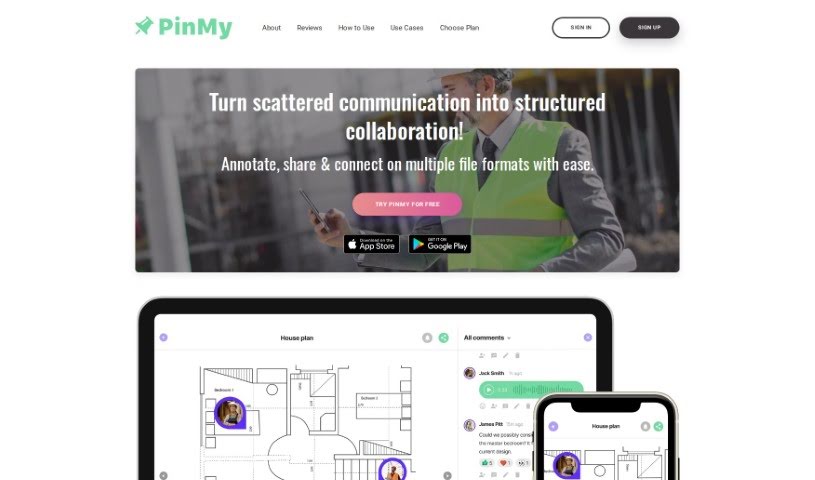
Screenshot of PinMy

PinMy

Discover what PinMy is and how to use it effectively in 2025. We'll explore its features and see how it stacks up against other photo editors.

Screenshot

What is PinMy?

PinMy is a handy mobile app built to make working together on visual stuff much easier. It is a way to chat about images using your voice or text, right on the picture itself. This makes it super clear and organized for all sorts of things – whether it’s for work projects, school assignments, or even just personal notes. You can get PinMy on your iPhone or Android phone, or use it right in your web browser, so it’s easy for everyone to access. It’s got features like making changes as you go, turning your voice notes into text, and generally making communication smoother. It’s a great tool for designers, people who create content, photographers, teachers, real estate agents, and lots of other professionals.

PinMy offers a free version with the essentials, and if you need more, there’s a premium subscription for extra capabilities.

Here’s what makes PinMy stand out:

  1. Pinpoint Accuracy: You can give really specific feedback by pointing exactly where you mean on an image.
  2. No More Guessing: Comments are directly attached to parts of the image, which really helps avoid confusion.
  3. Collaboration You Can Remember: It keeps a history of all your conversations about an image, so you won’t lose track of any important details.
  4. Voice to Text: Just speak your feedback, and the app turns it into text for quick notes without any typing.
  5. Everything in One Place: All your comments for a specific image are stored together, making collaboration and reviews much simpler.

Who created PinMy?

PinMy App was developed by PinMy.Co. While the specific founder isn’t mentioned, the company’s main goal is to improve how we communicate and collaborate on visual content. Their app lets you add voice and text comments directly onto images, which really speeds up the feedback process for all sorts of professional and personal uses. Pinmy.Co provides both a free plan and a premium subscription for those who need more advanced features, making it accessible and affordable.

What is PinMy used for?

PinMy is incredibly versatile and can be used for a wide range of tasks:

  • Sales & Marketing: Perfect for coordinating campaigns and getting team feedback.
  • Team Collaboration: Enhances how sales and marketing teams work together on visuals.
  • Education: Transforms how artistic feedback is given and received in educational settings.
  • Real Estate: Improves how agents and buyers interact with property images.
  • Quick Feedback: Use voice transcription for fast, on-the-spot comments.
  • Precise Feedback: Pinpoint exact areas for feedback, leaving no room for misinterpretation.
  • Streamlined Communication: Makes sharing and discussing images much clearer.
  • Real-time Updates: Implement changes as they happen with real-time revisions.
  • Easy Sharing: Share your pinned images effortlessly with anyone.
  • Organized Storage: Keep all image-related comments neatly consolidated.
  • Creative Work: Great for photo retouching, photography courses, and visual concept development.
  • Software Development: Streamlines collaboration for designers and developers.
  • Idea Visualization: Clearly show your ideas and concepts visually.
  • Photography Learning: Provides enhanced feedback for photographers honing their skills.
  • Student Feedback: Offers precise feedback for students in educational contexts.
  • Real Estate Insights: Gives immediate property details for agents.
  • Campaign Coordination: Acts as a central hub for sales and marketing campaigns.
  • Voice Notes: Quickly capture thoughts with voice transcription.
  • Laser-Sharp Feedback: Deliver feedback with incredible precision.
  • Clarity in Communication: Ensures messages about images are crystal clear.
  • Broad Collaboration: Share seamlessly to involve everyone.
  • Consolidated Feedback: Keep all feedback organized in one spot.

Who is PinMy for?

PinMy is a valuable tool for a wide variety of professionals and individuals:

  • Designers
  • Content creators
  • Photographers
  • Educators
  • Real Estate Agents
  • Mentors
  • Software designers
  • Developers
  • Project managers
  • Marketing Directors
  • Sales teams
  • Art Students
  • Artists
  • Photo Retouchers
  • Sales & Marketing Professionals

How to use PinMy?

Using PinMy App is straightforward. Just follow these simple steps to get the most out of it:

  1. Get Started: First, you’ll need to sign up for an account or log in if you’re already a user.
  2. Add Your Images: Begin by uploading the images you want to work on or get feedback for.
  3. Annotate Away: Use the app’s tools to add comments or voice notes directly onto specific parts of your images. This is how you give really precise feedback.
  4. Team Up in Real Time: Invite your colleagues or anyone you want to collaborate with to view and comment on the images. They can add their thoughts easily.
  5. Put Feedback into Action: Make any necessary revisions right away based on the comments you receive. This keeps your visuals up-to-date.
  6. Share with Ease: Send out your annotated images easily through email, text, Slack, or other platforms to keep everyone informed.
  7. Keep Comments Organized: All feedback for a single image stays together in one place, so you won’t have scattered comments across different apps.
  8. Try Free or Go Premium: PinMy offers a free plan that includes basic features like storing 6 files, unlimited pins, and comments. If you need more, consider upgrading to the premium plan for things like more storage space and longer voice notes.
  9. Need Help? Contact Us: If you have any questions or need a hand, you can reach out to PinMy directly via phone or email, which you’ll find on their website.

By following these steps, you’ll be able to use PinMy effectively for all your visual collaboration, feedback, and communication needs, whether for work or personal projects.

Related AI Tools

Discover more tools in similar categories that might interest you

123RF AI Image Generator

Creative Image Generation
Learn More

Stay Updated with AI Tools

Get weekly updates on the latest AI tools, trends, and insights delivered to your inbox

Join 25,000+ AI enthusiasts. No spam, unsubscribe anytime.