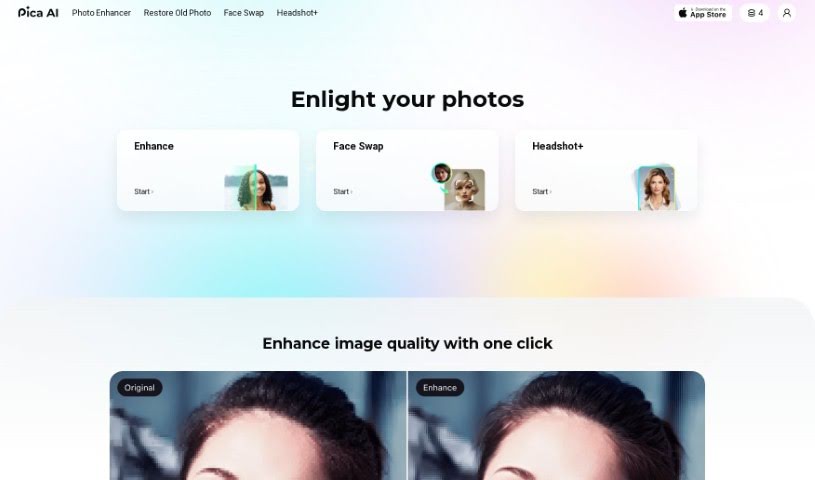
Screenshot of Pica AI

Pica AI

Discover what Pica AI is and learn how to use it effectively in 2025. We'll explore its features and see how it stacks up against other AI headshot generators.

Screenshot

What is Pica AI?

Pica AI offers a fantastic Anime Generator that lets you easily turn your creative anime ideas into amazing digital art. It’s a great tool for artists, anime fans, or anyone curious about anime, offering a range of styles from classic Japanese anime to modern 3D cartoons. Plus, Pica AI’s image enhancer is really good at boosting image quality. This makes it perfect for touching up old family photos, landscapes, portraits, or even those grainy, low-resolution pictures. You can conveniently use Pica AI’s online photo enhancer or grab the app to improve your images with just one click. You’ll see automatic, noticeable improvements in quality and detail.

Basically, Pica AI is a super versatile tool that handles both artistic anime creation and practical image enhancement needs.

Who created Pica AI?

David Boehme is the creator behind Pica AI. The company is all about using AI photo enhancement technology to make images better for all sorts of things, like LinkedIn profiles, resumes, and general online presence.

What is Pica AI used for?

  • Quickly create eye-catching anime images.
  • Transform your own photos into anime characters.
  • Fine-tune your anime characters with advanced settings.
  • Experiment with different anime styles and aesthetics.
  • Easily craft detailed and expressive anime characters and scenes.
  • Generate a variety of anime styles, including traditional Japanese anime, 3D cartoons, and even realistic anime looks.
  • Use simple text prompts to create personalized anime art.
  • Make fun meme videos with face swaps for social media.
  • Turn your photos into anime versions to see yourself as an anime character.
  • Produce anime-style art for both personal enjoyment and commercial projects.
  • Generate unique anime characters or convert existing photos into different anime styles.
  • Create visually appealing anime art rapidly, even if you’re not an expert artist.
  • Customize AI-generated anime characters by specifying details like hairstyle, eye color, clothing, and pose.
  • Choose from a selection of anime styles to match your vision.
  • Use text prompts to guide the creation of personalized anime art.
  • Craft detailed and expressive anime characters and scenes.
  • Connect with a community of other creators who love anime art.
  • Easily explore the world of anime art with flexibility.
  • Use your generated anime art for both personal and commercial purposes.
  • Turn personal photos into anime characters.
  • Create memes with face swaps.
  • Share meme videos on social media.
  • Generate visually appealing anime images rapidly.
  • Customize anime characters by specifying details like hairstyle, eye color, clothing, pose, and more.
  • Convert photos into various anime styles.
  • Use text prompts for personalized anime art.
  • Use the generated anime art for personal and commercial purposes.
  • Explore various anime styles to spark your creativity.
  • Analyze input prompts or images to produce anime-style art.
  • Generate visually appealing anime images rapidly.
  • Customize anime characters by specifying hairstyle, eye color, clothing, and pose.
  • Choose from a selection of anime styles for personalized creations.
  • Create detailed and expressive anime characters and scenes.
  • Use anime art for both personal and commercial purposes.
  • Spark creativity by exploring various styles and aesthetics.
  • Generate anime art without needing advanced drawing skills.
  • Join a community of creators in the world of anime art.
  • Make anime art personal with advanced settings.

Who is Pica AI for?

  • Digital artists
  • Illustrators
  • Animators
  • Graphic designers
  • Photographers
  • Photo Editors
  • Content creators
  • Social media managers
  • Game developers
  • Art educators

How to use Pica AI?

Want to enhance your images with Pica AI? It’s pretty straightforward:

  1. Pick How You’ll Enhance: You can use Pica AI’s online photo enhancer right on their website, or you can download the app for a more dedicated experience.
  2. Upload Your Image: Once you’re on the website or in the app, just upload the image you want to improve. Click the upload button and select your file.
  3. Start the Enhancement: After your image is uploaded, hit the enhancement button. Pica AI’s technology will automatically get to work, boosting the image quality and bringing out more details.
  4. Free Daily Usage: Good news – Pica AI gives you free uses every day for their online photo enhancer. This means you can enhance images without worrying about extra costs.
  5. Improve Those Low-Res Photos: Pica AI’s tech is really effective for enhancing photos that aren’t very high quality. Just upload your low-res image, and the AI will work its magic to improve its quality and details, making a real difference.
  6. Enjoy Your Better Images: Once the enhancement is done, you can download the improved image. It’ll have much better quality and clarity, perfect for sharing on social media or just for your personal use.

By following these simple steps, you can easily use Pica AI’s image enhancement features to make your photos look their best for all sorts of uses.

Related AI Tools

Discover more tools in similar categories that might interest you

123RF AI Image Generator

Creative Image Generation
Learn More

Stay Updated with AI Tools

Get weekly updates on the latest AI tools, trends, and insights delivered to your inbox

Join 25,000+ AI enthusiasts. No spam, unsubscribe anytime.