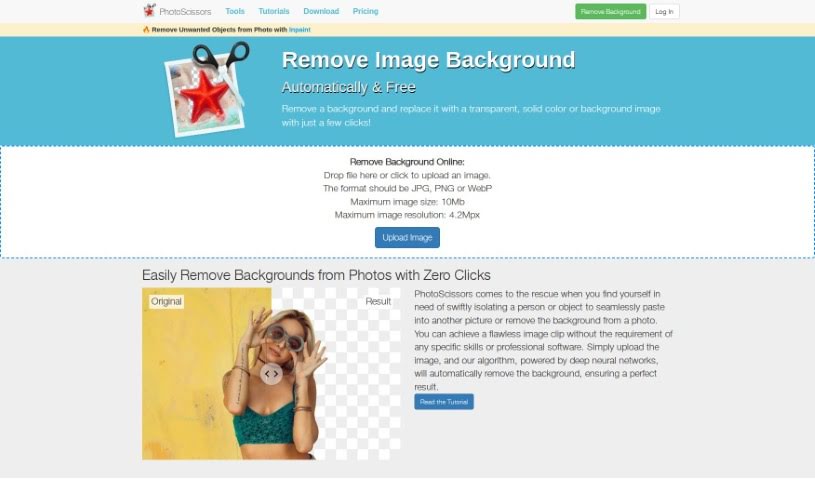
Screenshot of PhotoScissors

PhotoScissors

Discover PhotoScissors in 2025! Learn what this AI background remover does, how to use its features effectively, and how it stacks up against other background removal tools.

Screenshot

What is PhotoScissors?

PhotoScissors is a smart, AI-powered tool that’s really good at removing or swapping out backgrounds in your photos. It is your go-to for cleaning up images, whether you need to get rid of unwanted stuff, get product photos ready for online shops, or even spruce up your profile pictures for job hunting or dating sites. It uses deep neural networks to automatically detect and remove backgrounds, and you can easily replace them with a transparent background, a solid color, or even another picture. What’s particularly neat is its ability to handle tricky semi-transparent areas, like wisps of hair, making those tasks much simpler. Plus, there’s a handy ‘group by color’ feature that lets you quickly remove backgrounds by grouping similar colors, which is way easier than fiddling with traditional graphic editors.

You don’t need to be a Photoshop wizard to use this tool; it’s designed for anyone with basic editing skills. The interface is super user-friendly, so you can jump right in and get started quickly. This makes it perfect for all sorts of things: uploading product images, putting together collages, touching up photos for work or personal use, and generally making your images look better for online platforms like eBay, Amazon, and Etsy. While it works with common formats like PNG and JPG, keep in mind there are limits: uploads can be up to 10Mb, and resolutions up to 4.2Mpx. Still, its strength in managing complex semi-transparency, letting you easily separate foregrounds, swap backgrounds, create collages, and expertly handle hair and transparent objects, really sets it apart.

Who created PhotoScissors?

An unnamed founder developed PhotoScissors, introducing it to the public on July 18, 2023. The company behind it focuses on creating an AI-powered Background Remover that makes the process of removing backgrounds precise and simple. Their goal was to build a tool that’s easy for anyone with basic image editing skills to use, delivering results that rival more specialized software.

What is PhotoScissors used for?

  • You can create backgrounds that are either transparent or a specific color.
  • It’s great for listings on eBay, Etsy, and Amazon.
  • A special transparent marker tool is included.
  • It allows for very precise cutting out of objects.
  • You can use it to make eye-catching collages.
  • You’re able to set any color you like for the background.
  • It handles transparent objects with ease.
  • It helps remove backgrounds for various online platforms.
  • It’s useful for touching up photos for professional use.
  • It makes it easy to swap out dull backgrounds for more appealing ones.

Who is PhotoScissors for?

  • People who sell items online
  • Graphic designers
  • Social media managers
  • Content creators
  • Photographers
  • Web designers

How to use PhotoScissors?

Here’s how to get the most out of PhotoScissors:

  1. Upload Your Image: Just drag and drop your photo into the PhotoScissors interface, or click the upload button. Make sure it’s a JPG, PNG, or WebP file, and it’s no larger than 10Mb with a resolution up to 4.2Mpx.
  2. Automatic Background Removal: PhotoScissors uses advanced AI, specifically deep neural networks, to automatically remove the background. This means the process is fast and efficient, and you don’t need any special skills to do it.
  3. Replace the Background: Once the background is gone, you can easily swap it out. Choose transparency, a solid color, or even another image to fit your needs.
  4. Handle Semi-Transparency: PhotoScissors is really good at dealing with tricky semi-transparent areas, like fine details in hair. This feature saves a lot of time because it handles these elements effectively without you needing to edit pixel by pixel.
  5. ‘Group by Color’ Feature: If you prefer a different approach, this mode lets you quickly cut out the background by grouping similar colors. It really simplifies the process compared to how you’d do it in older graphic editors.
  6. Manage Transparent Objects: The tool comes with a transparent marker tool specifically for images that have transparent elements. You use this to mark areas where you want to keep both the foreground and background textures, making background changes much smoother.
  7. Common Applications: PhotoScissors is quite versatile. You can use it for uploading product images, creating collages, retouching photos, and much more, whether it’s for personal projects or professional work.
  8. User-Friendly Interface: The tool features an intuitive and easy-to-navigate interface. This makes it simple for users with just basic editing skills to achieve high-quality results without needing complex software.

Basically, PhotoScissors makes background removal much simpler. It offers helpful features like managing transparent objects, removing backgrounds by color, and handling hair details, making it a really useful tool for all sorts of editing tasks.

Related AI Tools

Discover more tools in similar categories that might interest you

123RF AI Image Generator

Creative Image Generation
Learn More

Stay Updated with AI Tools

Get weekly updates on the latest AI tools, trends, and insights delivered to your inbox

Join 25,000+ AI enthusiasts. No spam, unsubscribe anytime.