What is Photoenhanceai?
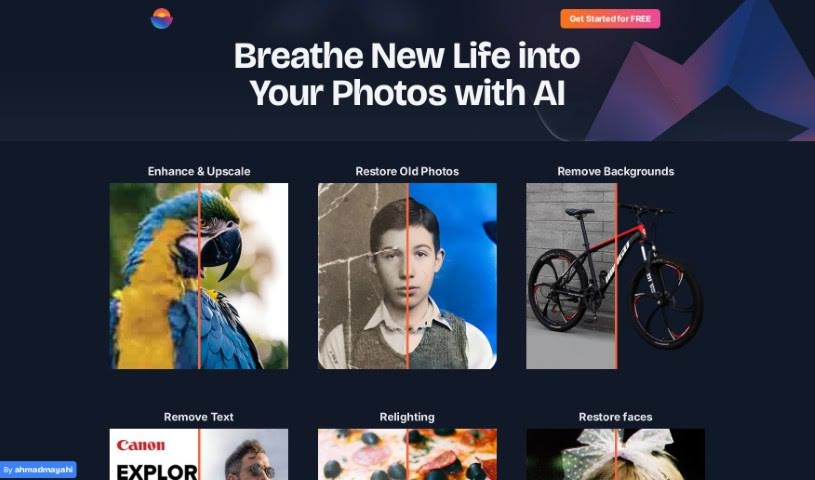
PhotoEnhanceAI is your go-to photo editing assistant. It uses really smart AI to handle a lot of the tricky, time-consuming parts of making your photos look great. What’s it good at? Pretty much everything! It can make your photos sharper, blow them up without losing quality (upscaling), bring old or damaged pictures back to life, magically remove backgrounds, and even swap them out for new ones it creates. Plus, it’s fantastic at brightening up those dark, nighttime shots and cleaning up any unwanted clutter in your images. It’s especially good with photos that have people in them, offering professional results that anyone, from beginners to seasoned pros, can achieve.
And the best part? You can try it out for free! You get a bunch of credits each month, so you can start editing right away. It’s designed to be super easy to use, helping you enhance your photos quickly and effectively.
Who created Photoenhanceai?
PhotoEnhanceAI first appeared on December 25, 2023. While the specific founder or company details aren’t readily available, what we do know is that this platform brings powerful AI to photo editing. It’s all about transforming and improving your images. You can upscale them, fix old photos, get rid of backgrounds, and make those nighttime shots look much better. It’s built to be accessible, so no matter your skill level, you can get great results.
What is Photoenhanceai used for?
Here’s a rundown of what you can do with PhotoenhanceAI:
- Make your images bigger and clearer (upscaling).
- Easily remove backgrounds from photos.
- Swap out existing backgrounds for new ones.
- Automatically improve your photos.
- Bring old or damaged pictures back to life.
- Make nighttime photos look brighter and clearer.
- Clean up images by removing unwanted objects or scratches.
- Give new life to pictures featuring faces.
- Create professional-looking photographs.
- Simplify busy or cluttered images.
- Restore faces in old photos.
- Bring old photos back from the brink.
- Take backgrounds out of pictures.
- Edit photos like a pro.
- Enhance and enlarge your photos.
- Adjust the lighting in your pictures.
- Fix faces in old or faded photos.
- Edit photos easily with a powerful, advanced editor.
- Make your nighttime shots look amazing.
- Remove scratches and other unwanted elements.
- Automate the tedious parts of photo editing.
- Achieve professional-quality editing.
- Restore photos that are old, blurry, or damaged.
- Remove backgrounds from any photo.
- Enhance photos taken in low light.
- Clean up photos by removing scratches or unwanted objects.
- Replace backgrounds in your images.
- Automate many common photo editing tasks.
- Improve the overall clarity of your images.
Who is Photoenhanceai for?
This tool is a great fit for:
- Photographers, whether you’re just starting or have been shooting for years.
- Graphic designers who need polished images.
- Anyone working as an Image Editor.
- Specialists focused on photo restoration.
- Photo Editors looking for efficient tools.
How to use Photoenhanceai?
Using PhotoEnhanceAI is pretty straightforward. Here’s how you can get started:
- First, head over to the PhotoEnhanceAI website. Sign up for a free account, and you’ll get 20 credits each month to use.
- Next, upload the photo you want to work on.
- You’ll see a range of editing options. You can choose to enhance, upscale, restore, remove backgrounds, get rid of text or objects, or even adjust the lighting.
- Pick the specific function you need. Maybe you want to fix an old photo, remove a background, add a new AI-generated one, or improve a night shot.
- Then, just let the AI do its magic. It can even make your photos up to 10 times larger without losing any of that crisp detail.
- Check out features like face restoration to really bring photos with people back to life, or to clean up those annoying scratches and unwanted bits.
- If you want to change the background, this feature lets you swap it out for a high-quality one created by AI.
- Once you’re happy with how everything looks, you can download your edited masterpiece.
- Take advantage of the automated editing features. They’re designed to be efficient and give you professional-level results, making your photos look fresh and vibrant.
PhotoEnhanceAI is really user-friendly, so it doesn’t matter if you’re new to editing or have been doing it for ages. You get free credits just for signing up each month. While it’s great at automating tasks, you can still use its simple interface to really make your photos shine, whether you’re enhancing, restoring, or transforming them.