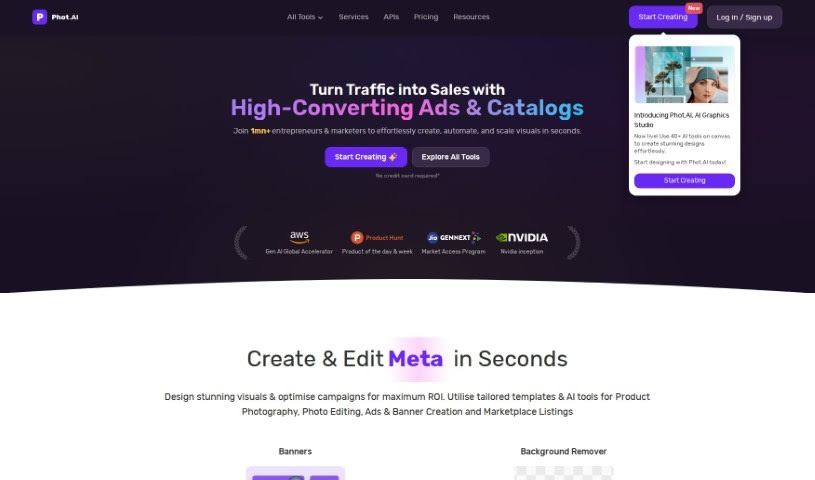
Screenshot of Phot Ai

Phot Ai

Discover what Phot AI is and how to use it effectively in 2025. We'll explore its features and see how it stacks up against other photography tools.

Screenshot

What is Phot Ai?

Phot AI is a really advanced tool for editing photos and designing with AI, letting you create, change, and improve images right in your browser. It’s packed with features like professional-grade retouching, HDR capabilities, and it’s all cloud-based, so you can access it from anywhere. You can even generate passport photos online with it! There’s a free version with basic tools, and if you go premium, you get access to more advanced features and priority support. Whether you need to remove backgrounds, get rid of watermarks, boost image quality, create professional product shots, or even make custom avatars, Phot AI has you covered. It’s designed to be super user-friendly, whether you’re a beginner or a seasoned pro, offering a whole range of tools to make your visuals shine.

Who created Phot Ai?

Phot AI Overview:

Phot AI, which is an AI-powered suite for photo editing, first launched on June 17, 2024. David Deisadze, a photographer himself, is the one who created it. It’s quickly become popular with all sorts of people, from marketing teams and businesses to individual creators. The platform offers advanced editing tools, including professional retouching and HDR, and it really covers a broad spectrum of photo editing and graphic design needs. Phot AI works as a cloud-based platform, meaning you can use it on pretty much any device. They offer both free and premium services; the premium subscription unlocks more advanced tools and gives you priority support.

What is Phot Ai used for?

  • You can fix scratches and tears in old photos.
  • It helps you create professional-grade product photography.
  • Use the AI Vector Generator to turn your text ideas into cool vector art.
  • It even has video editing tools, like a video enhancer and a background remover.
  • You can edit photos, make custom avatars, and improve visuals for marketing and e-commerce.
  • It’s great for generating passport photos online.
  • Adjust and improve lighting and contrast in your images with the AI Photo Brightener.
  • Create unique AI avatars using the AI Avatar Generator.
  • Boost video quality with AI technology.
  • Effortlessly create beautiful product photos for your online store.
  • The AI Vector Generator turns text prompts into dynamic vector art.
  • It includes video editing tools like a video enhancer and background remover.
  • It’s perfect for professional photo editing and design for photographers and marketing teams.
  • Use the AI Background Replacer to swap out image backgrounds.
  • The AI Photo Brightener helps adjust and enhance lighting and contrast.
  • Create unique AI avatars with the AI Avatar Generator.
  • Remove watermarks from your images.
  • Generate passport photos for online use.
  • Improve photo lighting and contrast.
  • Generate unique AI avatars.
  • Enhance video quality, including upscaling and unblurring.
  • Create AI product photography for online stores.
  • Fix scratches and tears in old photos.
  • It includes an AI Photo Restorer.
  • There’s also an AI Background Replacer.
  • And the AI Vector Generator is there for your vector art needs.

Who is Phot Ai for?

  • Professional photographers
  • Marketing teams
  • Photographers
  • Graphic designers
  • Product photographers
  • Marketing professionals
  • Business owners
  • Bloggers
  • Freelance marketers
  • Entrepreneurs

How to use Phot Ai?

Here’s a simple guide to using Phot AI effectively:

  1. Remove Backgrounds: Use the AI-powered background remover. It’s really good at identifying and taking out backgrounds from your images accurately.
  2. Remove or Replace Objects: There’s a handy object remover tool that lets you precisely remove or swap out objects in your photos.
  3. Enhance Images: Make your images look better with the AI Photo Enhancer. It boosts resolution, sharpens details, and fixes blurriness.
  4. Remove Text: You can easily get rid of unwanted text and watermarks from images using the AI Text Remover tool.
  5. Restore Photos: Bring old or damaged photos back to life by fixing scratches and tears with the AI photo restoration tool.
  6. Product Photography: Create professional-looking product photos that are perfect for catalogs, brochures, and online stores.
  7. Generate AI Avatars: Make unique AI avatars easily to add a personal touch and creativity to your projects.
  8. Video Editing: Improve your video quality. You can upscale videos to 4K resolution and remove backgrounds without needing a special studio.
  9. Create Passport Photos: Quickly generate passport photos online that meet all the official requirements.
  10. Create AI Vector Art: Use the AI Vector Generator to turn your text prompts into dynamic vector illustrations, great for design projects.

By using these features in Phot AI, you can really speed up your photo editing, restoration, and creative design tasks, making everything much more efficient.

Related AI Tools

Discover more tools in similar categories that might interest you

123RF AI Image Generator

Creative Image Generation
Learn More

Stay Updated with AI Tools

Get weekly updates on the latest AI tools, trends, and insights delivered to your inbox

Join 25,000+ AI enthusiasts. No spam, unsubscribe anytime.