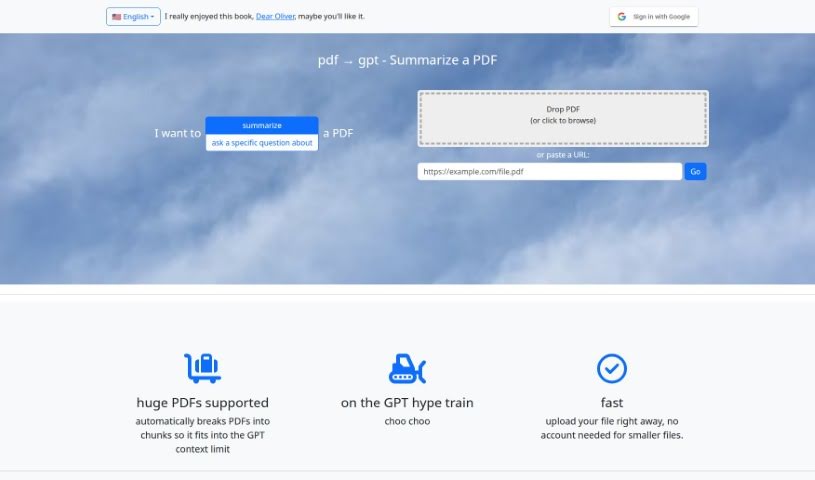
Screenshot of PDF2Gpt

PDF2Gpt

Discover what PDF2Gpt is and how to use it effectively in 2025. We'll explore its features and see how it stacks up against other PDF chat tools.

Screenshot

What is PDF2Gpt?

PDF2Gpt is a handy AI tool that uses the power of GPT models to summarize long PDF documents. It is your personal assistant for tackling dense PDFs. It helps you pull out the most important information and key takeaways without you having to read through every single page. The tool smartly breaks down your PDF into smaller, digestible chunks. Then, it generates an overall summary, plus detailed summaries for each specific section, all while keeping the original context intact.

What’s great is that PDF2Gpt has a really easy-to-use interface. You can simply upload your PDF file or, if it’s online, just paste the document’s URL. It’s built to handle even massive PDFs, breaking them down and summarizing them efficiently so you get manageable insights.

The summaries PDF2Gpt provides are quite detailed and rich. This comes from its ability to process the entire document, giving you a comprehensive overview and nuanced summaries that stay true to the original context. Plus, you can ask specific questions about the content, and PDF2Gpt will generate a summary that directly answers your query, making it super easy to find exactly what you need.

Who created PDF2Gpt?

According to the tool’s website, PDF2Gpt was developed by an individual who can be reached at [email protected]. The tool first launched on June 18, 2024. It’s packed with features like summarizing large PDFs, creating detailed summaries, offering a user-friendly interface, and efficiently handling very large PDF files.

What is PDF2Gpt used for?

  • It summarizes large PDFs.
  • It generates detailed summaries.
  • It helps you find specific information.
  • It offers summaries for each section.
  • It provides a table of contents.
  • It can handle huge PDF files.
  • It expands on single user reviews.
  • It processes entire PDFs.
  • It creates summaries with richer detail.
  • It offers an overall summary, table of contents, and section summaries.

Who is PDF2Gpt for?

  • Content creators
  • Researchers
  • Students
  • Academics
  • Professionals working with a lot of information

How to use PDF2Gpt?

Using PDF2Gpt is pretty straightforward. Just follow these steps:

  1. Head over to the pdf2gpt.com website.
  2. You can either drag and drop your PDF file directly onto the page or click to browse your files. Alternatively, you can paste a URL if the document is online.
  3. If your PDF is large, the tool automatically splits it into smaller parts to work within GPT’s context limits.
  4. Use the simple interface to type in any questions you have about the content you want summarized.
  5. You can then browse through detailed summaries for the whole document, specific sections, or a table of contents.
  6. Take advantage of the tool’s ability to manage enormous PDF files and deliver rich, detailed summaries.
  7. Make sure JavaScript is enabled in your browser, as it’s essential for the tool to analyze and generate summaries.

By following these steps, you’ll be able to effectively use PDF2Gpt to summarize those extensive PDF documents with the help of the GPT model. If you need more help or have questions, you can always reach out directly to [email protected] via the website.

Related AI Tools

Discover more tools in similar categories that might interest you

Academic Help Free Essay Generator

Education Academic Writing
Learn More

Stay Updated with AI Tools

Get weekly updates on the latest AI tools, trends, and insights delivered to your inbox

Join 25,000+ AI enthusiasts. No spam, unsubscribe anytime.