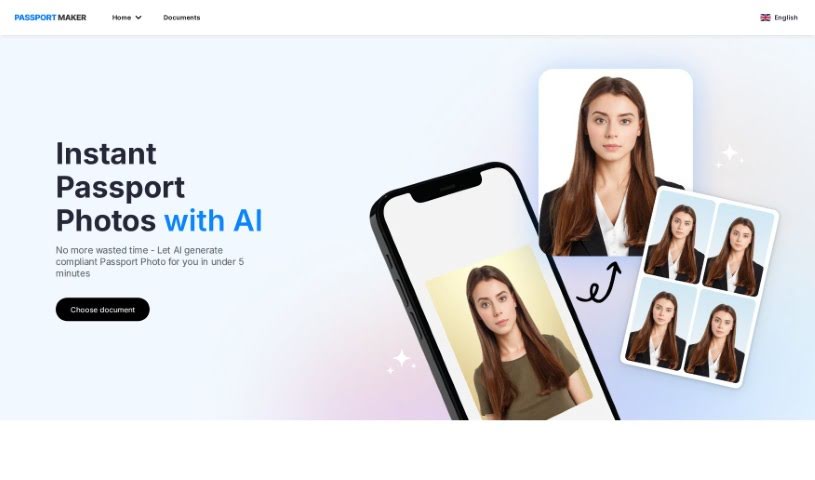
Screenshot of PassportMaker

PassportMaker

Discover what PassportMaker is and how to use it effectively in 2025. We'll explore its features and see how it stacks up against other photo editors.

Screenshot

What is PassportMaker?

PassportMaker is an online service that uses smart technology, especially AI algorithms, to automatically create passport photos. The goal of this platform is to make it simple for anyone to get high-quality passport photos that meet the specific rules from governments all over the world. You just upload a photo, and the AI handles things like removing the background, cropping it to the right size, and making the photo look better. PassportMaker lets you create passport photos whenever and wherever you want, so you don’t need a professional photographer. Plus, it’s cheaper than traditional photo services, making it a really practical choice when you need official photos for documents.

Who created PassportMaker?

PassportMaker first launched on November 21, 2023. The company is all about providing great passport photos that fit global standards. They started PassportMaker with the idea of making it easier to get passport photos by using the latest technology and AI. People know PassportMaker for being easy to use, affordable, and convenient for creating official photos for things like passports, visas, and ID cards. The company is based in Singapore. You can reach them by email at [email protected] or by calling +65 67322447.

What is PassportMaker used for?

PassportMaker helps you with a bunch of things:

  • It automatically creates official document photos using AI.
  • It can remove backgrounds from your photos.
  • It clarifies images so they meet official guidelines.
  • It standardizes photo sizes for different documents and country requirements.
  • It helps you get photos ready for passports, visas, travel cards, driving licenses, and ID cards.
  • You can edit photo backgrounds to match document guidelines.
  • You can download your created photos as printable files or sheets.
  • It has a user-friendly interface that works well on mobile devices.
  • To keep your data safe, you don’t need to create an account.
  • It’s free to use for making high-quality passport photos.
  • It’s great for creating passport photos for various documents like passports, visas, travel cards, driving licenses, and ID cards.
  • It handles automatic photo editing tasks such as background removal, clarifying images, and standardizing sizes.
  • You can edit photo backgrounds to meet specific document guidelines.
  • Download your photos as printable files or sheets with multiple images.
  • It offers a user-friendly experience on both web and mobile platforms.
  • No account is needed, which helps protect your data because they don’t store personal information or photos.
  • There’s also a mobile app for iOS and Android devices that does pretty much the same things as the website.
  • It supports the standards for over 130 countries.
  • Its AI features include auto head detection, cropping, face detection, background adjustments, and making blurry photos look more realistic.
  • It’s a cost-effective, high-quality, convenient, and affordable way to get passport photos.

Who is PassportMaker for?

PassportMaker is a helpful tool for:

  • Photographers
  • Travel agents
  • Immigration Consultants
  • ID card facilitators
  • Visa application advisors
  • Driving instructors

How to use PassportMaker?

Here’s how you can use PassportMaker to create your passport photos:

  1. First, head over to PassportMaker.com and pick the type of document you need the photo for (like a US Passport).
  2. Then, upload a clear picture of yourself.
  3. Let the AI tool work its magic to edit your image, making sure it fits the specific sizes for your document. You can also make manual changes, like adding a suit or changing the background color if you want.
  4. Take a good look at the edited image to make sure it’s exactly what you need.
  5. Once you’re happy with it, download the final photo.
  6. For the best results, make sure you prepare a clean, plain background and follow the shooting tips they provide.
  7. PassportMaker can handle many types of documents, not just passports. Think visas, ID cards, and driving licenses too, as it automatically adjusts the photo to the correct size and dimensions.
  8. The tool has features like automatic head detection, precise face detection, realistic enhancement for blurry photos, adjustments for background and lighting, and even options to customize clothing.
  9. You can access PassportMaker online or through its mobile app, available for both Android and iOS devices, so it’s easy to use on any platform.
  10. The service is free to use, and they take data security seriously to protect your information.

By following these steps, you can easily create official passport photos using PassportMaker. Its AI features really help streamline the process and ensure you get high-quality results every time.

Related AI Tools

Discover more tools in similar categories that might interest you

123RF AI Image Generator

Creative Image Generation
Learn More

Stay Updated with AI Tools

Get weekly updates on the latest AI tools, trends, and insights delivered to your inbox

Join 25,000+ AI enthusiasts. No spam, unsubscribe anytime.