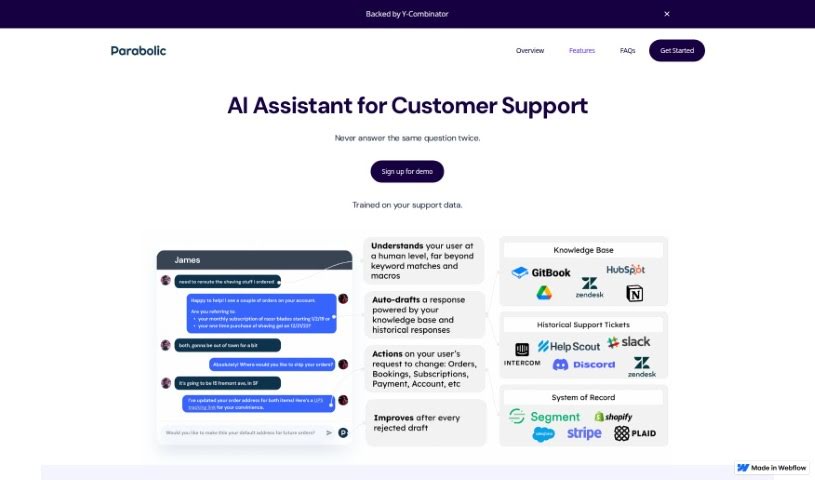
Screenshot of Parabolic

Parabolic

Discover what Parabolic is and how to use it in 2025. We'll explore its features, compare it to other customer service tools, and show you how to get the most out of it.

Screenshot

What is Parabolic?

Parabolic is a smart AI tool built to help customer support teams. It offers AI-powered suggestions for customer queries, making it easier for your agents to respond. It fits right into ticketing software you might already use, like Intercom, Zendesk, and Helpscout. This means agents can quickly look over and confirm the AI’s suggested answers before they hit send. What’s really neat is that Parabolic can handle those tricky, less common questions by suggesting answers it finds in your past conversations or knowledge base. It’s also designed to manage those more complicated customer service interactions that involve several steps.

Who created Parabolic?

While the exact founder isn’t mentioned in the provided information, we do know that Parabolic is an AI tool for customer support that received support from Y-Combinator. It integrates smoothly with popular ticketing systems such as Intercom, Zendesk, and Helpscout. Key features include a “human-in-the-loop” system, which lets agents review and approve AI responses, ensuring accuracy and continuous learning. It also automatically categorizes incoming queries and can suggest answers based on previous interactions. Parabolic’s goal is to boost customer service by offering personalized help and getting smarter with every interaction.

What is Parabolic used for?

  • Embedded: It fits right into your current ticketing software, so there’s no need to switch tools.
  • Human-in-the-loop: Your agents can review and approve AI-generated responses. This is great because it allows the system to keep learning and stay accurate.
  • Answers your RAQs: It suggests answers even for rarely asked questions, often after just one match in a past conversation or your knowledge base.
  • Multistep: It’s capable of handling those complex conversations that go back and forth many times with customers.
  • Upsell Mode: Based on what the customer is asking about, it can spot chances to recommend extra products or services.

Who is Parabolic for?

  • Customer support teams
  • Customer Support Team Members
  • Customer service agents
  • Customer Support Representatives

How to use Parabolic?

To get the most out of Parabolic, here’s a simple guide:

  1. Integration: First, embed Parabolic directly into your existing ticketing software. Think Intercom, Zendesk, or Helpscout – wherever your team works.
  2. Human-in-the-Loop: Make sure to use the human-in-the-loop feature. This lets your agents check and refine the AI’s suggested answers before they’re sent out, which really helps the system learn and improve.
  3. Rarely Asked Questions (RAQs): Parabolic is great at suggesting responses for those less common questions. It can often find an answer based on just one previous conversation or a match in your knowledge base.
  4. Multistep Conversations: Don’t worry about complex back-and-forth chats; Parabolic can help you navigate them effectively.
  5. Upsell Mode: Keep an eye out for opportunities to suggest additional products or services. This mode helps you spot those chances based on the customer’s current inquiry.
  6. Auto-Categorization: Incoming questions can be automatically tagged and sorted. This ensures they quickly get to the right teams or departments.
  7. Continuous Learning: Parabolic automatically indexes responses, figures out what customers mean even when they don’t use exact keywords, and drafts general and specific answers. It gets better with every single interaction.

By following these steps, you’ll be able to fully use Parabolic to make your customer support smoother and keep your customers happier.

For more in-depth information, you can check out the “parabolic.pdf” file. It covers topics like using ChatGPT for Customer Support and highlights Parabolic’s key features.

Related AI Tools

Discover more tools in similar categories that might interest you

Stay Updated with AI Tools

Get weekly updates on the latest AI tools, trends, and insights delivered to your inbox

Join 25,000+ AI enthusiasts. No spam, unsubscribe anytime.