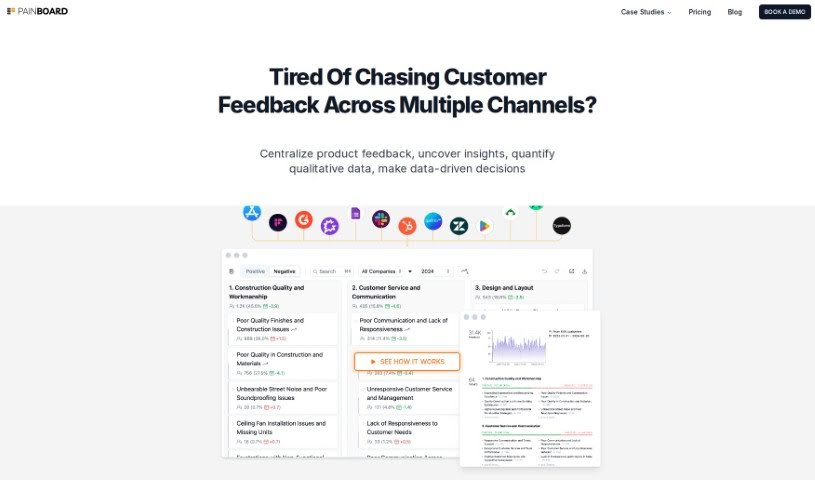
What is Painboard?
Painboard is your AI assistant for understanding what your customers are really saying. It’s designed to take all that unstructured feedback – the comments, reviews, and support messages that don’t fit neatly into categories – and turn it into clear, actionable insights. It’s a smart blend of AI analysis and human know-how, helping you build strategies that actually work for your business. Painboard is great at handling tons of customer feedback, spotting those recurring issues and emerging trends, and then organizing it all to match your specific business goals. Ultimately, it helps you connect better with your customers, make your customer service improvements smoother, and really get a handle on what’s happening by turning raw data into practical steps.
Who created Painboard?
Painboard was actually developed by Justin Ruckman, who leads Product & Design over at EverCommerce. It first came out on December 12, 2023, thanks to jimu Labs, Inc. This platform is all about helping businesses make sense of customer feedback that isn’t already organized. By using a mix of AI analysis and human insight, it helps create strategies that are tailored specifically for each business, making it easier to understand what customers need.
What is Painboard used for?
Here’s a look at what Painboard helps you achieve:
- It helps you connect better with your customers.
- It turns messy, unstructured feedback into clear insights.
- It makes managing customer feedback much more efficient.
- It ensures your insights line up with what your organization is trying to do.
- It creates helpful visuals that make themes easy to grasp.
- You can understand themes right away.
- It lets you track how trends change over time.
- It helps you pinpoint recurring problems.
- It makes creating strategies that fit your business much simpler.
- It’s a big help with analyzing trends.
- You can easily merge, move, or rename themes to fit your needs.
- It keeps your efforts aligned with your company’s goals.
- It offers a comparative view, letting you filter and compare insights.
- You get a dedicated comparative view feature.
- It streamlines the process of improving your customer service.
Who is Painboard for?
Painboard is a valuable tool for a wide range of professionals, including:
- Product Managers
- Customer service representatives
- Business analysts
- Marketing professionals
- Quality Assurance Specialists
- User Experience Designers
- Software developers
- Sales Representatives
- Customer Experience Managers
- Director of Product & Design
- Customer service representatives (again, it’s that useful!)
- Designers
- Customer support teams
How to use Painboard?
To get the most out of Painboard, here’s a straightforward guide:
- Get into the Platform: First, just log in to Painboard using your usual login details.
- Bring in Your Customer Feedback: Gather all your customer data from different places – think NPS surveys, online reviews, support tickets, and so on.
- Explore the Themes: Once your feedback is in, use the platform to look at and fine-tune the themes that emerge from customer comments, especially through chat interactions.
- Use the Comparative View: Painboard has a neat comparative view feature. You can use this to filter and compare insights from different time periods or specific custom fields.
- See Your Insights Visually: Take advantage of the visuals Painboard provides. They make it super easy to understand the main themes right away.
- Make Themes Your Own: You can merge, move, and rename themes to make sure they perfectly match your business objectives.
- Boost Your Customer Service: Make your customer feedback processes smoother. This will help improve service quality and make your customers happier.
- Build Your Strategies: Use the insights you get from Painboard to create business strategies and make decisions that are specifically tailored to your needs.
- Engage Proactively: Really dig into the data you’ve collected. The ‘on-demand themes’ feature is great for this, encouraging you to interact with the information proactively.
- Grow Your Business: Turn that unstructured feedback into practical steps. Understanding customer needs and trends this way is key to helping your business grow.
Remember, the whole point of Painboard is to simplify how you manage customer feedback. It’s all about turning raw data into organized, actionable insights that help you make better decisions and keep your customers satisfied.