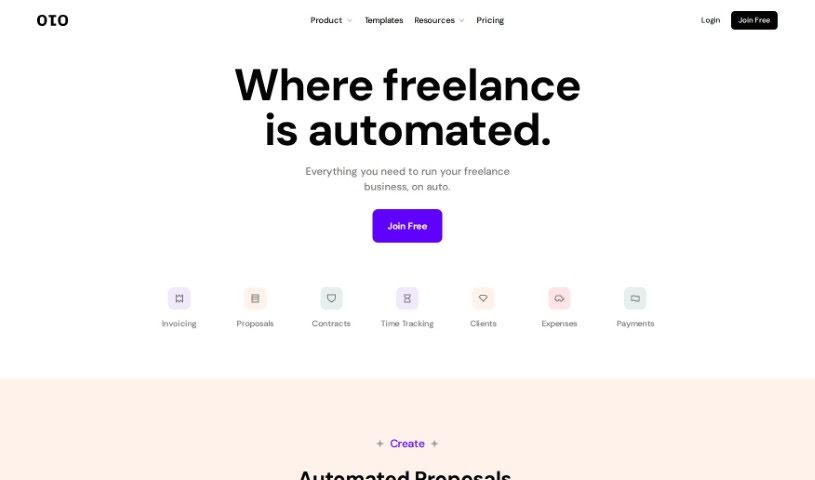
Screenshot of Oto Work

Oto Work

Discover Oto Work in 2025! Learn what this freelance financial tool does, how to use its features like invoicing, time tracking, and contracts, and see how it stacks up against other automation tools.

Screenshot

What is Oto Work?

Oto Work is a really handy financial tool built specifically for freelancers. It bundles together a bunch of useful features like creating invoices, tracking your time, managing expenses, keeping tabs on your clients, and even setting up online contracts. Basically, it’s designed to automate a lot of the day-to-day stuff that comes with freelancing. You can easily manage all your different clients, keep track of the hours you’re actively working on projects, sort out your spending, and generally make your accounting much simpler. Plus, Oto lets you get instant approvals on proposals and create, sign, send, and track contracts that are already made, complete with e-signature capabilities.

Whether you bill by project or by the hour, Oto Work has you covered. It can even generate personalized email replies for your clients and send out reminders if payments are late. It also plays nicely with other popular tools you might already use, like OpenAI, Stripe, Paypal, and Google. And since it handles payments in over 135 different currencies, it’s super convenient for anyone working remotely.

Who created Oto Work?

Oto Work was actually built by a small, self-funded team who all work remotely. The folks behind it have direct experience as freelancers themselves, and their goal was to give other freelancers the tools they need to really run and grow their businesses. It first launched on February 13, 2023. The platform offers a whole suite of features to help manage a freelance business, including keeping track of clients, logging hours, managing expenses, sending out automatic invoices, creating online contracts, and handling secure payments. It connects with services like Stripe and PayPal and supports over 135 global currencies, which is a big plus for remote work.

What is Oto Work used for?

Oto Work is used for a variety of freelance business tasks:

  • Expense Management: Keep track of all your spending.
  • Invoicing: Easily create invoices for hours you’ve logged.
  • Time Tracking: Log your working hours in real-time and share them.
  • Proposals: Generate project proposals.
  • Client Management: Keep all your clients organized.
  • Online Payments: Integrate with Stripe and Paypal to get paid online.
  • Contracts: Create legally sound contracts.
  • Custom Invoices: Use templates to make your invoices look just right.
  • Progress Updates: Share how projects are going with your clients.
  • Live Hour Tracking: Monitor and share your logged hours as you work.
  • Time Tracking: A dedicated feature for logging your time.
  • Expense Management: Categorize your expenses and simplify your accounting.
  • Client Management: Handle all your client interactions smoothly.
  • Online Payments: Connect with Stripe and Paypal for easy payments.
  • Contract Generation: Create legally vetted contracts quickly.
  • Progress Updates: Share project status with clients.
  • Live Tracking & Sharing: Log hours live and share them with clients.
  • Receipt Uploads: Manage expenses by uploading receipts.
  • Client Management: A central place for client details.
  • Invoicing: Handle both project-based and hourly billing.
  • Live Hour Tracking: Keep a real-time record of your logged hours.
  • Automated Documents: Generate proposals, contracts, and invoices automatically.
  • Instant Proposal Approval: Get quick sign-offs on your proposals.
  • Secure Payments: Accept payments safely online.
  • Global Currency Support: Work with clients worldwide using various currencies.
  • Expense Reports: Get insights and reports on your spending.
  • Online Payment Integration: Connect with Stripe and PayPal.
  • Legal Contracts: Generate contracts that are legally vetted.
  • Live Hour Tracking: Monitor your working hours live.
  • Expense Categorization: Organize your spending and manage it easily.
  • Invoicing: Bill for your hours, whether hourly or project-based.
  • Simplified Accounting: Categorize spending and make accounting easier.
  • Client Communication: Share updates on hours, invoices, proposals, and contracts.
  • Secure Contracts: Create online contracts that are legally vetted.
  • Customizable Invoices: Use templates for your invoices.
  • Progress Sharing: Update clients on hours, invoices, proposals, and contracts.
  • Live Hour Tracking & Sharing: Log hours in real-time and share them.
  • Platform Integrations: Connect with OpenAI, Stripe, Paypal, and Google.
  • Proposal Approvals: Get instant approvals for your proposals.
  • Contract Management: Create, sign, send, and track pre-made contracts with e-signatures.
  • Project Proposals: Draft detailed proposals for your projects.
  • Document Generation: Create invoices and contracts.
  • Time Tracking: Log your working hours live.
  • Client Updates: Manage clients and share progress.
  • Payment Integration: Connect with Stripe and PayPal.
  • Legal Contract Generation: Create secure, legally vetted online contracts.
  • Proposal Approvals: Get instant sign-offs on proposals.
  • Live Hour Tracking: Easily track your logged hours.

Who is Oto Work for?

Oto Work is a great fit for:

  • Freelancers
  • Contractors
  • Independent Professionals
  • Independent Contractors
  • Small Business Owners
  • Consultants

How to use Oto Work?

To get the most out of Oto Work, here’s a simple guide:

  1. Invoicing System: Use Oto’s system to easily create proposals, invoices, and contracts. It makes billing for your tracked hours, whether hourly or project-based, really straightforward.
  2. Time Tracking: Log your working hours live and share them with clients using the time tracking feature. You can even send hours via a simple link.
  3. Proposal Generation: Oto can create detailed proposals for your projects, often powered by AI to make them more tailored.
  4. Client Management: Keep your clients organized and share progress updates like tracked hours, invoices, proposals, and contracts all in one place.
  5. Expense Management: Make accounting simpler by categorizing your spending and uploading receipts for your expenses.
  6. Online Payments: Connect with Stripe and Paypal to accept payments from clients anywhere in the world, as it supports over 135 currencies.
  7. Contract Generation: You can easily create secure online contracts without starting from scratch.
  8. Customizable Features: Tailor your invoice templates and email responses to make communication smoother.
  9. Instant Approval: Give clients the option to approve proposals instantly, which can speed up starting new projects.
  10. Continuous Updates: Stay in the loop with real-time notifications about document statuses and get reminders for any overdue payments.
  11. Plan Options: You can choose from a free plan, a Starter plan at $6 per month, or the Pro plan for $24 per month, depending on what you need.

By following these steps, Oto Work can really improve your freelancing experience by making your financial management, client interactions, and overall project workflows much more efficient.

Related AI Tools

Discover more tools in similar categories that might interest you

Stay Updated with AI Tools

Get weekly updates on the latest AI tools, trends, and insights delivered to your inbox

Join 25,000+ AI enthusiasts. No spam, unsubscribe anytime.