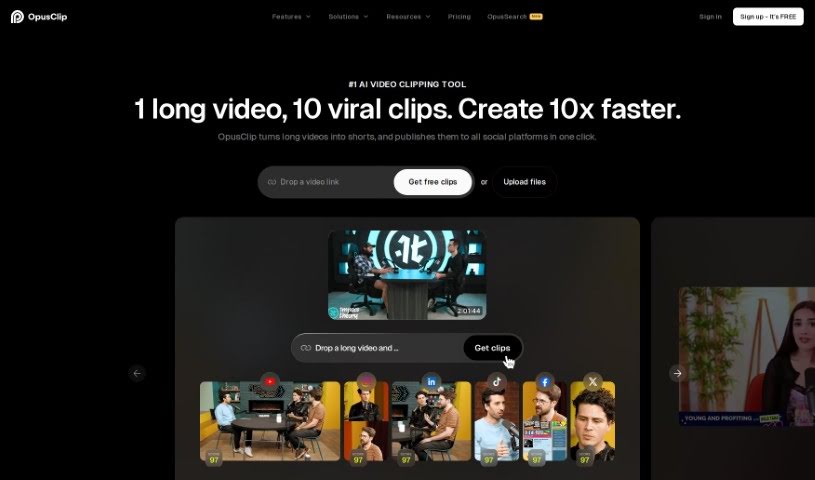
Screenshot of Opus Clip

Opus Clip

Discover what Opus Clip is and how to use it effectively in 2025. We'll explore its features and see how it stacks up against other Reel Makers.

Screenshot

What is Opus Clip?

Opus Clip is an AI-powered tool that helps creators repurpose their video content. It is your go-to for turning longer videos into engaging, bite-sized clips perfect for platforms like TikTok, YouTube Shorts, and Instagram Reels. It uses smart AI features, including ClipGenius™ to help pick out the best content, an AI Virality Score™ to guess how well your clips might do, and Active Speaker Detection to make your videos look really professional. You can also post directly to your social media, trim clips super fast, remove those awkward filler words for cleaner audio, and it supports over 20 languages and various video resolutions. Basically, Opus Clip makes video editing simpler and helps you connect with your audience more easily, all thanks to AI.

Who created Opus Clip?

Opus Clip was started by a team that includes Young, Jay, and Grace. Young actually ran a talent agency before he noticed how tough it was for new creators to edit all their raw footage. Seeing the potential of AI, this trio founded Opus back in 2022 with a clear goal: to make video creation accessible to everyone. The founding members brought experience from places like TikTok, LinkedIn, and Airbnb, and they’ve also received support and funding from investors such as DCM and AI Grant.

What is Opus Clip used for?

  • Creating social media posts: Get your content ready for your favorite platforms.
  • Scheduling social media posts: Plan your content calendar ahead of time.
  • Create social-ready clips instantly: Turn long videos into short, shareable clips in a flash.
  • AI adjusts clips for various aspect ratios: Your videos will look great whether they’re for TikTok, Reels, or Shorts.
  • Identifies compelling hooks and rearranges highlights into viral short videos: The AI finds the most interesting parts and puts them together to make clips that have a good chance of going viral.
  • Automatically adds animated captions with various templates: Make your videos more engaging and accessible with stylish, animated captions.
  • Incorporates contextually relevant B-roll into videos: The AI can add supporting video clips that fit the content, making your videos more dynamic.
  • Creates various brand templates with customized elements: Keep your branding consistent by creating templates with your own logos, colors, and fonts.
  • Intuitive editor with text-based and timeline-based editing capabilities: Whether you prefer editing by typing or using a visual timeline, the editor is easy to use.
  • Choose from different aspect ratios for tailored videos: Easily select the right format for each social platform.
  • Generate a virality score for short clips based on AI analysis: Get an idea of how likely your clip is to perform well before you post it.
  • Export to Adobe Premiere Pro and DaVinci Resolve in one click: Seamlessly move your edited clips to professional editing software for further refinement.
  • Auto Reframe for adjusting clips to various aspect ratios: The AI automatically adjusts your video’s framing to fit different screen sizes.
  • AI Curation for extracting compelling highlights and rearranging videos: Let the AI find the best moments and assemble them into new clips.
  • Animated Captions with various templates: Add eye-catching captions that move and animate.
  • Customization with AI B-roll, overlays, fonts, etc.: Personalize your videos with a range of AI-generated visuals and design elements.
  • Brand Templates creation with customized elements: Build your own reusable templates to maintain brand consistency.
  • Efficient editing with intuitive editor capabilities: Make quick edits with a user-friendly interface.
  • 1-click posting and analytics for faster growth: Share your content easily and track its performance to grow your audience.
  • Seamless collaboration and streamlined workflows: Work with your team efficiently on video projects.
  • Export to Adobe Premiere Pro and other platforms: Get your finished videos into the tools you need.
  • AI Curation to identify compelling hooks and rearrange highlights into short videos: The AI helps you find the most engaging parts of your long videos and turn them into short clips.
  • Add animated captions with various templates: Make your videos pop with animated text.
  • Incorporate AI B-roll, overlays, fonts, and more for customization: Add extra visual elements to make your videos unique.
  • Create brand templates with customized features: Design your own templates to keep your branding consistent.
  • Export to Adobe Premiere Pro and other platforms in one click: Easily send your edited videos to other software or platforms.
  • Seamless collaboration and streamlined workflows with a team workspace: Work together smoothly with your team in a shared space.
  • Better organization of clips with advanced features like folders and labels: Keep your video projects tidy and easy to manage.
  • Generating social post titles and descriptions: Get AI-powered suggestions for catchy titles and descriptions for your posts.
  • Team collaboration in a workspace: Work with your team in a dedicated online space.
  • AI-based video editing and repurposing for social media platforms like TikTok, YouTube Shorts, and Instagram Reels: Use AI to edit and adapt your videos for different social channels.
  • Utilizing AI features like ClipGenius™, AI Virality Score™, and Active Speaker Detection: Take advantage of smart AI tools to improve your content.
  • Incorporating AI-generated B-roll, dynamic layouts, and emojis into videos: Add visual interest with AI-created clips, changing layouts, and fun emojis.
  • Customizing videos with brand templates, fonts, and effects: Make your videos your own with personalized branding and styles.
  • Enhancing video editing with features like auto reframing, caption editing, and filler word removal: Improve your editing process with tools that automatically adjust framing, let you edit captions, and clean up audio.
  • Exporting videos to Premiere Pro and DaVinci Resolve for further editing: Send your clips to professional editing software when you’re ready.
  • Auto Reframe with AI adjustments for various aspect ratios: The AI automatically adjusts your video to fit different screen sizes perfectly.
  • AI Curation to extract highlights and rearrange into short videos: Let the AI find the best moments and create short clips from them.
  • Brand Templates creation for customization: Design your own templates to keep your branding consistent.
  • Intuitive editor with editing capabilities: A user-friendly editor that makes video editing straightforward.
  • One-click posting and analytics for faster growth: Share your videos easily and track their performance to grow your audience.
  • Seamless collaboration with team workspace: Work together with your team in a shared environment.
  • Export to Adobe Premiere Pro and other software: Easily send your finished videos to other editing programs.
  • Smart content curation with ClipGenius™: Use AI to intelligently select the best parts of your video.
  • Utilize AI Virality Score™ to gauge potential reach: Get an AI prediction of how popular your clip might be.
  • Dynamic AI layouts and contextual B-rolls: Use AI to create interesting visual arrangements and add relevant background video clips.
  • Automatically add animated captions: Make your videos more engaging with animated text.
  • Customize videos with AI-generated visuals: Personalize your videos using AI-created elements.
  • Create brand templates for personalized branding: Design your own templates to maintain a consistent brand look.
  • Efficient clip trimming and extension features: Easily adjust the length of your video clips.
  • Direct posting to multiple platforms: Share your creations directly to your social media accounts.

Who is Opus Clip for?

  • Content creators
  • Social media managers
  • Video editors
  • Marketers
  • Creators
  • Digital marketers
  • Businesses
  • Social media influencers
  • Videographers
  • Influencers
  • Advertisers
  • Brand managers
  • Business owners

How to use Opus Clip?

Here’s how you can get started with Opus Clip:

  1. Content Creation: First, upload your video footage directly into Opus Clip.
  2. ClipGenius™: Next, use ClipGenius™ – it’s the smart content curation feature that helps pick out the best parts.
  3. Dynamic Editing: You can then trim and extend clips efficiently, and the tool even removes filler words for you.
  4. AI Enhancements: Take advantage of the AI features like AI Curation, Animated Captions, AI B-roll, and Brand Templates to make your videos shine.
  5. Customization: Personalize your videos using brand templates and a variety of other editing options.
  6. Publication: Choose the right aspect ratios and platforms for posting, and check your virality potential with the Virality Score.
  7. Collaboration: If you’re working with a team, you can collaborate seamlessly using the Team Workspace feature.
  8. Export: Finally, export your finished videos to Adobe Premiere Pro or other platforms with ease.

By following these steps, you can efficiently create engaging, high-quality short videos using Opus Clip’s powerful AI tools and editing capabilities. Happy video creation!

Related AI Tools

Discover more tools in similar categories that might interest you

Stay Updated with AI Tools

Get weekly updates on the latest AI tools, trends, and insights delivered to your inbox

Join 25,000+ AI enthusiasts. No spam, unsubscribe anytime.