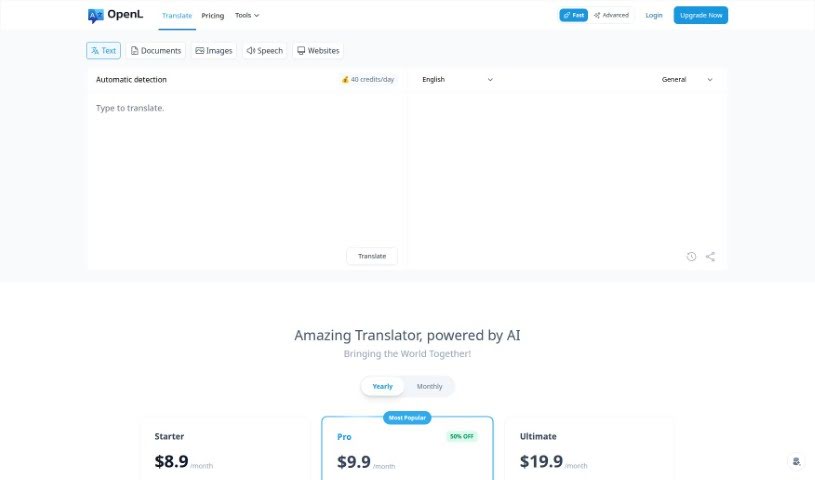
Screenshot of OpenL

OpenL

Discover what OpenL is and how to use it effectively in 2025. We'll explore its features and see how it stacks up against other translation tools.

Screenshot

What is OpenL?

OpenL Translate is a sophisticated AI-powered translation tool designed to make communicating across different languages much easier. It handles over 100 languages, covering popular ones like English, Spanish, and French, as well as more unique dialects. This means it’s great for both everyday personal use and more serious professional translation needs. The platform delivers accurate translations by using strong AI technology that really gets the nuances and cultural details right. Beyond just translating, OpenL also helps improve your writing with its Grammar Fix tool and supports your language learning journey with its Learn function. It is a helpful Assistant, too, aiding with content creation and making sure your grammar is spot on. You can try OpenL for free with 30 translations each day, or opt for the Pro version if you need to translate longer texts without limits – perfect for professional work. Plus, canceling is straightforward.

Who created OpenL?

OpenL Translate was developed with the goal of breaking down language barriers. This platform offers AI-powered translations in more than 100 languages, including English, Spanish, French, and a variety of less common dialects. The service is known for providing accurate translations that capture subtle meanings and cultural context. OpenL can translate text, documents, images, and even speech, aiming for native-level accuracy. While the exact founder or founding group isn’t publicly listed, the company’s core mission is to enhance user experience through advanced AI technology, enabling seamless global communication.

What is OpenL used for?

  • Assistant: It helps with various tasks.
  • Translate conversations, documents, and more: Get translations that feel like they were written by a native speaker.
  • Bridging cultural divides: Communicate across over 100 languages.
  • Easy multi-format translation: Translate texts, documents, images, and audio files effortlessly.
  • Writing enhancement: Improve your writing with AI grammar tools and language learning features.
  • Personal and professional use: It’s designed for all your translation needs.
  • Seamless global communication: Connect worldwide using AI neural translation.
  • Supports unique dialects: It handles less common languages alongside widely spoken ones.
  • Efficient service: Streamlines tasks involving multiple translation formats.
  • Refined writing: Achieve academic and professional excellence with better writing.
  • Tailored for everyone: Whether for personal use or professional projects, it’s a good fit.
  • Accurate AI Translation: Get precise translations in over 100 languages.
  • Global communication: Connect with people worldwide using AI neural translation.
  • Bridge cultural divides: Easily translate across more than 100 languages.
  • Translate various formats: Handle texts, documents, images, and audio with ease.
  • Fast, efficient service: Get quick translations for all your multi-format needs.
  • Level up your writing: Use AI grammar tools and refinement features.
  • Enhance language learning: Improve your skills for academic and professional success.
  • Global community interaction: Makes connecting with people worldwide simpler by easing translation.
  • Attractive subscription: Offers a free daily trial and a subscription model.
  • Bulk Translator: Translate many items at once.
  • Fancy Text: Create stylized text.
  • Word Counter: Check word counts.
  • Numbers to Words: Convert numerical figures into text.
  • Case Converter: Change text capitalization.
  • Auto Capitalize: Automatically capitalizes text appropriately.
  • Fast Mode: For quick, reliable daily translations.
  • Advanced Mode: For precise translations needed for business and research.
  • AI Detector: Check if text might be AI-generated.

Who is OpenL for?

  • Students
  • Educators

How to use OpenL?

Here’s how you can get started with OpenL Translate:

  1. Visit the Website: Head over to the OpenL Translate website to access the tool.
  2. Pick Your Mode: Choose between “Fast Mode” for quick translations or “Advanced Mode” for more precise, professional results.
  3. Input Your Content: Type in the text you need translated, or upload a document, image, or audio file.
  4. Select Languages: Tell OpenL the original language of your text and the language you want it translated into. It supports over 100 languages.
  5. Choose Translation Format: OpenL Translate can handle various formats, including text, documents, images, and audio files.
  6. Translate: Click the translate button to start the process.
  7. Review and Adjust: Once translated, take a moment to check the results for accuracy and make any necessary edits.
  8. Explore Other Tools: Don’t forget to check out the other features, like grammar checking, writing refinement, and language learning tools.
  9. Consider Upgrading: If you often translate long texts or need more professional features, think about upgrading to the Pro plan for unlimited use and extra benefits.
  10. Share Your Thoughts: If you run into any issues or have suggestions, please provide feedback to OpenL Translate.

Following these steps should help you make the most of OpenL Translate for all your translation needs.

Related AI Tools

Discover more tools in similar categories that might interest you

Stay Updated with AI Tools

Get weekly updates on the latest AI tools, trends, and insights delivered to your inbox

Join 25,000+ AI enthusiasts. No spam, unsubscribe anytime.