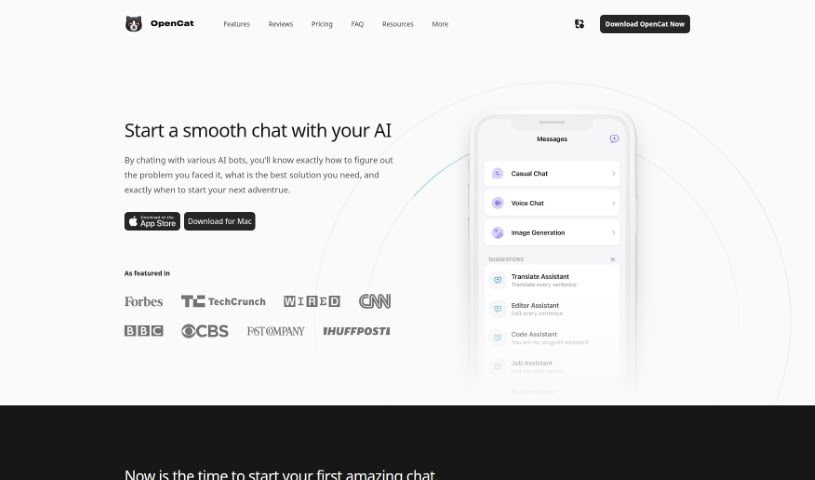
What is OpenCat?
OpenCat is a really versatile AI platform, going way beyond just a simple chat app. It offers a bunch of cool features, like letting you type with AI across different apps, integrating with Siri, enabling team collaboration, rendering markdown, giving you access to a prompt library, and letting you use several AI models for all sorts of chat experiences. You can use OpenCat for your personal life or for business, connecting it with various apps to really boost your communication and get more done. Plus, OpenCat is serious about your privacy, using advanced encryption to keep your data safe and secure.
The platform has a few different pricing options. There’s a free version, and you can upgrade to OpenCat Pro for $9.99 to get extra features like the keyboard extension, iCloud sync, and text-to-speech. Then there’s also OpenCloud AI, which gives you access to the GPT API, voice chat, vision chat, text-to-image generation, and Siri/shortcut integrations, all for $2.99. Just so you know, OpenCat works on iOS and macOS devices, and they’ve got security measures in place to protect your data and conversations.
Who created OpenCat?
OpenCat, this neat AI chatbot interaction platform, was actually started by Baye. It’s a native AI chat client built specifically for Apple devices, making conversations with powerful AI chat engines feel really smooth. OpenCat really focuses on user privacy and includes handy features like a Keyboard Extension, Siri Integration, and OpenCat Cloud for easier access to AI APIs. You can grab it for iOS and macOS devices; there’s a free basic version, and you can subscribe for premium features.
What is OpenCat used for?
- Better Communication: It really helps you communicate better on your iPhone, iPad, and Mac.
- AI Integration: You can easily bring AI chatbots like OpenAI Azure OpenAI and Claude API into your everyday chats.
- Chat Anywhere: Use the handy keyboard extension to chat with AI right inside any app you’re using.
- Voice Control: Get AI chat access anytime thanks to a handy Siri Shortcut that combines voice commands with chatbot tech.
- Easy API Access: The OpenCat Cloud service makes it simple to access various AI APIs without needing to deal with complicated setups.
- Sync Across Devices: Keep everything consistent across all your Apple devices with iCloud syncing for your AI chat sessions.
- Integrate Powerful AI: Use OpenCat to bring AI chatbots like OpenAI Azure OpenAI and Claude API into your everyday communications. This makes your interactions smarter.
- Keyboard Extension: You can effortlessly chat with AI from within any application thanks to OpenCat’s convenient keyboard extension. It’s super handy.
- Siri Integration: Access AI chat whenever you need it with a useful Siri Shortcut that cleverly merges voice control with chatbot technology.
- OpenCat Cloud: Experience straightforward access to various AI APIs without the headache of complex configurations through the OpenCat Cloud service.
- iCloud Synchronization: Ensure your AI chat sessions stay consistent across all your Apple devices by using iCloud synchronization.
Who is OpenCat for?
- Business professionals looking to boost efficiency.
- Individuals who want to use AI for personal tasks.
- App developers interested in AI integration.
- Anyone who loves productivity and wants to streamline their workflow.
How to use OpenCat?
Here’s a simple guide to getting started with OpenCat:
- Download the App: First things first, grab the OpenCat app from the App Store if you’re on iOS, or head over to their website to download the macOS version.
- Explore Features: Take some time to check out what it can do:
- Keyboard Input: You can use AI right within apps like Messages, Notes, and Mail, which is super convenient.
- Siri Integration: Access AI chats directly through Siri Shortcuts without even needing to open the app itself.
- OpenCat for Team: If you work with others, you can collaborate as a team to make your chat experience even better.
- Markdown Rendering: You can format your AI chats using Markdown, adding things like bold text, italics, and links to make them clearer.
- Prompt Library: There’s a handy library of prompts available to help you get started with your AI chats quickly.
- Multiple Models: You can chat with different AI models, which is great for getting diverse results and experiences.
- Choose Your Plan: You’ve got options here:
- OpenOpenCat: You can start using it for free, with the option to buy additional features later.
- OpenOpenCat Pro: This unlocks more advanced productivity features for a one-time purchase of $9.99.
- OpenCloud AI: You can try it free for 3 days, and then it’s $2.99 to subscribe and really boost your productivity.
- Security and Privacy:
- OpenCat takes data protection seriously, using advanced encryption techniques.
- It’s a good fit for both personal and business use, and you can connect it with various apps.
- Subscription:
- While OpenCat is free to download, you’ll need a subscription for the premium features.
- You can cancel or manage your subscriptions through their website if needed.
- Device Compatibility: To use OpenCat across your devices, just download the app and log in with your iCloud account. This keeps your conversations and settings synced up.
- Additional Information:
- Remember, iCloud keeps everything synchronized across your Apple devices.
- There are lots of valuable features designed to give you a smooth AI chat experience.
- They’re committed to user privacy and are always working on more innovative features for the future.
By following these steps, you’ll be able to use OpenCat effectively for all sorts of personal and business tasks, enjoying its many features and strong security.