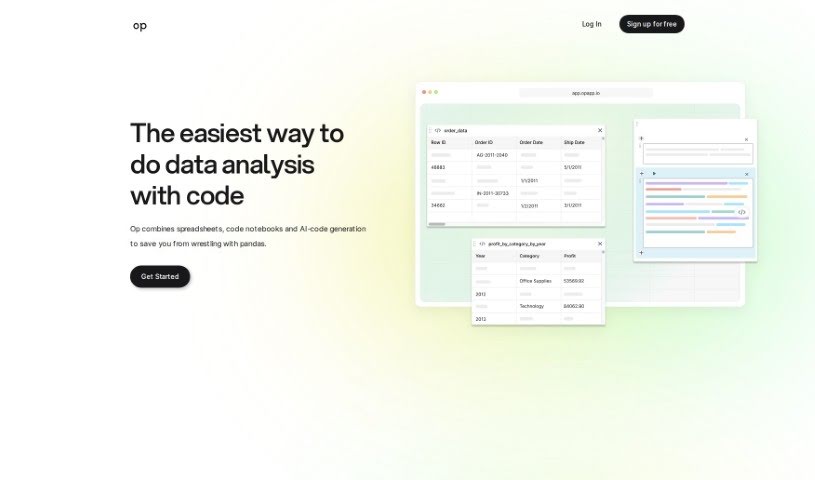
Screenshot of Op App

Op App

Discover what Op App is and how to use it effectively in 2025. We'll explore its features and see how it stacks up against other data analytics tools.

Screenshot

What is Op App?

Op App is a handy data analysis tool designed to make working with your data much simpler. Basically, you can just ask it questions about your data, and it’ll give you back code that’s relevant to what you’re asking. It’s like combining the ease of spreadsheets with the power of Jupyter notebooks, all wrapped up with an AI chat feature that writes code for you based on your questions. The whole idea is to speed up data analysis, make coding smoother, and give you an easy-to-use way to really dig into your data.

Who created Op App?

Jake, the Founder & CEO of Sublime, is the person behind Op App. He actually started it as a side project before officially launching it on July 30, 2024. Sublime is the company that developed Op App, and they’re all about making data analysis more efficient. They do this by blending spreadsheets and code, and adding that AI chat capability to generate code based on what users ask.

What is Op App used for?

  • Op App really helps with data analysis. You can ask it questions about your data, and it’ll give you back code that’s tailored to your specific needs.
  • It generates code by taking your questions or queries about your data and then creating code that fits perfectly.
  • You might not need to spend as much time searching for solutions to Python errors anymore, because Op App uses a question-and-answer format to provide code that’s relevant to your situation.
  • Op App lets you connect visual tables directly with data frames in your code. This makes it super easy to see and access your data.
  • It helps you understand your data better by showing you visual representations that are synced up with the data frames in your code.
  • You can try out Op App’s features and see what it can do with a free trial period.
  • It cleverly combines spreadsheets, Jupyter notebooks, and an AI chat function. This mix helps generate code contextually based on your questions, making data analysis much more efficient.
  • The AI chat feature in Op App really streamlines the whole data analysis process. It gives you context-relevant code right after you ask your questions.
  • Op App makes data analysis feel intuitive by bringing together spreadsheets, code notebooks, and AI chat, which simplifies things a lot.
  • It makes the data analysis process smoother by combining spreadsheets, code notebooks, and AI-generated code. This makes everything more efficient and easier to grasp.
  • It enhances data analysis by giving you code that’s relevant to your questions.
  • It generates code by taking your questions about your data.
  • It syncs up visual tables with data frames so you can see and get to your data easily.
  • It helps you understand your data better by showing you visuals that match the data frames in your code.
  • You get a free trial without needing a credit card.
  • It combines spreadsheets, code notebooks, and AI chat to make data analysis smoother.
  • It helps with debugging and troubleshooting code by generating relevant code.
  • It makes the data analysis process easier by offering an all-in-one platform.
  • It helps users focus on finding important insights by simplifying how code is generated.
  • It answers your data questions quickly by generating code that fits your queries.
  • Op App makes data analysis more efficient.
  • You can generate code just by asking questions.
  • It brings together spreadsheets and code.
  • It helps you figure out Python errors.
  • It generates code that’s relevant to your needs.
  • It syncs your data frames with tables.
  • You can see your code and data side-by-side.
  • It offers an easy-to-use interface.
  • It helps you get data insights just by asking questions.
  • It saves you time when you’re debugging.
  • Op App improves data analysis by letting you ask questions about your data and get relevant code back.
  • It helps you understand your data better with visual representations that sync with your code’s data frames.
  • Op App can cut down on the need to hunt for Python error solutions thanks to its Q&A style.
  • You can try Op App for free without needing a credit card.
  • Op App brings together spreadsheets, code notebooks, and AI chat to make data analysis smoother and generate code that fits your questions.
  • You can see your data clearly by syncing visual tables with the data frames in your code.
  • Op App provides an intuitive interface by combining spreadsheets, code notebooks, and AI chat.
  • It can help you focus on finding important insights in your data.
  • Op App makes the data analysis process easier by combining spreadsheets, code notebooks, and AI-generated code.
  • Op App helps answer your data questions in about 5 minutes by generating code that’s relevant to your queries.
  • It enhances data analysis by generating code based on your questions.
  • It improves your understanding of data with visual representations.
  • It offers a Q&A feature for specific data questions.
  • It syncs visual tables with data frames for easy data access.
  • It makes it easier to find important insights.
  • It streamlines data analysis.
  • It saves you time on data analysis tasks.
  • It removes the need to search for Python error solutions.
  • It makes coding more efficient and accessible.
  • It simplifies data analysis, even if you don’t know Python pandas.

Who is Op App for?

  • UI Designers
  • Marketing Leaders

How to use Op App?

Here’s a simple guide to using Op App effectively:

  1. Getting Started: First, sign up for the free trial on the Op App website. You won’t need a credit card to do this.
  2. Asking Questions: Use the Q&A feature to ask any questions you have about your data.
  3. Code Generation: Op App will then generate code that’s relevant to your questions.
  4. Data Visualization: You can sync visual tables with data frames in the code. This makes it really easy to see and get to your data.
  5. Enhanced Understanding: Op App also provides visual representations that are synchronized with data frames in the code, helping you understand your data better.
  6. Free Trial: Make sure to take advantage of the free trial period to explore all of Op App’s features and capabilities.
  7. No Python Pandas Knowledge Needed: You don’t need to know Python pandas to use Op App. It generates the code for you based on your questions.
  8. Debugging and Troubleshooting: Op App makes debugging much simpler. It provides context-relevant code, so you won’t have to spend as much time searching for solutions to errors.
  9. Focus on Meaningful Insights: Op App saves you time, which means you can concentrate more on finding truly meaningful insights from your data.
  10. Unique Features: What really sets Op App apart from other tools is its unique combination of spreadsheets, code notebooks, and AI chat. This blend streamlines the entire data analysis process.

By following these steps, you can use Op App to make your data analysis efficient and simple, without needing to be a coding expert.

Related AI Tools

Discover more tools in similar categories that might interest you

Stay Updated with AI Tools

Get weekly updates on the latest AI tools, trends, and insights delivered to your inbox

Join 25,000+ AI enthusiasts. No spam, unsubscribe anytime.