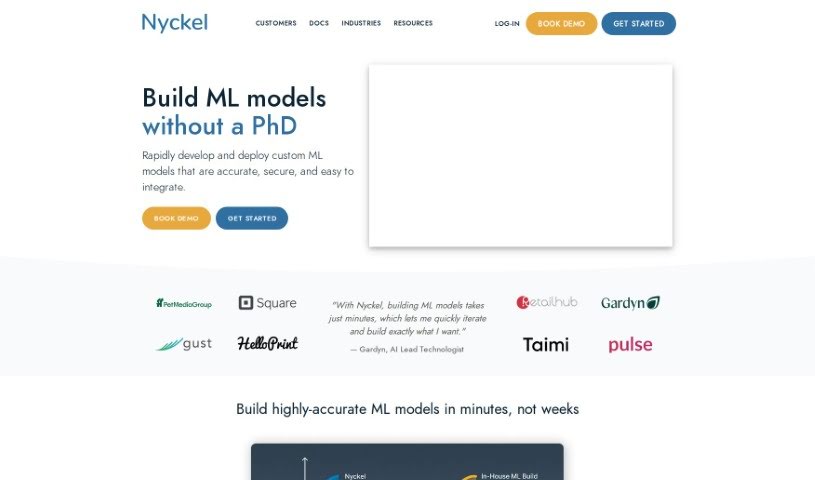
Screenshot of Nyckel

Nyckel

Discover Nyckel, a user-friendly AI platform for auto-labeling images and text. Learn how to use its features effectively in 2025 and see how it stacks up against other search engines.

Screenshot

What is Nyckel?

Nyckel is a platform designed to make auto-labeling images and text with AI super simple. The whole idea behind it is to bring image and text classification to everyone, even if you don’t have a ton of machine learning experience. With Nyckel, you can easily build your own custom classifiers for things like sorting photos, checking text content, or labeling things as they happen – all in about 5 minutes! Most other AI/ML tools can be pretty complicated and take a lot of time to get going, but Nyckel lets you start classifying right away, super fast and efficiently. It’s built to be really easy to use, focusing specifically on image and text classification, so you can create your classification models quickly.

Who created Nyckel?

Nyckel was started by Gardyn, who’s described as the AI Lead Technologist. The company’s main goal is to make image and text classification straightforward for people who aren’t necessarily machine learning experts. Nyckel provides a platform where you can build your own custom classifiers for all sorts of tasks – like sorting images, moderating text, or labeling content in real-time, all within a 5-minute window. Essentially, the company wants to offer a simple, user-friendly way to build classification models quickly and efficiently.

What is Nyckel used for?

Nyckel is great for a variety of tasks, including:

  • Image classification: Sorting and categorizing images.
  • Text Classification: Analyzing and categorizing text data.
  • AI-powered auto-labeling: Automatically tagging images and text using artificial intelligence.
  • Quick custom classifiers: Building your own classification models in just 5 minutes.
  • Real-time content labeling: Tagging content as it comes in.
  • Creating custom models: Developing specific classification models tailored to your needs.
  • Monitoring requests: Keeping an eye on incoming requests in real-time.
  • Improving accuracy: Annotating samples to make your models smarter.
  • Deep Neural Network integration: Connecting with over 100 Deep Neural Networks.
  • Data processing: Making your data handling more efficient.
  • Scalability: Easily scaling up from day one thanks to elastic requests.
  • Integrated annotation: A built-in tool for annotating data.
  • Corner case tracking: Identifying and managing unusual situations.
  • Production data capture: Collecting data as it’s used in production.
  • Logo detection: Identifying logos within images.
  • Automatic retraining: Models that update themselves.
  • Classification API: Creating custom classifiers via an API.
  • Auto-labeling images with AI: Using AI to automatically tag images.
  • No-code creation: Building custom classifiers without writing code.
  • Specific text classification: Like sports text or news tagging.
  • Tabular classification: Classifying data organized in tables.
  • Active learning: Monitoring and improving models through user feedback.

Who is Nyckel for?

Nyckel is a fantastic tool for:

  • Developers
  • AI Lead Technologists
  • Machine Learning experts
  • Image Analysts
  • Text Moderators
  • Content Labelers

How to use Nyckel?

Using Nyckel for image and text classification is pretty straightforward. Here’s a quick rundown:

  1. Sign Up: First, you’ll need to create an account on the Nyckel platform. Just provide your email and a password that meets the requirements.
  2. Training: You can train and deploy classifiers for free on Nyckel. You’ll only pay for usage that goes beyond the free tier limits.
  3. Classification: Nyckel lets you auto-label images and text using AI, so you don’t need to be a complex AI/ML expert. You can classify all sorts of data, like text, sports text, news articles, logos in images, and more, using your own custom labels.
  4. Ease of Use: The platform really simplifies classification. You can build custom classification models in just 5 minutes, no need for deep technical knowledge.
  5. No-Code Platform: It’s designed as a no-code platform, making it super accessible even if you don’t have extensive machine learning experience.
  6. Cost Structure: Nyckel’s pricing is based on usage. You pay per invoke and per sample after you’ve used up your free allowance. Businesses and larger companies can get better rates as their usage grows.
  7. Focus on Classification: Nyckel concentrates solely on image and text classification. It aims to be a powerful yet user-friendly AI solution for this specific job.
  8. Enterprise Features: If you’re using Nyckel for business, they offer extra features like Single Sign-On (SSO), deployment within your Virtual Private Cloud (VPC), the ability to export models, Data Processing Agreements (DPAs), and more.

By following these steps, you can effectively use Nyckel to auto-label images and text with this intuitive and cost-effective AI platform.

Related AI Tools

Discover more tools in similar categories that might interest you

Stay Updated with AI Tools

Get weekly updates on the latest AI tools, trends, and insights delivered to your inbox

Join 25,000+ AI enthusiasts. No spam, unsubscribe anytime.