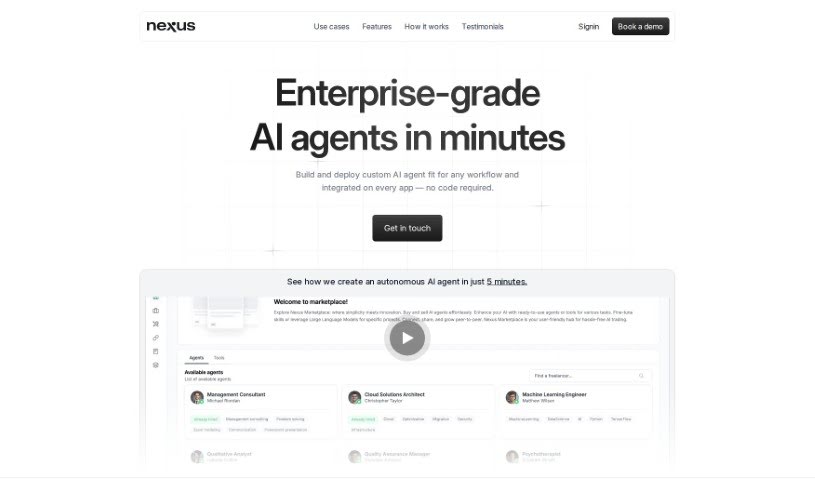
Screenshot of NexusGPT

NexusGPT

Discover NexusGPT in 2025! Learn what this AI freelancer platform is, how to use its features effectively, and how it stacks up against other project management tools.

Screenshot

What is NexusGPT?

NexusGPT is a really innovative AI platform designed to connect businesses with talented freelance professionals across all sorts of industries. It uses smart AI algorithms to make the process of matching businesses with the right freelancers much smoother, which really boosts efficiency and communication. You’ll find features like automated workflows, task management, automatic planning, pre-built AI agents, and easy integration across different platforms. This means you can create, customize, and deploy your own AI agents without much fuss. Plus, you can upload all sorts of documents, connect with over 1500 unique tools from their marketplace, and seamlessly integrate these agents into whatever platforms you’re already using.

What makes NexusGPT stand out is how flexible, user-friendly, and effective it is in the AI world. People who’ve used it often say they’re impressed with how well it performs and how easily it fits into their existing work processes. And for those who are concerned about data security, NexusGPT lets you run your agents on your own servers, giving you complete control over your data.

Who created NexusGPT?

NexusGPT was developed by Nexus GPT, a company that’s really leading the way in AI-freelancer platforms. They launched it on June 18, 2024, with a clear goal: to connect businesses with skilled freelancers using AI to make collaboration better. Their aim is to make project delivery and partnerships between businesses and professionals much simpler, using advanced AI to match people up efficiently and manage projects smoothly.

What is NexusGPT used for?

  • You can connect it with Microsoft Teams.
  • It works with Slack, too.
  • You can even use it with WhatsApp.
  • And it integrates with your Email.
  • You can power your agents using Mistral.
  • Or use Claude for your agents.
  • It also supports using open-source models.
  • You have the ability to fine-tune your Agents.
  • Creating Agents is straightforward.
  • Customizing Agents is also easy.

Who is NexusGPT for?

  • Occupational therapists
  • Financial risk specialists
  • IOS developers
  • Multimedia designers
  • Branding experts
  • SAP consultants

How to use NexusGPT?

Here’s a simple guide to using NexusGPT effectively:

  1. Creating Your Own AI Agent:

    • Start by building your custom AI agent right on NexusGPT.
    • Upload any specialized knowledge you have, in formats like PDF, DOCX, TXT, PPTX, EML, images, or even by connecting to Notion, Drive, and websites.
    • Use the chat feature to fine-tune the agent exactly how you need it.
    • Pick unique tools from their marketplace to give your agent extra power.
  2. Putting Your Agent to Work:

    • Once your agent is all set up, you can deploy it through NexusGPT.
    • Then, integrate it into different platforms depending on what you need it for.
  3. Keeping Your Data Safe:

    • NexusGPT really cares about your data privacy. You can run your agents securely, either by paying per token or by using your own dedicated server.
    • This setup gives you full control over your data, ensuring your use of AI technologies is confidential and secure.
  4. Uploading Documents:

    • NexusGPT is pretty flexible with document uploads. You can bring in PDFs, Word docs, text files, presentations, emails, images, and even connect to Notion, Google Drive, or websites to boost your agent’s abilities.
  5. What Users Are Saying:

    • People have really praised NexusGPT for being flexible, easy to use, and effective in the AI space. Some even think it’s among the top 5% of AI solutions out there!
  6. Making It Your Own:

    • You get a high degree of customization with NexusGPT agents. You can choose which large language models to use, pick tools from the marketplace, and even fine-tune agents by providing specific examples.
  7. Connecting Across Platforms:

    • NexusGPT supports integrating with various platforms. This means you can seamlessly connect your agents to places like Microsoft Teams, Slack, WhatsApp, and Email.

By following these steps, you can really make the most of NexusGPT to create and deploy custom AI agents that are perfect for your needs, and then easily use them across different platforms.

Related AI Tools

Discover more tools in similar categories that might interest you

Stay Updated with AI Tools

Get weekly updates on the latest AI tools, trends, and insights delivered to your inbox

Join 25,000+ AI enthusiasts. No spam, unsubscribe anytime.