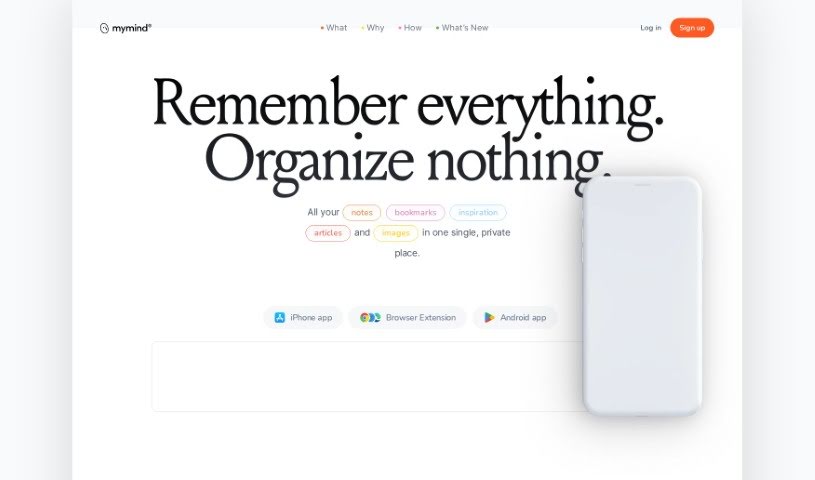
Screenshot of MyMind

MyMind

Discover what MyMind is and how to use it effectively in 2025. We'll explore its features and see how it stacks up against other automation tools.

Screenshot

What is MyMind?

MyMind is a private, secure digital extension for your brain. It’s a place where you can easily save and organize all sorts of valuable stuff – your notes, pictures, favorite quotes, and even text you’ve highlighted. It uses AI to help you capture and store your thoughts, ideas, and anything that sparks your inspiration, all in one spot. What’s really neat is its AI memory assistant; it automatically sifts through your notes, pointing out the important bits so you can recall them later. You can also add notes directly onto images, use smart tags to keep everything organized, and access it all seamlessly from any device. MyMind is built with your privacy and security as top priorities, encrypting and storing your data safely. Plus, it makes sharing and working with others simple. Basically, MyMind blends AI smarts with an easy-to-use design to make note-taking and organizing much better, helping you be more productive and remember more.

Who created MyMind?

Rishit Patel is the person behind MyMind. The company is also called mymind, Inc., and their main goal is to offer a private, secure place for saving and organizing notes, images, quotes, and highlights. MyMind is designed to help people remember important information efficiently, using AI to make things easier. It’s a great tool for students, professionals, or really anyone who needs a better way to organize their thoughts and boost their productivity and memory. The platform includes that AI memory assistant we mentioned, tools for adding notes to images, smart tagging for organization, and strong privacy features to keep your data safe.

What is MyMind used for?

  • It can read text in images.
  • Capture all your notes and ideas in one convenient place.
  • Use smart bookmarks to keep your information organized.
  • Get AI-powered tags for the images you save.
  • Save text snippets and highlights easily.
  • Recognize text within your photos.
  • Search for specific keywords directly within images.
  • Create visual mood boards to gather inspiration.
  • Write without distractions when you need to focus.
  • Collect all your research and references in a single hub.
  • Keep a private collection of resources and references.
  • It’s your single, private spot for notes, bookmarks, inspiration, articles, and images. Always accessible and synced across all your devices.
  • Offers a Focus Mode for distraction-free work.
  • Makes saving highlights simple.
  • Lets you create a private share link for your content.
  • Helps you find text within images.
  • Search for keywords in memes, handwritten notes, or any text captured in photos.
  • Save and easily find quotes and highlights that inspire you.

Who is MyMind for?

  • Students
  • Teachers
  • Researchers
  • Writers
  • Journalists
  • Artists
  • Designers
  • Marketers
  • Project managers
  • Developers
  • Entrepreneurs
  • Consultants
  • Scientists
  • Academics
  • Therapists
  • Content creators

How to use MyMind?

Here’s a simple guide to get the most out of MyMind:

  1. Get Started: Head over to the official MyMind website at https://mymind.com/.
  2. Sign Up: Create your account by providing the necessary details.
  3. Explore Features: Take a look around and get familiar with everything MyMind offers, like note-taking, annotating images, and the AI memory assistant.
  4. Capture Your Ideas: Start saving your thoughts, ideas, and inspirations effortlessly.
  5. Use the AI Assistant: Let the AI memory assistant help by automatically analyzing and highlighting key information in your notes.
  6. Annotate Images: Mark up images with notes to remember important visual details.
  7. Tag Your Notes: Use the smart tagging system to automatically categorize your notes, making them easy to find later.
  8. Sync Across Devices: Enjoy seamless integration so you can access your notes and images from anywhere, anytime.
  9. Stay Secure: MyMind keeps your privacy and security top-notch by encrypting and storing all your data safely.
  10. Share and Collaborate: If you want, you can share your notes with others to collaborate more effectively.

By following these steps, you can really boost your productivity, improve your memory, and stay organized with MyMind. It’s a great way to unlock your mind’s full potential!

Related AI Tools

Discover more tools in similar categories that might interest you

Stay Updated with AI Tools

Get weekly updates on the latest AI tools, trends, and insights delivered to your inbox

Join 25,000+ AI enthusiasts. No spam, unsubscribe anytime.