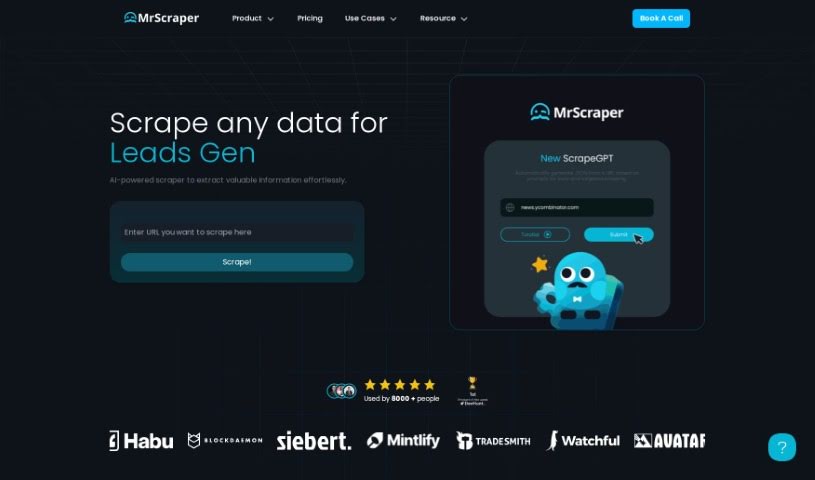
Screenshot of MrScraper

MrScraper

Discover what MrScraper is and how to use it effectively in 2025. We'll explore its features and see how it stacks up against other Data Analytics Tools.

Screenshot

What is MrScraper?

MrScraper is a handy web scraping tool that lets you pull data from websites without needing to mess with code selectors. It cleverly blends AI language models with tried-and-true scraping methods. This means it can tackle big, complicated data extraction jobs on large and complex web pages really efficiently. You get features like scraping without needing code selectors, handling those massive and intricate pages, automatic proxy rotation, built-in support for pagination, and it even uses real browsers with JavaScript rendering. Plus, it’s got automatic captcha solutions to keep things moving. MrScraper also includes a scheduler so you can set up recurring scraping tasks. They’re planning to offer API endpoints in the future, and you might even see a downloadable macOS app for extra security down the line. To get started, you’ll need a MrScraper account – they offer a free option, with paid plans available depending on what you need.

Who created MrScraper?

John Madrak, the Founder of Waddling Technology, is the mind behind MrScraper. He launched it on June 7, 2024, introducing AI-powered web scraping tools designed for efficient data extraction without the need for code selectors. MrScraper’s capabilities include automatic proxy rotation, pagination support, and a built-in scheduler for recurring jobs. What really sets it apart is how it combines AI language models with traditional scraping techniques, ensuring that data extraction is thorough and comprehensive. This service is part of Waddling Technology’s mission to make web scraping tasks much simpler.

What is MrScraper used for?

MrScraper is incredibly versatile and can be a real game-changer for several key business functions:

  • Lead Generation: It helps automate finding leads, building and updating your lead lists, enriching that data, and uncovering valuable insights.
  • eCommerce: Get real-time insights into pricing and availability, pull product details, match catalogs, and keep track of stock levels.
  • Finance: Receive real-time alerts, extract accurate data, gain unbiased insights, and ensure regulatory compliance.
  • ETL for LLMs: It’s great for extracting, cleaning, and normalizing data, customizing rules, and keeping your LLMs up-to-date.
  • Job Postings: Collect and import job listings, transform the data, identify hiring companies, and track employment trends.
  • Media Monitoring: Keep an eye on important issues and stakeholders, track brands and keywords, and set up custom reports or alerts.

Essentially, it handles a lot of the heavy lifting:

  • It completely removes the need for code selectors.
  • It’s built to handle big documents, no matter their length or complexity.
  • It uses automatic proxy rotation to keep your scraping smooth.
  • Pagination is supported, so you can easily work through multi-page sites.
  • There’s a built-in scheduler for setting up jobs to run regularly.
  • It uses real browsers, so JavaScript rendering is handled.
  • It offers automatic captcha solutions.
  • It can manage proxy rotation, pagination, and even prompt engineering.
  • It’s designed to handle large websites by intelligently extracting data from paginated pages.
  • For enhanced security, they’re looking at offering it as a downloadable macOS app.
  • API endpoints are planned for the future.

Who is MrScraper for?

  • Computer consultants
  • Founders

How to use MrScraper?

Getting started with MrScraper is pretty straightforward. Here’s a simple breakdown:

  1. Set up your first scraper: You’ll start by specifying a selector, which is designed to be really intuitive and simple.
  2. Test it out: Make sure your scraper is working effectively on the website you’re targeting.
  3. Collect more data: You can easily increase the amount of data you collect thanks to the tool’s user-friendly interface.
  4. Automate your tasks: Use MrScraper to create automated scrapers for various sites. You won’t have to worry about IP blocking, scheduling, or scalability.
  5. Quick element selection: Just open the website in your developer tools, select the elements you want to extract, and let MrScraper do the heavy lifting.
  6. Leverage key features: Take full advantage of features like automatic proxy rotation, pagination support, and real browsers with JavaScript rendering for efficient scraping.
  7. Choose your plan: You can opt for the free option for smaller tasks or select from subscription plans for larger data volumes.
  8. Consider pricing: Look at the different pricing plans based on your specific needs. They offer a free tier and paid subscriptions that include advanced features like data parsers and webhooks.

Overall, MrScraper really shines because it’s easy to use, packed with useful features, and handles data extraction efficiently, making it a great choice for your web scraping needs.

Related AI Tools

Discover more tools in similar categories that might interest you

Stay Updated with AI Tools

Get weekly updates on the latest AI tools, trends, and insights delivered to your inbox

Join 25,000+ AI enthusiasts. No spam, unsubscribe anytime.