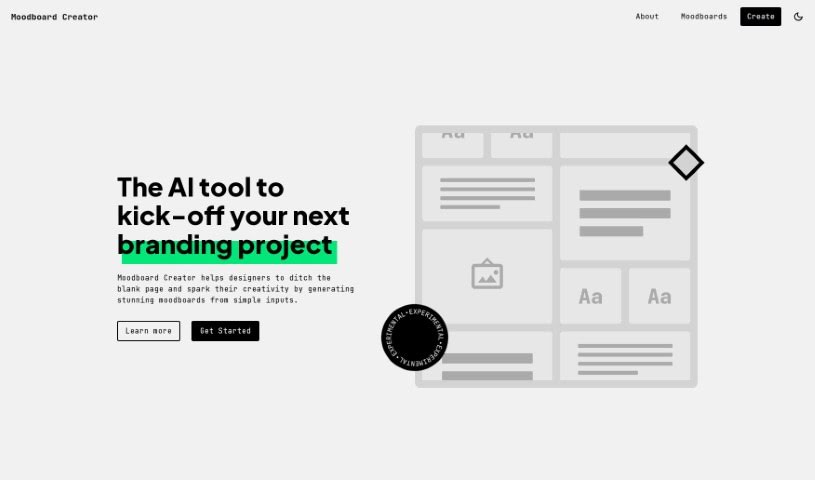
Screenshot of Moodboard Creator

Moodboard Creator

Discover what Moodboard Creator is and how to use it effectively in 2025. Explore its features and see how it stacks up against other infographic tools.

Screenshot

What is Moodboard Creator?

Moodboard Creator is a smart AI tool designed to help designers kickstart their branding projects. It’s great for creating impressive moodboards by turning simple ideas into detailed visual guides. This really helps shape design directions and get the creative juices flowing. It’s super easy to use, so whether you’re a seasoned pro or just starting out, you’ll find it helpful. It’s fantastic for sparking creativity, letting you explore different colors, textures, and patterns, and it makes communicating your design vision a breeze. Juan Ignacio Rios developed Moodboard Creator, and it’s a real lifesaver for designers who don’t want to stare at a blank page. Instead, you can dive into your projects with plenty of inspiration and clear direction.

Who created Moodboard Creator?

About Moodboard Creator:

Juan Ignacio Rios launched Moodboard Creator on December 27, 2023. This AI application is built to assist designers right at the beginning of branding projects. How? By generating really impressive moodboards from just a few simple inputs. The tool is designed with the user experience in mind, making it a good fit for both professional designers and those new to the field. It’s all about boosting creativity, offering visual guides, and helping you explore colors, patterns, and textures. While it doesn’t have features like team collaboration or support for vector graphics, Moodboard Creator really shines with its easy-to-use interface and its knack for inspiring creative ideas for design projects.

What is Moodboard Creator used for?

  • It helps designers get started on projects without facing a blank page.
  • It sparks creativity by generating stunning moodboards from simple inputs.
  • It assists designers during the crucial inspirational phase of a branding project.
  • You can incorporate specific branding elements provided by the platform.
  • It lets users tweak and explore subtle changes in the moodboards it generates.
  • It makes it easy to create moodboards using simple inputs.
  • It aids in shaping design directions.
  • It supports exploring and experimenting with colors, textures, and patterns.
  • It helps communicate design ideas effectively through visual guides.
  • It really ignites creativity in design projects.
  • It helps designers avoid the dreaded blank page when starting out.
  • It inspires creativity by generating impressive moodboards.
  • It’s a big help in branding projects, guiding the formulation of design direction.
  • It supports exploring colors, patterns, and textures.
  • It makes communicating design ideas much more effective.
  • It turns basic information into visuals to get projects going.
  • It ignites creativity throughout the design process.
  • It provides helpful visual guides and aids in sparking creative projects.
  • It’s super convenient for designers thanks to its user-friendly interface.
  • It helps you ditch the blank page struggle.
  • It generates impressive moodboards.
  • It ignites user creativity.
  • It’s a great aid for branding projects.
  • It’s useful for both professionals and novices.
  • It makes formulating design direction possible.
  • It supports exploring colors, patterns, and textures.
  • It ensures effective communication of ideas.
  • It turns basic data into visuals.
  • It helps you avoid starting with a blank page.
  • It helps you ditch that blank page.
  • It generates stunning moodboards.
  • It creates moodboards using simple inputs.
  • It helps with design direction formulation.
  • It aids in sparking creative projects.
  • It offers visual guides.

Who is Moodboard Creator for?

  • Designers
  • Branding professionals
  • Creatives
  • Art Directors
  • Marketing professionals
  • Novices
  • Professional Designers
  • Graphic designers
  • Brand managers
  • Creative professionals

How to use Moodboard Creator?

Here’s how you can use Moodboard Creator:

  1. First, head over to the Moodboard Creator website and click the “Get Started” link.
  2. Next, describe your business by entering details about your product, service, team, and so on.
  3. Then, provide 3 to 7 keywords that capture the essence or focus of the moodboard you want.
  4. Once you submit your inputs, the AI technology within Moodboard Creator will whip up a unique moodboard just for you, based on the information you provided.
  5. If you want to tweak the results, just hit the “Try again” button. It’ll pre-fill the fields, making it easy to explore further.
  6. With the moodboards it generates, you can really kickstart your creativity, dive into different visual elements like colors, textures, and patterns, and effectively share your design ideas.
  7. Moodboard Creator is fantastic for avoiding that blank page problem. It gives you a concrete starting point that really sparks creativity for your design projects.
  8. While Moodboard Creator is mainly for branding projects, it’s not strictly limited to that. It can likely help with all sorts of other design and creative projects too.

Moodboard Creator, developed by Juan Ignacio Rios, really stands out because it’s so user-friendly, uses AI to generate moodboards, and focuses on igniting creativity in the design process. It transforms basic data into captivating visuals, offering a powerful tool for designers, whether they’re seasoned professionals or just starting out, who want to kickstart their creative projects.

Related AI Tools

Discover more tools in similar categories that might interest you

123RF AI Image Generator

Creative Image Generation
Learn More

Stay Updated with AI Tools

Get weekly updates on the latest AI tools, trends, and insights delivered to your inbox

Join 25,000+ AI enthusiasts. No spam, unsubscribe anytime.