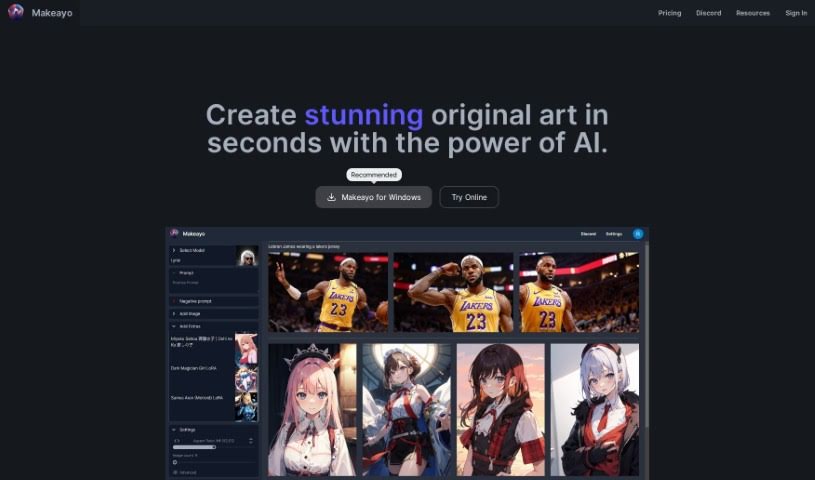
Screenshot of Makeayo

Makeayo

Discover what Makeayo is and how to use it effectively in 2025. We'll explore its features, compare it to other AI art generators, and guide you through its capabilities.

Screenshot

What is Makeayo?

Makeayo is a really neat AI tool that helps you create unique and stunning art. It’s designed to be super easy to use, offering unlimited art generation so you can really play around. You can transform images into different styles, upscale them to high definition for incredible detail, and even match poses from existing pictures. Plus, it comes with a variety of different art models to choose from. The best part? It’s completely free to use right now, and it works on Windows 10 and 11. They’re planning to bring it to Mac and Linux soon, too! The community around Makeayo is also a big plus – it’s a lively and supportive group that really sparks artistic inspiration and encourages people to create together.

Who created Makeayo?

While we don’t have specific details about who founded Makeayo, it was developed by a dedicated individual or team. Makeayo officially launched on June 20, 2024. The core idea behind the company was to build a powerful AI tool for generating unique and stunning art. They’ve packed it with features like a straightforward user interface, unlimited art generation, innovative image transformation, HD upscaling for crisp details, pose matching capabilities, and a selection of diverse art models. Currently, the tool is available for Windows 10 and 11 users, with plans to expand its reach to Mac and Linux operating systems in the future.

Who is Makeayo for?

Makeayo is a fantastic tool for anyone interested in creating art, especially:

  • Graphic designers
  • Digital artists
  • Illustrators
  • Creative professionals
  • Artists of all kinds
  • Designers
  • Creatives
  • Art enthusiasts

How to use Makeayo?

Ready to start creating your own original art with Makeayo? It’s a simple process:

  1. Choose a Base: First, pick a starting point or a base image to kick off your art creation.
  2. Describe Your Picture: Next, tell the AI exactly what you envision for your artwork. Describe the artistic style, elements, or mood you’re going for.
  3. Generate Results: Just hit the generate button, and Makeayo will create original art for you in mere seconds.

Here are some of the key features that make Makeayo so great:

  • User-Friendly Interface: It’s really easy to get around, making art creation a smooth experience.
  • Unlimited Generations: You can keep refining and evolving your art without worrying about extra costs.
  • Image Transformation: Turn your existing images into unique styles, opening up tons of artistic possibilities.
  • HD Upscaling: Make your art look even better by enhancing details with 4k resolution and beyond.
  • Pose Matching: Get dynamic artistic outputs by matching poses from your input images.
  • Diverse Models: You’ll have access to a wide selection of models, perfect for all sorts of creative needs.

Some extra details you might find helpful:

  • Community Engagement: Jump into a lively community for inspiration and to collaborate with other artists.
  • Operating Systems: It’s currently built for Windows 10 and 11, but they’re working on bringing it to Mac and Linux too.
  • Cloud-Based Service: They’re developing a cloud option, so you might be able to run Makeayo using services like RunDiffusion soon.
  • Affiliate Program: Keep an eye out for an upcoming affiliate program where you can earn rewards.
  • Cost: Makeayo is free to use, which is fantastic for anyone wanting to explore generative art.

If you have any questions for the Makeayo team, feel free to reach out via email. They’re aiming to respond to user inquiries as quickly as possible.

Related AI Tools

Discover more tools in similar categories that might interest you

123RF AI Image Generator

Creative Image Generation
Learn More

Stay Updated with AI Tools

Get weekly updates on the latest AI tools, trends, and insights delivered to your inbox

Join 25,000+ AI enthusiasts. No spam, unsubscribe anytime.