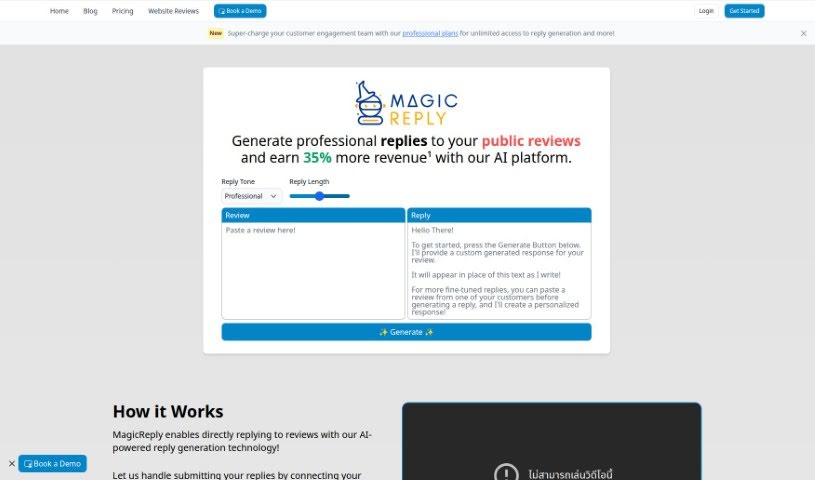
Screenshot of MagicReply AI

MagicReply AI

Discover what MagicReply AI is and how to use it effectively in 2025. We'll explore its features and see how it stacks up against other customer service tools.

Screenshot

What is MagicReply AI?

MagicReply is your AI assistant for handling online reviews. It’s designed to help businesses craft professional, thoughtful responses to public feedback, which is super important for managing your online reputation. It’s pretty straightforward to use: you can either paste a review directly into the tool or connect it to your favorite review platforms. Then, you just pick the tone and length you want for your reply, hit ‘Generate,’ and MagicReply whips up a polished response for you. It works with a bunch of popular sites like Google, Yelp, Facebook, Airbnb, and many others. While it’s great for keeping up with reviews and engaging with customers more easily, it’s not perfect. You get a limited number of free generations, and there’s always a small risk of misinterpretation or even defamation if you’re not careful. So, it’s really important that you always take a moment to read and edit the replies before you send them out.

Who created MagicReply AI?

MagicReply was actually created by a company called Somnus Labs Inc. They launched this AI tool on May 28, 2023, with the goal of making it easier for businesses to respond professionally to all sorts of public reviews. Just remember, it’s always your job to check and tweak the generated replies before you submit them. MagicReply itself doesn’t promise that everything it generates will be perfectly accurate, relevant, or complete.

What is MagicReply AI used for?

MagicReply is really handy for a bunch of things:

  • Managing your online reputation: It helps you respond to public reviews, keeping your business looking responsive and professional.
  • Crafting replies for various platforms: You can get help writing responses for sites like Google, Yelp, Facebook, Airbnb, Tripadvisor, Amazon, Foursquare, and Trustpilot.
  • Handling all kinds of feedback: It assists you in addressing both happy customers who leave great reviews and those who might be less satisfied.
  • Balancing your workload: By automating the initial reply generation, it can really help ease the burden on business owners.
  • Boosting customer engagement: It helps you interact with customers more effectively through your review responses.
  • Improving word-of-mouth: Good, timely responses can encourage positive word-of-mouth advertising.
  • Customizing your replies: You can choose the tone and length that best suits your business.
  • Keeping your data safe: The service assures data privacy and provides clear disclaimers and usage terms.
  • Enhancing your site experience: By managing reviews efficiently, it contributes to a better overall online presence.
  • Providing AI insights: It can offer insights into ratings and help you maintain a positive reception.

Essentially, it’s all about making it easier to manage your online reputation, engage with customers, and ensure your business presents a positive image. It helps you show appreciation for happy customers and thoughtfully address those who are dissatisfied, all while saving you time and producing unique replies that can improve your business’s word-of-mouth advertising. It supports platforms like Google, Yelp, Facebook, Airbnb, Tripadvisor, Amazon, Foursquare, and Trustpilot, offering professional plan upgrades for unlimited replies and ensuring data privacy with clear terms.

Who is MagicReply AI for?

MagicReply is a great tool for anyone involved in managing a business’s public image and customer interactions. This includes:

  • Business owners
  • Customer service teams
  • Marketing professionals and managers
  • Public Relations specialists and managers
  • Small business owners and managers
  • Online reputation managers
  • Digital marketers
  • Self-employed individuals
  • Customer engagement teams

If you’re responsible for how your business is perceived online and how you interact with customers through reviews, MagicReply can be a valuable asset.

How to use MagicReply AI?

Using MagicReply is pretty straightforward. Here’s a quick rundown:

  1. Get started: Head over to the MagicReply website. If you already have an account, just log in. If you’re new, you’ll need to sign up.
  2. Input the review: You can either paste the review you want to respond to directly into the tool, or you can connect it to your preferred review platform for easier access.
  3. Set your preferences: Choose the tone you want for your reply – maybe friendly, professional, apologetic, or even humorous. You can also select how long you want the response to be.
  4. Generate the reply: Once you’ve set your preferences, just click the ‘Generate’ button. MagicReply will then create a professionally written response for you.
  5. Review and edit: This is a crucial step! Always take a moment to read through the generated reply. Make sure it’s accurate, relevant, and sounds like your brand before you send it out.
  6. Need help? If you run into any issues while using MagicReply, you can reach out to their support team at admin[at]somnuslabs[dot]com.
  7. Unlock more features: If you find yourself using MagicReply a lot, consider upgrading to one of their professional plans. This usually gives you unlimited reply generation and access to other helpful features.

Remember, MagicReply is there to help you manage your online reputation by assisting with responses across platforms like Google, Yelp, and Facebook. Just keep in mind that the tool doesn’t guarantee the accuracy of its generated replies, so it’s always your responsibility to review and edit them carefully before sharing them.

Related AI Tools

Discover more tools in similar categories that might interest you

Stay Updated with AI Tools

Get weekly updates on the latest AI tools, trends, and insights delivered to your inbox

Join 25,000+ AI enthusiasts. No spam, unsubscribe anytime.