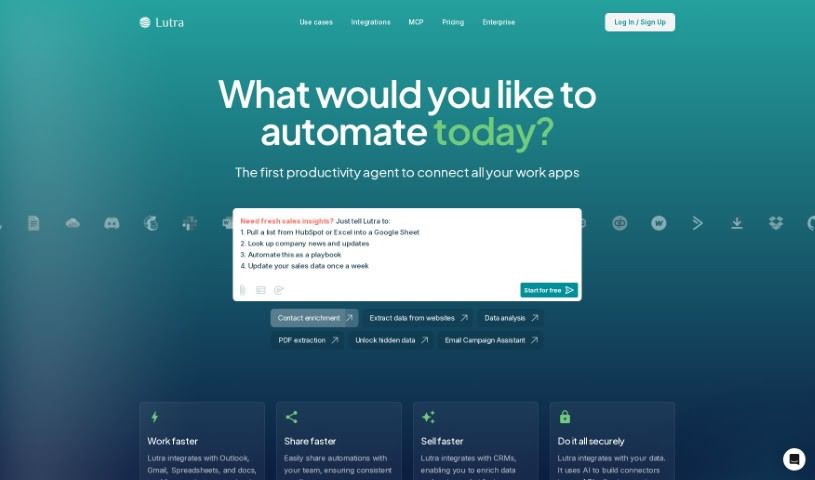
Screenshot of Lutra AI

Lutra AI

Discover what Lutra AI is and how you can use it to boost your productivity in 2025. We'll cover its features, compare it to other automation tools, and show you exactly how to get started.

Screenshot

What is Lutra AI?

Lutra AI is a platform designed to make incorporating AI into your daily work super easy, even if you’re not technical. It is your personal AI assistant builder. You can create and customize AI workflows in just minutes, and the best part? No coding required! Lutra AI works by taking your plain English instructions and turning them into the code needed to build these custom AI workflows. These workflows are built to be reliable, secure, and specifically tailored to help you with all sorts of tasks. The goal is to give you the power to have a personal developer who can create and tweak workflows just for you, really boosting your productivity and making things run smoother.

Who created Lutra AI?

Lutra AI was founded by a talented team, including Jiquan Ngiam, Vijay Vasudevan, Bozhi See, Joshua Newman, Jerry Charumilind, and Marc Rasi. The company officially launched on December 8, 2023. They’ve gained support from investors like Coatue Management, Hustle Fund, Maven Ventures, and WVV Capital, along with backing from notable individuals such as Andrej Karpathy and Jeff Dean, plus many other executives. Their mission is clear: to offer an AI platform that automates workflows efficiently, without needing any coding skills. This allows users to effortlessly create their own custom tools and seamlessly integrate AI into their existing processes.

What is Lutra AI used for?

Lutra AI can help you with a wide range of tasks, including:

  • Generating text content.
  • Analyzing your data.
  • Automating tasks within Google Workspace. For example, it can pull information from PDF files stored in your Google Drive and then organize it neatly into a Google Spreadsheet.
  • Suggesting new features you might want to integrate based on your input.
  • Automatically labeling your emails.
  • Using ‘People Insights’ to find public information about a person and their company.
  • Customizing and developing your own AI workflows without needing to write any code.
  • Scheduling workflows so they run automatically at specific times.
  • Extracting information from a whole folder of PDF files in Google Drive.
  • Creating custom AI tools to automate your tasks and workflows with ease.
  • Extracting, categorizing, and enriching data from various sources using AI.
  • Quickly deploying solutions with pre-built integrations for popular tools.
  • Classifying different types of documents.
  • Extracting structured data from documents.
  • Automating tasks specifically within Google Workspace.
  • Extracting data from PDF files in Google Drive and organizing it into a Google Spreadsheet.
  • Providing personalized workflow creation tailored to your needs.
  • Working seamlessly with your existing apps.
  • Automatically scheduling workflows for operation.
  • Automating internet research.
  • A workflow for generating a News Digest.
  • A workflow for labeling emails.
  • A workflow for gathering People Insights.
  • Creating personalized workflows.
  • The ability for workflows to operate automatically.
  • Automating tasks within Google Workspace.

Who is Lutra AI for?

Lutra AI is a great tool for a variety of people and professions:

  • Patent attorneys
  • Professionals in the tech industry
  • Patent Attorneys
  • Tech professionals
  • Anyone who can benefit from automating their workflows and integrating AI
  • Researchers
  • Professionals working in the tech landscape
  • Teams across different industries
  • Tech professionals
  • Investment professionals
  • ML researchers
  • Writers

How to use Lutra AI?

Here’s a straightforward guide to using Lutra AI effectively:

  1. Integration: Lutra AI is designed to be user-friendly, allowing for quick integration into your workflows without any coding. You can build and customize AI workflows in minutes. You can start with pre-built workflows like ‘News Digest Generator’, ‘Email Labeler’, and ‘People Insights’, or you can create your own personalized workflows based on what you need.
  2. Workflow Automation: Lutra AI lets you see all the actions your workflows take, and you can schedule them to run automatically. This really saves you time and effort.
  3. Google Workspace Automation: Lutra AI is particularly good at automating tasks within Google Workspace. For instance, it can extract information from PDF files in your Google Drive and then organize it into Google Spreadsheets.
  4. Data Extraction: You can use Lutra AI to extract, categorize, and enrich data from various sources, including the internet, PDFs, and spreadsheets, simply by using plain language commands.
  5. AI Workflows Customization: You don’t need coding skills to build AI workflows with Lutra AI. The platform uses a natural language interface, so you can automate complex processes just by giving simple instructions in English.
  6. Additional Actions and Credits: If you’re on a paid plan, you can buy extra actions and credits if your workflows need them.
  7. User Data Security: Lutra AI takes user data security and privacy very seriously. They are working towards SOC-2 compliance to ensure your customer data is well-protected.
  8. Feedback and Feature Suggestions: Lutra AI really values user feedback and suggestions for new features. They’re always looking to improve the platform to better meet your needs.

By following these steps, you can use Lutra AI to make your workflows smoother, automate tasks, and boost your productivity in a way that’s secure and easy to use.

Related AI Tools

Discover more tools in similar categories that might interest you

Stay Updated with AI Tools

Get weekly updates on the latest AI tools, trends, and insights delivered to your inbox

Join 25,000+ AI enthusiasts. No spam, unsubscribe anytime.