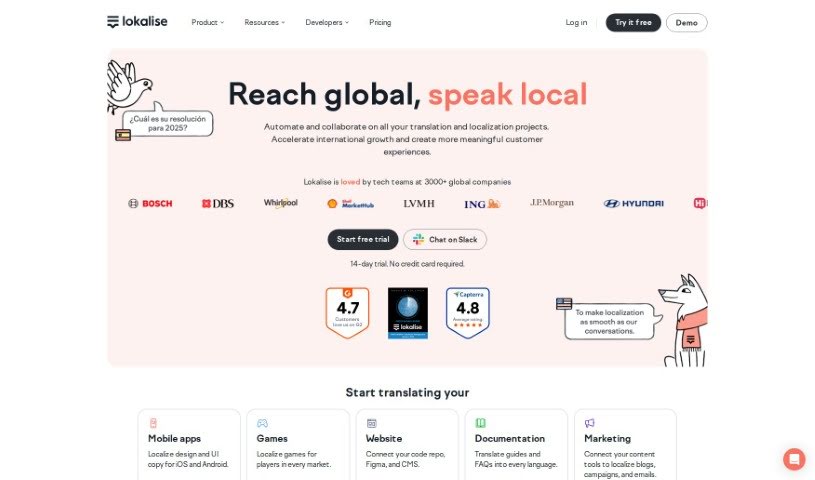
Screenshot of Lokalise

Lokalise

Discover what Lokalise is and how to use it effectively in 2025. We'll explore its features and see how it stacks up against other translation tools.

Screenshot

What is Lokalise?

Lokalise is a really comprehensive platform for managing localization and translations. It’s packed with tools designed to help developers and teams handle their localization projects smoothly. It is your go-to for everything from a Translation API and SDKs for iOS and Android, to webhooks and a command-line interface (CLI) that developers can use to really speed things up. The main goal here is to make localization workflows simpler and more automated. This means you can develop faster and manage all your different language content much more efficiently. Plus, Lokalise offers a helpful developer hub, complete with guides and tutorials, to make building apps for a global audience a seamless experience.

Who created Lokalise?

Lokalise was actually started by Nick Ustinov and Pavel Pomerantsev. They officially launched the company on October 4, 2023.

What is Lokalise used for?

Lokalise is super versatile and can be used for a whole range of things:

  • Games: Perfect for localizing game text and dialogue.
  • Customer Service: Helps manage translations for support tickets and communications.
  • Managers: Gives project and localization managers a clear overview and control.
  • Developers: Streamlines the integration of translations into code.
  • Mobile Apps: Essential for making your app accessible in multiple languages.
  • Web Apps: Ensures your website content is localized for different regions.
  • Documents: Handles translation for various document types.
  • Marketing Assets: Localizes campaigns, ads, and other promotional materials.
  • Translators: Provides an efficient environment for translation work.
  • Designers: Supports the localization of UI elements and visual content.
  • AI Translation: Integrates with AI tools for faster translation suggestions.
  • AI-powered Translation: Leverages AI to enhance the translation process.
  • Localization and Translation Management: At its core, it’s about managing the entire process.
  • Real-time Support Translation: Enables quick translation for live customer interactions.
  • Integration with Developer Tools: Seamlessly connects with tools like CLI, Flutter SDK, iOS SDK, and Android SDK.
  • Quality Assurance for Translations: Includes features to check and ensure the accuracy of translations.
  • Professional Translation Services: Offers options for getting expert translation help.
  • In-context Editing: Allows translators to see and edit text directly within the app or website interface.
  • Tailored Features for Various Professional Verticals: Offers specific functionalities for different industries.
  • Collaborative Translation Environment: Lets multiple people work on translations together.
  • Localization Workflow Management: Helps organize and track the entire localization process.
  • Localization for Professional Sectors: Specifically designed for business needs.
  • Integration with Developer Tools: Connects with tools like CLI, Flutter SDK, iOS SDK, and Android SDK for smooth integration.
  • Translation Quality-Assurance Tools: Provides ways to ensure translations are top-notch.
  • In-context Editing Feature: Lets you edit translations right where they appear.
  • Continuous Localization and Translation Management: Supports ongoing localization efforts.
  • Localization for Various Professional Sectors: Caters to the needs of different industries.
  • Collaborative Translation and Localization Workflow Automation: Automates tasks for teams working on translations.
  • Tailored Features for Developers, Localization Managers, Translators, Designers, Marketers, Customer Service, and Enterprise Solutions: Offers specific tools for each role and business type.
  • Integration with Developer Tools: Connects easily with tools developers use.
  • Automated Localization Processes: Helps automate many parts of the localization workflow.

Who is Lokalise for?

Lokalise is a great fit for a variety of professionals involved in bringing products and content to a global audience:

  • Software Developers: To easily integrate and manage translated strings.
  • Project Managers: For overseeing localization projects and timelines.
  • Localization Managers: To streamline workflows and manage teams.
  • Quality Assurance Testers: To verify the accuracy and consistency of translations.
  • Content Writers: To ensure their content is properly localized.
  • Graphic Designers: To manage localized text within visual assets.
  • Product Managers: To ensure products are ready for international markets.
  • Marketing Specialists: To localize campaigns and reach wider audiences.
  • Translators: To provide an efficient and user-friendly translation environment.
  • Technical Writers: To manage documentation in multiple languages.

How to use Lokalise?

Getting started with Lokalise is pretty straightforward. Here’s a simple breakdown of how to use it effectively:

  1. Create an Account: First things first, head over to Lokalise’s website and sign up. This gives you access to all their features.
  2. Project Creation: Once you’re logged in, you’ll want to create a new project. Just click the “New project” button, give your project a name, and pick the language your original content is in (that’s your source language).
  3. Add Languages: Next, you need to tell Lokalise which languages you want to translate into. You can do this by clicking the “Add language” button right inside your project.
  4. Upload Files: Now, upload the files that contain the text you need translated. Lokalise is pretty flexible and supports a bunch of different file formats, like XLIFF, JSON, XML, and many others.
  5. Translate Content: With your files uploaded, you can jump into translating using Lokalise’s online editor. Just click on the text you want to translate and type your version into the fields provided.
  6. Collaboration: If you’re working with a team, you can invite them to join your project. This lets everyone work on translations at the same time, which is super helpful.
  7. Review and Approve: After the translations are done, it’s important to review them to make sure everything is accurate and sounds right. Once you’re happy with the quality, you can approve them.
  8. Integration: Lokalise plays nicely with other popular tools you might already be using, like GitHub, Slack, and Jira. Connecting Lokalise to these can really help streamline your whole localization process.
  9. Automate: Take advantage of Lokalise’s automation features to handle repetitive tasks. For example, you can automatically sync translations back to your code repository.
  10. Finalize and Deploy: Once all your translations are complete, reviewed, and approved, you can finalize the project. Then, you’re ready to deploy the translated content to your website or app!

Following these steps should help you use Lokalise efficiently and make your project’s translation process much smoother.

Related AI Tools

Discover more tools in similar categories that might interest you

Stay Updated with AI Tools

Get weekly updates on the latest AI tools, trends, and insights delivered to your inbox

Join 25,000+ AI enthusiasts. No spam, unsubscribe anytime.