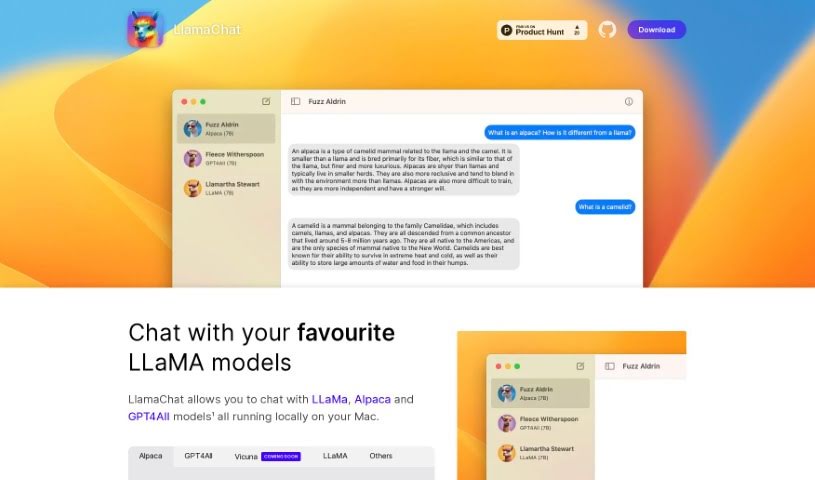
Screenshot of LlamaChat

LlamaChat

Discover what LlamaChat is and how to use it effectively in 2025. We'll explore its features and see how it stacks up against other chatbots.

Screenshot

What is LlamaChat?

LlamaChat is a really neat platform that lets you have engaging conversations with advanced AI models right on your Mac. It’s designed so you can easily chat with popular LLaMa LLM models, like the Alpaca model. Alpaca is a 7B-parameter LLaMa model that Stanford fine-tuned to be a fantastic chatbot. What makes LlamaChat special is that it’s completely open-source. This means you can use it for free, forever, and even get involved in its development. You can convert and import models using raw PyTorch checkpoints or .ggml files, which is pretty handy. It’s all thanks to open-source libraries like llama.cpp and llama.swift. The app is built for macOS 13, working with both Intel processors and Apple Silicon, and you can get it up and running with a simple brew command.

Who created LlamaChat?

LlamaChat was brought to life by a dedicated team or individual who crafted version 1.2.0, specifically for folks using macOS 13. Their focus was on making it easy to engage with AI models like Alpaca, which is a 7B-parameter LLaMa model that Stanford fine-tuned. LlamaChat really shines because it’s fully open-source, built on principles of transparency and community effort. It offers cool features like having AI conversations locally on your machine and making it simple to convert models using PyTorch checkpoints or .ggml files. This really shows their commitment to involving developers and making AI interactions user-friendly.

What is LlamaChat used for?

  • Chatting with AI Locally: You can have conversations with various LLaMa models, including Alpaca and GPT4All, all running right on your Mac.
  • macOS 13 Compatibility: LlamaChat is built to work smoothly with macOS 13, supporting both Intel processors and Apple Silicon.
  • Completely Open-Source: Dive into the world of open-source! You get access to LlamaChat’s full source code, so you can contribute or tweak it however you like.
  • Local Mac AI Chats: Talk to different LLaMa models like Alpaca and GPT4All right from your Mac.
  • Works with macOS 13: It’s designed for both Intel and Apple Silicon Macs running macOS 13.
  • Open Source Access: You can get the full source code to customize or contribute to.
  • Easy Model Importing: Convert and import AI models using raw PyTorch checkpoints or ready-to-go .ggml files.
  • Community Input: Help make it better by suggesting improvements through GitHub Pull Requests.

Who is LlamaChat for?

  • Developers
  • Enthusiasts

How to use LlamaChat?

Getting started with LlamaChat is pretty straightforward. Here’s how:

  1. Installation: First, grab the latest version, 1.2.0, which is made for macOS 13. You can install it on your Mac easily by opening your terminal and running this command: brew install --cask llamachat.
  2. Chatting with AI: Once installed, you can start talking to advanced AI models like LLaMa, Alpaca, and GPT4All directly within the LlamaChat interface on your Mac.
  3. Bringing Your Own Models: Want to use a specific model? You can import them into LlamaChat by converting them from raw PyTorch checkpoints or using pre-converted .ggml model files. This gives you a lot of flexibility.
  4. Make It Your Own (Open-Source): Since LlamaChat is fully open-source, you have access to all its code. This means you can contribute to its development, customize it to fit your needs, and be part of a growing community.
  5. Join the Community: Get involved with the LlamaChat community! You can suggest new features or improvements by submitting GitHub Pull Requests. It’s a great way to help shape the tool.
  6. Check Your Mac: Just make sure your Mac is ready. It needs to be running macOS 13 and support either Intel processors or Apple Silicon.

By following these simple steps, you can really make the most of LlamaChat’s cool features, chat with AI models, and be part of its collaborative community. It’s a great way to experience interacting with AI on your Mac!

Related AI Tools

Discover more tools in similar categories that might interest you

Stay Updated with AI Tools

Get weekly updates on the latest AI tools, trends, and insights delivered to your inbox

Join 25,000+ AI enthusiasts. No spam, unsubscribe anytime.