What is LivingWriter?
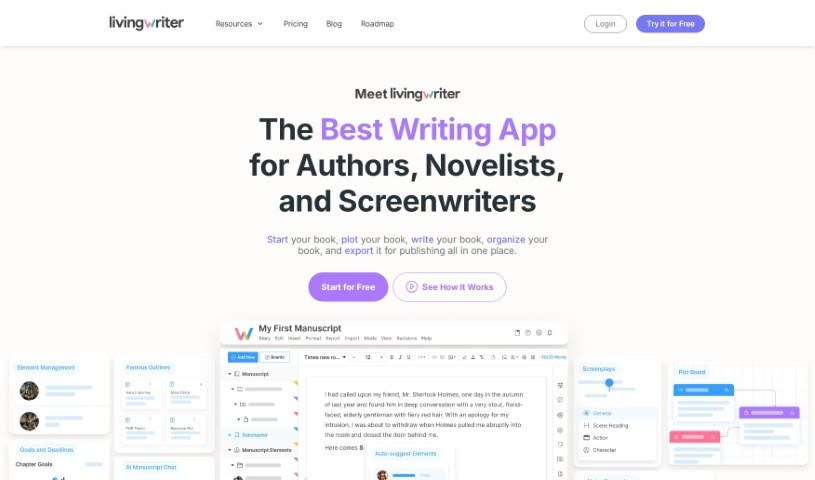
LivingWriter is a really advanced platform for writing and organizing manuscripts, built specifically for authors and novelists. It’s more than just a word processor; it offers features designed for structured writing, like easy drag-and-drop organization, an AI Outline Generator, and special writing templates. The platform helps you keep your manuscripts organized and structured. You can access notes, elements, and goals right on your screen in a sidebar, use LivingWriter Boards for a complete overview of your manuscript, and get AI-powered suggestions for characters, locations, and objects. Plus, LivingWriter lets you set writing goals, track your progress with statistics, and export your work in formats like PDF and DOCX.
Who created LivingWriter?
LivingWriter was actually created by a team of writers who are also published authors themselves. They launched the platform on June 6, 2023, with a clear goal: to become the go-to solution for all writing needs. They’ve been partnering with other companies to improve their services without making users pay extra. The software really focuses on user experience, offering features perfect for fiction, non-fiction, world-building, and screenwriting. You’ll find advanced capabilities like drag-and-drop organization, smart text auto-suggestions, manuscript outlines, intuitive writing goals, and secure cloud storage.
What is LivingWriter used for?
LivingWriter is a versatile tool that can help with a lot of different writing tasks:
- Collaborative writing: Work with others on your projects.
- Content organization: Keep all your writing materials tidy.
- Academic papers: It’s great for helping you draft academic papers.
- Screenplays: You can also use it to help write screenplays.
- Visual organization: It’s a visual tool for managing your manuscript, its elements, and your research.
- Device access: You can access it on various devices.
- Exporting: Export your manuscripts in different formats like PDF, DOCX, and even directly to Google Drive and Dropbox.
- Sharing: It has features for sharing and co-authoring.
- Non-fiction writing: It’s well-suited for non-fiction projects too.
- Screenwriting: And of course, it’s great for screenwriting.
- Manuscript outlines: You can use time-tested manuscript outlines.
- AI Outline Generator: There’s an AI Outline Generator that covers many different genres.
- Device compatibility: It works across multiple devices.
- Academic drafting: It helps with drafting academic papers.
- Screenplay drafting: And it assists with screenplay drafting.
- Progress tracking: You can track your writing progress.
- AI outlining: It offers AI-powered manuscript outlining.
- Safe storage: Your data is stored safely.
- Genre support: It supports a wide range of genres.
- Multiple formats: You can export manuscripts in various formats.
- Academic/Screenplay assistance: It helps with academic papers and screenplays.
- Manuscript structure: It helps organize and structure your manuscripts.
- Templates: You get templates for different genres.
- Visual organization: LivingWriter Boards offer visual organization.
- Connectivity: You can access it on various devices as long as you have internet.
- Export options: Manuscripts can be exported in various formats.
- Screenwriting use: It’s useful for screenwriting.
- Outline usage: You can use time-tested manuscript outlines.
- Book/Novel structure: It helps with structured writing for books and novels.
- Academic aid: It aids in drafting academic papers.
- Screenwriting support: It supports screenwriting.
- Structured environment: It provides a structured environment for academics and scriptwriters.
- Specific templates: You get specific templates and outline structures for academic papers and screenplays.
- Easy organization: It makes organizing and structuring manuscripts easy.
- Outline creation: You can create time-tested manuscript outlines.
- Plotting/Management: It helps in plotting drafts and managing elements using visual boards.
- Exporting manuscripts: You can export manuscripts in various formats.
- Sharing/Co-authoring: It facilitates sharing and co-authoring features.
- Academic assistance: It helps with academic papers.
- Screenplay assistance: It helps with screenplays.
- Draft organization: It helps organize drafts and manage elements through LivingWriter Boards.
- Device access: You can access LivingWriter on various devices.
- Format exporting: Manuscripts can be exported in different formats.
- AI Outline Generator: You can use the AI Outline Generator to structure books.
Who is LivingWriter for?
LivingWriter is a great tool for:
- Book authors
- Novelists
- Academics
- Scriptwriters
- Authors in general
How to use LivingWriter?
Using LivingWriter is pretty straightforward. Here’s a quick guide:
- Organize Manuscripts Easily: You can use the drag-and-drop feature to easily arrange and reorder your chapters, subchapters, and other elements just the way you like.
- On-Screen Sidebar: Make the most of the sidebar that’s always on your screen. It gives you quick access to your notes, goals, and comments, which really helps with managing your manuscript smoothly.
- LivingWriter Boards: Check out the visual boards. They give you a complete overview of your manuscript, letting you plot out your story, manage different elements, and gather your research all in one efficient place.
- AI Outline Generator: Take advantage of the AI-powered story outlining. It can even auto-suggest elements like character names, locations, and objects to help you build structured narratives.
- Smart Text and Auto-Suggest: You can store your elements to get auto-suggestions, which really helps your writing flow by giving you quick access to detailed notes.
- Writing Goals and Stats: Set your writing goals, track your progress, and keep an eye on your word counts. It’s a good way to stay motivated and productive.
- Privacy Assurance: LivingWriter takes your data privacy seriously. They delete your data after each session and never use it for AI training.
- Versatility: Beyond just writing books, LivingWriter is also great for academics, scriptwriters, and non-fiction authors, offering specific templates and organization tools for them too.
- Exporting: You can easily export your manuscripts in formats like PDF, DOCX, and others, and you can even export directly to cloud services.
- Sharing Features: Collaboration is easy! You can share chapters or your entire book with others, either for them to view or to edit.
Overall, LivingWriter’s interface is user-friendly, and its advanced features, AI integration, and smart organizational tools make it a really valuable platform. It’s designed to improve your writing process, no matter the genre or type of project you’re working on.