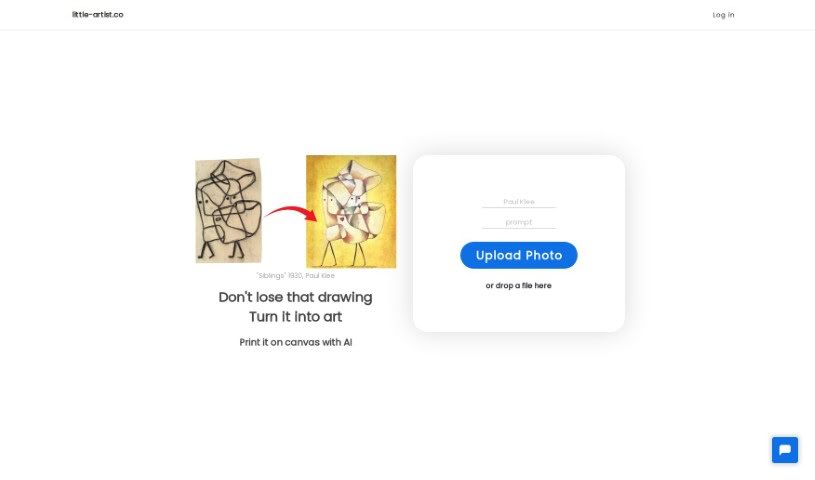
Screenshot of Little Artist

Little Artist

Discover what Little Artist is and how to use it effectively in 2025. We'll explore its features and see how it stacks up against other drawing generators.

Screenshot

What is Little Artist?

Little Artist is a neat AI platform that takes kids’ drawings and turns them into really professional-looking art, all while keeping that special spark of the child’s own creativity. It uses AI to make the drawings look even better, and you can even store them in a digital collection or get them printed on canvas. The big idea behind Little Artist is to make kids feel great about their art. By showing their work as professional pieces, it helps boost their self-esteem, encourages them to keep drawing, and makes sure their art is preserved for years to come. It’s super easy to use – you just upload a photo of the drawing through the website, and the AI does its magic, turning it into a unique piece. This way, you can build a digital gallery that shows how your child’s creativity grows over time.

Who created Little Artist?

Mary Williams is the creator behind Little Artist, as you can see on their website. This AI-powered platform actually launched on December 30, 2023. Its main goal is to transform children’s drawings into professional-level art, making sure the child’s original creativity shines through. It’s all about boosting kids’ self-esteem and encouraging them to explore their artistic side even more. The company itself operates from little-artist.co.

What is Little Artist used for?

  • It turns children’s drawings into art.
  • It makes sure the child’s original creativity is preserved.
  • It helps boost young artists’ self-esteem.
  • It encourages a child’s artistic desire.
  • It inspires kids to keep creating.
  • You can get the artwork printed.
  • It helps create a digital art collection.
  • It’s great for making keepsakes.
  • It enhances sketches, turning them into polished images.
  • It promotes artistic exploration.
  • It helps children develop a professional art aesthetic.
  • It boosts a child’s self-esteem by showcasing their art as professional-level pieces.
  • It fosters a child’s artistic desire by validating their creativity and encouraging more exploration.
  • You can print the transformed artwork on canvas.
  • It allows you to create a digital collection of artworks.
  • It enhances the aesthetic quality of children’s sketches using AI.
  • It inspires continued creativity in children by celebrating their unique artistry and validating their sketches as professional-level art.
  • It helps preserve art by digitally transforming and storing it for many years.
  • It helps create a childhood keepsake by turning children’s drawings into professional artworks.
  • It showcases a child’s creativity by printing the processed artwork on canvas for everyone to see and appreciate.
  • It stores all transformed artwork, building a digital collection that tracks a child’s creative growth over time.
  • It deals with children’s unique creativity by preserving their original artistic sense while presenting refined art pieces.

Who is Little Artist for?

  • Artists
  • Art teachers
  • Parents
  • Child Development Psychologists
  • Children’s artists
  • Parents of creative children
  • Child psychologists
  • Young artists
  • Children
  • Art enthusiasts
  • Those who create childhood keepsakes
  • Art preservationists
  • Art Therapists
  • Pediatricians

How to use Little Artist?

Using Little Artist is pretty straightforward. Here’s how you can get started:

  1. First, you’ll need to sign in to the Little Artist website. You can easily do this using your Google account.
  2. Next, upload a photo or a scan of your child’s drawing. The platform has a user-friendly interface that makes this step simple.
  3. Once uploaded, Little Artist’s AI processing kicks in. It’ll transform the image, making it look more polished while carefully preserving the original creativity your child put into it.
  4. After the transformation is done, you have the option to order a print of the artwork on canvas, right there from the platform.
  5. Don’t forget to use the storing feature! This lets you keep all the transformed artworks in one place, building a wonderful digital collection that shows your child’s creative journey over time.
  6. You’ll really see how Little Artist helps boost your child’s self-esteem. Their art will look professional, which encourages them to explore their creativity even more.
  7. Finally, just enjoy the unique and beautiful artworks that come from your child’s sketches!

This whole process doesn’t just create lovely keepsakes of your child’s art; it also gives them a platform to express themselves and feel validated. Plus, the digital collection feature means you can track and cherish their artistic journey for years to come.

Related AI Tools

Discover more tools in similar categories that might interest you

123RF AI Image Generator

Creative Image Generation
Learn More

Stay Updated with AI Tools

Get weekly updates on the latest AI tools, trends, and insights delivered to your inbox

Join 25,000+ AI enthusiasts. No spam, unsubscribe anytime.