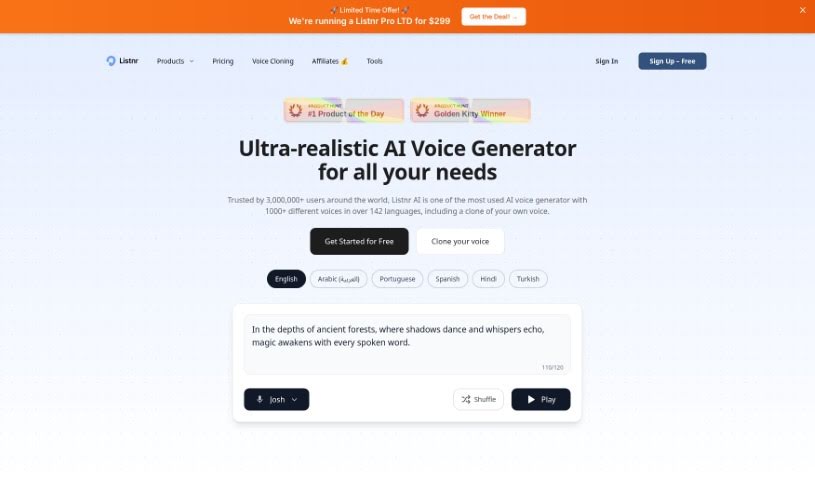
Screenshot of Listnr Ai

Listnr Ai

Discover what Listnr AI is and how to use it effectively in 2025. We'll explore its features and see how it stacks up against other Text-to-Speech tools.

Screenshot

What is Listnr Ai?

Listnr Ai is a text-to-speech software that really shines because of its podcasting features and a huge library of over 1000 realistic voices. You can download your audio files, and even host and distribute your converted speech right through Listnr. Plus, it lets you embed audio into your websites using their handy Audio Player widgets. This is a great way to reach more people and make your content more engaging for listeners.

Listnr’s AI voice generator is pretty impressive; it lets you create convincing, natural-sounding voiceovers super fast, which can save you a ton of time and money. You get fine-tuned control over things like pitch, you can add pauses where needed, tweak pronunciations, and even adjust the speaking speed. It supports over 142 languages, including major ones like English, Spanish, French, and German, making it a really comprehensive solution for all your text-to-speech needs. On top of that, Listnr offers an AI Voice Generator perfect for all sorts of projects – think ads, e-learning modules, product demos, presentations, audiobooks, and even YouTube videos. It’s also a fantastic tool for creating automated audio versions of your articles and blogs, making it super convenient for publishers and content creators to connect with their audience.

Who created Listnr Ai?

BL Samota founded Listnr Ai. He was inspired to get into podcasting and found Listnr to be an excellent tool for everything involved: recording, editing, hosting, and even making money from podcasts. The company itself offers a text-to-speech solution that uses advanced AI algorithms and deep learning. This technology allows users to turn text into speech that sounds incredibly natural. Listnr boasts over 1000 realistic voices across many languages, and it supports podcasting features like hosting, distribution, and embedding audio content.

What is Listnr Ai used for?

  • Creating AI voiceovers
  • Turning articles and blogs into audio automatically
  • Generating voices through an API
  • Making AI-powered podcasts
  • Producing voiceovers for YouTube videos
  • Crafting authentic voices for game characters
  • Producing podcasts
  • Generating authentic voices for sales pitches and social media content
  • Creating audiobooks with realistic AI voices
  • Embedding audio into websites to improve the listening experience
  • Producing podcasts
  • Creating AI voices for Shorts, TikToks, and Reels (short-form content)
  • Voiceovers for YouTube Videos
  • Generating authentic voices to boost sales and social media growth
  • Creating audiobooks at scale with realistic AI voices
  • Producing podcasts
  • Creating audiobooks
  • Using realistic, multi-lingual voices for your content

Who is Listnr Ai for?

  • Content creators
  • Podcasters
  • Advertisers
  • E-Learning professionals
  • People creating product demos
  • Presenters
  • Authors
  • YouTubers
  • Game developers
  • Publishers
  • Marketing professionals
  • Educators
  • Social media managers
  • Audiobook producers
  • Marketers
  • Voiceover Artists
  • Developers

How to use Listnr Ai?

To get the most out of Listnr AI, just follow these simple steps:

  1. Sign Up or Log In: First, create an account on Listnr or log in if you’re already a member.
  2. Access the Dashboard: Once you’re logged in, head over to your dashboard.
  3. Create Voiceover: Look for and click the “Create Voiceover” button.
  4. Insert Text: Paste or type the text you want to convert into speech.
  5. Select Voice: Pick a voice from the wide variety of options available.
  6. Preview: Listen to a preview of the converted speech to make sure it sounds just right.
  7. Save or Export: You can then save your audio or export it as a WAV or MP3 file.

Listnr also offers cool features like controlling the pitch, adding natural pauses, adjusting pronunciations, and changing the speaking speed to really fine-tune your voice output. It supports over 142 languages and has a user-friendly interface, making it easy to customize and create voiceovers. Plus, Listnr is perfect for generating voiceovers for ads, e-learning, product demos, presentations, audiobooks, podcasts, and YouTube videos. It’s a versatile and efficient tool, offering both free and paid plans to suit different needs.

By following these steps and using the features Listnr provides, you can really create engaging voice and video content.

Related AI Tools

Discover more tools in similar categories that might interest you

Stay Updated with AI Tools

Get weekly updates on the latest AI tools, trends, and insights delivered to your inbox

Join 25,000+ AI enthusiasts. No spam, unsubscribe anytime.